How ReplyMagic Reads Each Instagram Post Before Replying: and Why That Beats Keyword Auto-Reply Tools
Handle Instagram comment auto reply volume with context, not triggers. ReplyMagic reads each post, then drafts on-brand replies for price, size, booking, and more.

What is Instagram comment automation, and why does context matter?
Instagram does not offer native auto-replies for public post comments. Meta Business Suite Instant Replies are scoped to Instagram Direct, so anything that posts a visible response under a comment requires a third-party tool connected through the Meta Instagram API (Source: Spurnow). That distinction is where most teams get tripped up.
There are really two paths people lump together as "Instagram comment auto reply":
- Public replies: visible responses posted under the original comment, which work as social proof and brand voice in front of every future viewer.
- Comment-triggered DMs: a private Instagram Direct message sent to the commenter, usually to deliver a link or capture a lead.
Inrō draws the same line in its setup guide: Instant Replies inside Meta Business Suite are configured for DMs, while automatic comment replies need a separate workflow with a comment trigger, monitored posts, reply text, and activation (Source: Inrō).
Public comment replies are brand moments, not hidden support tickets: every person who lands on that post sees the response forever. That is why context matters more than triggers. A keyword-rule reply firing on the wrong post does not just confuse one commenter; it sits there publicly, signed by your brand, until someone notices.
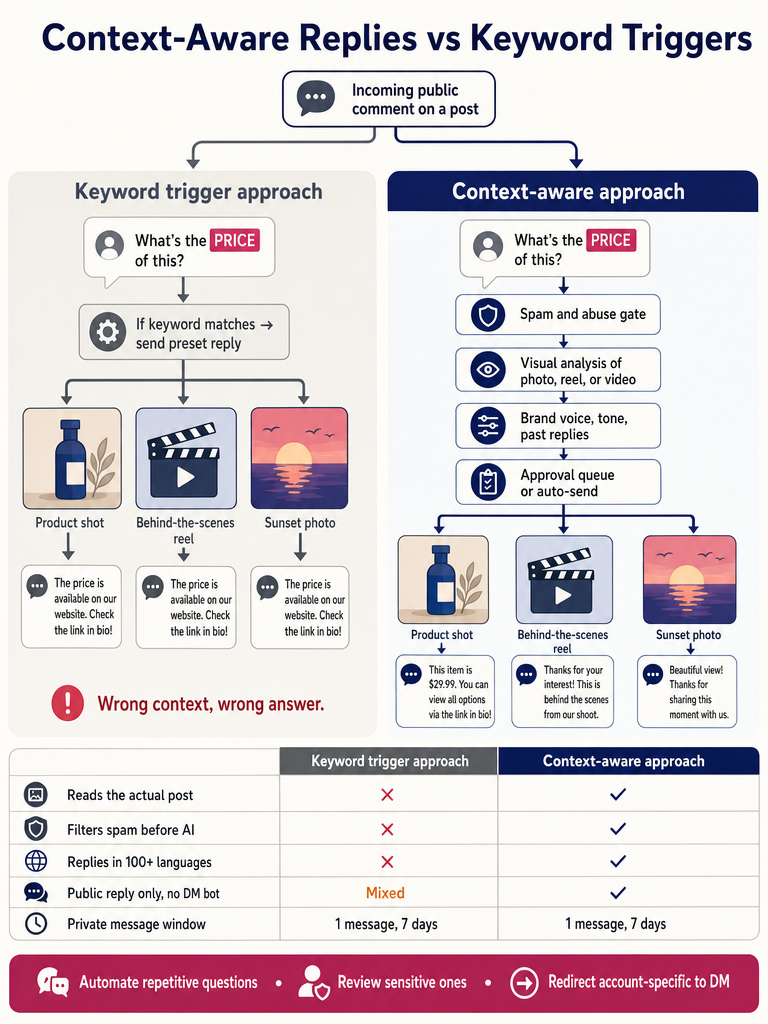
How does ReplyMagic read a photo, Reel, or video before replying?
ReplyMagic uses Google Gemini to analyze the actual creative: the photo, Reel, or video: before drafting any reply. That means the response can reference what is shown on screen, not just what the caption says or what keyword the commenter used.
This matters most on the posts where comment volume actually spikes: launches, viral Reels, product drops, hotel guest questions, and cohort enrollment posts. On those posts, the same word ("price", "available", "size") shows up on dozens of different threads with completely different correct answers. Reading the post creative is what lets a reply distinguish between a cream linen dress in a Reel and the limited-edition sweatshirt in the carousel above it.
Context, not triggers: replies are conditioned on what the post actually shows, not on whether the comment matches a word in a list.
A few concrete examples of what visual context unlocks:
- A commenter writes "how much?" under a Reel of three different products. The reply can answer for the product actually featured in the Reel, not a generic price list.
- A guest asks "is this room available in July?" on a hotel suite post. The reply can name the suite shown in the photo instead of saying "please check our booking page."
- A coach posts a Reel previewing a new cohort. A comment asks "what's the prerequisite?": the reply can reflect what the Reel positioned the cohort as, not a default boilerplate.
Past replies, tone preferences, emoji habits, and sign-offs from the connected Instagram account anchor how that drafted answer sounds. So the reply is grounded in two things at once: what the post is, and how the brand normally talks.
How do keyword-triggered Instagram auto-replies work, and where do they break?
The standard keyword-rule pattern is well-documented across the category. Maedix describes it cleanly: set a trigger such as "LINK", "PRICE", or "FREE"; the user comments the keyword; a public reply posts; an automated DM sends the link or offer; the lead is captured: and the whole sequence runs in under 3 seconds (Source: Maedix). ChitChatBot.ai offers a similar setup model, letting teams configure triggers as comments that contain a keyword, exactly equal a keyword, or all comments, then choose private replies, public replies, or both (Source: ChitChatBot.ai). CommentGuard, NapoleonCat, and Inrō document variations of the same flow.
Here is the problem. The trigger has no idea which post the comment is on.
| Scenario | Keyword rule fires | Result |
|---|---|---|
| "LINK" trigger set globally | Comment "share the link to last month's drop" on a Reel about a new launch | Reply blasts the wrong product link, publicly |
| "PRICE" trigger | Comment "price went up 😅 still worth it" on a sold-out item | Replies with a price for an item you no longer sell |
| "shipping" trigger | Sarcastic comment "shipping took forever lol" | Auto-reply explains shipping policy under a complaint |
Keyword rules react to words; they do not understand which post they are reacting to. That is why the same keyword on the wrong post creates the wrong public answer: and the bad reply sits under your brand name for everyone to see. For a deeper walk-through of an alternative, see Instagram Comment Automation Without Keyword Rules.
What is the difference between public vs DM automation for Instagram comment replies?
Public replies and comment-triggered DMs serve different jobs. CreatorFlow frames it well: public replies build visible engagement and social proof, while DM automation is positioned for delivering links, capturing emails, and driving conversions (Source: CreatorFlow).
There is also a hard Meta API constraint to plan around. According to Spurnow, citing Meta's official API documentation, a brand can send one private message to someone who commented on Instagram content, and has 7 days to send it; for Instagram Live, private messages can only be sent during the broadcast (Source: Spurnow).
| Use case | Better surface | Why |
|---|---|---|
| Price, sizes, availability, hours | Public reply | Future viewers get the answer too: one reply, hundreds of impressions |
| Sending a discount code or link | DM | Public links invite spam; DMs feel personal |
| Sensitive or account-specific question | DM handoff | A "DM me and I'll check on this" reply protects the customer |
| Cancellation, refund, complaint | DM handoff or human | Public answers can escalate; private is calmer |
ReplyMagic's boundary is deliberate: it replies to public Instagram comments, and it can suggest a "DM me" handoff for sensitive or account-specific questions, but it is not a DM bot. If your goal is a comment-to-DM funnel, that is a different category. If your goal is to make every public reply under your posts sound right and reference the actual post, that is exactly what ReplyMagic does.
Stop letting keyword rules write your public brand voice: Get started with ReplyMagic.
How to set up a smart auto-reply in Instagram comments?
Setting up a smart Instagram comment auto-reply takes about 10 minutes and follows seven steps:
- Connect your Instagram Business Account through Meta/Instagram OAuth. This is the official permission flow Meta requires; it is not screen scraping. ReplyFox notes that connecting through the Meta Graph API is what gives a tool real-time comment access and Meta-ecosystem compliance (Source: ReplyFox).
- Let the system read incoming comments through the Meta Graph API. New comments stream in as they happen.
- Train reply style from the connected account's history. Past replies, tone preferences, emoji habits, and sign-offs become the voice template: not a generic AI persona.
- Configure per-post settings. Some posts (a complaint thread, a sensitive announcement) should be excluded from automation entirely. Others (a launch Reel) are exactly where you want it.
- Add exclusion phrases and spam gates. Pre-LLM filters block scams, crypto bait, link spam, and abusive comments before any AI reply is generated. This keeps the model from being asked to "reply" to garbage.
- Choose your mode: approval queue, review mode, or auto-send. Repetitive low-risk questions can auto-send; ambiguous or sensitive ones go to the queue.
- Test on real comment types. Run drafts against price, size, booking, availability, enrollment, shipping, policy, and cancellation comments before going live. Read every draft. Tune voice settings if anything sounds off.
Spurnow notes that comment automation can free a team from answering the same questions 50 times a day (Source: Spurnow): but only if the setup actually distinguishes the questions worth automating from the ones worth a human.
Which comments should be automated, reviewed, or redirected to DM?
Use a simple decision rule: automate the boring repeats, review the ambiguous ones, redirect the sensitive ones.
| Comment type | Mode | Why |
|---|---|---|
| Price, sizes, availability, opening hours | Auto-send | High volume, low risk, public answer helps everyone |
| Booking windows, enrollment dates, shipping policy | Auto-send | Same answer every time, factually verifiable |
| Product compatibility, ingredients, materials | Review mode | Specific, occasionally wrong: worth a human glance |
| Complaints, cancellations, refunds | Approval queue or human | Public replies can escalate fast |
| Health, wellness, medical-adjacent questions | DM handoff | Liability and tone matter; never auto-answer publicly |
| Account-specific ("did my order ship?") | DM handoff | Cannot answer publicly without account context |
| Spam, crypto, scam links, abuse | Block (spam gate) | Never reaches AI |
NapoleonCat recommends auto-replies specifically when multiple people ask the same thing: price, product features, opening times, or when teams are out of office (Source: NapoleonCat). That is the right ceiling for full automation.
For everything else, ReplyMagic exposes the controls by name: approval queue (every reply waits for a human), review mode (drafts surface for quick edits), per-post settings (turn automation off on specific posts), and exclusion phrases (any comment containing this never gets auto-answered).
Should Instagram auto-replies send instantly, use a delay, or wait for approval?
The right timing depends on the risk of the comment, not a single global setting. The category contradicts itself on this. Maedix promotes its keyword sequence completing in under 3 seconds (Source: Maedix). ReplyLink, in contrast, warns that instant replies look obviously automated and recommends a random delay of 1, 5 minutes before responses post (Source: ReplyLink).
Both can be right depending on what you are replying to. Resolve the tension by sorting comments by risk:
- Auto-send (near-instant): clear repeat questions where the answer never changes: price, size availability, hours, booking link.
- Short delay (1, 5 minutes): anything where instant feels uncanny, or where you want replies to look like a human is at the keyboard.
- Approval queue: anything where public accuracy matters more than speed: launches, sensitive topics, edge cases, comments on posts you have not pre-approved.
Speed is a feature for repetitive questions and a liability for everything else. A reply that posts in 3 seconds and is wrong is worse than one that posts in 3 minutes and is right.
How do you keep automated replies in the brand's real voice and language?
Voice is a mechanism, not a slogan. ReplyMagic conditions every reply on the connected account's actual past replies, tone preferences, emoji habits, and sign-offs. So if your brand uses lowercase and ends with "✨", the drafts use lowercase and end with "✨". If a teammate replied to 200 comments last month with a specific cadence, that cadence carries into the AI drafts. Five teammates do not produce five different brand personalities.
Most ranking guides recommend templates or dynamic variables like the commenter's username (Source: ReplyLink). Templates work for two scenarios and break the moment a comment goes off-script: voice trained on real past replies bends with the conversation instead of snapping.
On language: ReplyMagic replies in whatever language the commenter wrote in, automatically, across 100+ languages (Source: ReplyMagic). No setting, no toggle, no language detection rule to configure. A Spanish comment on a French hotel's Reel gets a Spanish reply. A Japanese comment on a US creator's product drop gets a Japanese reply. For travel, hospitality, and global creator brands, this is the difference between answering a guest in time and losing them to the competitor who replied in their language.
Does it support comments on Live, Reels, ads, stories, and regular posts?
Surface support varies by tool, and the gaps matter before you commit. CommentGuard, for example, says it supports auto-replies on Instagram posts, ads, stories, and Reels, but does not currently support Instagram Live comments (Source: CommentGuard). Meta Live also has its own private-message timing limit: DMs to people who commented during a Live can only be sent while the broadcast is live, per Meta's API documentation cited by Spurnow (Source: Spurnow).
ReplyMagic's scope is deliberately tight: it watches incoming public comments on posts and reads each post's photo, Reel, or video before drafting. That is the surface where comment volume spikes during launches, viral Reels, product drops, and hospitality posts: and the surface where reading the actual creative changes reply quality the most. Live and DMs are different products with different constraints.
How to choose the best Instagram comment auto-reply setup for your account
Use this checklist when evaluating any tool: including ReplyMagic: for an account with high Instagram comment volume:
| What to look for | Why it matters |
|---|---|
| Reads the actual post creative (image/Reel/video) | Replies reference what is on screen, not just keywords |
| Connects via Meta/Instagram OAuth | Official, compliant, low account risk |
| Approval queue + review mode + auto-send | Lets you scale without losing control |
| Pre-LLM spam and scam filtering | Prevents AI from "politely answering" crypto bots |
| Brand voice trained on real past replies | Drafts sound like you, not like ChatGPT |
| Multilingual replies (in commenter's language) | Required for global creators, hotels, travel |
| Per-post settings and exclusion phrases | Disable automation where it shouldn't run |
| Public-comment focus, not just DM funnels | Public replies are visible brand moments |
| Clear plan limits | No surprise overage fees mid-launch |
Where ReplyMagic fits: Free is 10 AI replies per day with 1 Instagram account; Pro is 3,000 replies per month; an extra Instagram account add-on is $15/month for 1 more account and 3,000 more replies. That structure works for solo creators testing on a single account, scales to a Pro plan during a launch month, and adds capacity per account when an agency or multi-brand operator needs it.
The category will keep selling keyword triggers and DM funnels. The accounts winning their comment threads are the ones replying with context: referencing the actual post, in the brand's actual voice, in the commenter's actual language, with humans in the loop where it matters.
Get started with ReplyMagic and connect your first Instagram Business Account in a few minutes: drafts start landing in your queue based on what each post actually shows, not which word a commenter happened to type.
Frequently asked questions
Can Instagram auto-replies handle comments in multiple languages automatically?
ReplyMagic replies in whatever language the commenter wrote in: automatically, across 100+ languages, with no toggle or configuration required. A Spanish comment on an English post gets a Spanish reply; a Japanese comment on a US creator's drop gets a Japanese reply. For global brands, hotels, and travel creators, that's the difference between answering a guest in time and losing them.
Will automated Instagram comment replies get my account flagged or banned?
Tools that connect through the official Meta/Instagram OAuth and Graph API: rather than screen scraping or session hijacking: operate within Meta's ecosystem and carry far lower account risk. The gap to watch is compliance with Meta's API terms, which is why the connection method matters before anything else.
How do I stop spam and crypto bots from triggering auto-replies on my posts?
Pre-LLM spam gates: filters that run before any AI model is ever called: block scams, crypto bait, link spam, and abusive comments at the door. Without that layer, an auto-reply tool will dutifully draft a polite response to every crypto bot that hits your thread.
What's the difference between auto-replying to Instagram comments vs. sending automated DMs?
Public comment replies are visible to every future viewer of the post: they function as brand voice and social proof, not just support. Comment-triggered DMs are private and better suited for delivering links, discount codes, or handling sensitive account-specific questions. They're different jobs, and the best setups use each surface for what it's actually good at.
How many Instagram comments can an AI tool realistically handle per month?
That depends entirely on the plan: ReplyMagic's Free tier handles 10 AI replies per day on one account, while Pro covers 3,000 replies per month; an extra Instagram account add-on runs $15/month for one more account and 3,000 more replies. For a launch month or viral Reel, knowing your ceiling before you hit it is the thing that prevents an automation gap at the worst possible moment.
Should I auto-send Instagram comment replies or put them in an approval queue?
Sort by risk, not by preference: repetitive low-stakes questions like price, sizes, hours, and availability can auto-send because the answer never changes and public visibility helps future viewers too. Complaints, sensitive topics, edge cases, and anything on a post you haven't pre-cleared belong in the approval queue: speed is a feature for boring repeats and a liability for everything else.
Sources
- everyone thinks I'm just really good at responding to DMs. Like ...www.instagram.com
- Try to respond to every comment within 24 hours OR, if you can't ...www.instagram.com
- Instagram Keyword Triggers: Complete Auto-Reply Guidecreatorflow.so
- Portfolio - Saurabh Dhar | Full Stack Developer Projectswww.saurabhdhar.com