Stop Answering "Is This Still Available?" on Instagram: ReplyMagic's Context-Aware AI Replies for You
Handle Instagram comment AI assistant overload with context-aware replies that read each post, match your voice, and keep launch questions in check.

What Is an Instagram Comment AI Assistant?
An Instagram comment AI assistant is software that watches public comments on a brand's own Instagram posts, Reels, and videos, then drafts or sends replies that match the post's actual content and the brand's voice. It's the layer that sits between your inbox and the thousands of "is this still available?" comments you'd otherwise answer one by one.
The use case is sharpest during launches, viral Reels, product drops, cohort enrollment, and booking spikes. The same five questions: price, sizes, availability, shipping, policies, booking: flood the thread, and most of them have one correct answer that lives on that specific post.
An Instagram comment AI assistant replies in-thread, on the post itself, using the facts of that exact post: not in DMs, and not from a keyword cheat sheet.
This is the line that confuses most buyers. Many tools sold under "Instagram AI reply" are actually DM autoresponders, comment-to-DM funnels, or keyword bots that post a public reply and then push the conversation into Messenger. ReplyMagic is a public-comment assistant. It can suggest a "DM me" redirect when a question is sensitive: refunds, medical specifics, account issues: but it doesn't operate as a DM bot. According to Meta's own rollout, Instagram has separately added AI reply suggestions inside DMs (Source: InstantDM), which is a different surface and a different problem.
How Do I Automate Instagram Comment Replies With AI?
You connect an Instagram Business account through Meta OAuth, point the assistant at the comments stream, and let it draft replies that reference the actual post before anything goes out.
Here is the practical workflow ReplyMagic runs for every incoming comment:
- Connect your Instagram Business or Creator account via Meta/Instagram OAuth. ReplyMagic uses the official Instagram Graph API: the same surface other reputable tools rely on (Source: ReplyFox; YourAIAgent).
- Save post context once. Per post, you note product, price, sizes, offer, booking window, enrollment dates, CTA, and tone. ReplyMagic answers using those facts in your voice (Source: ReplyMagic).
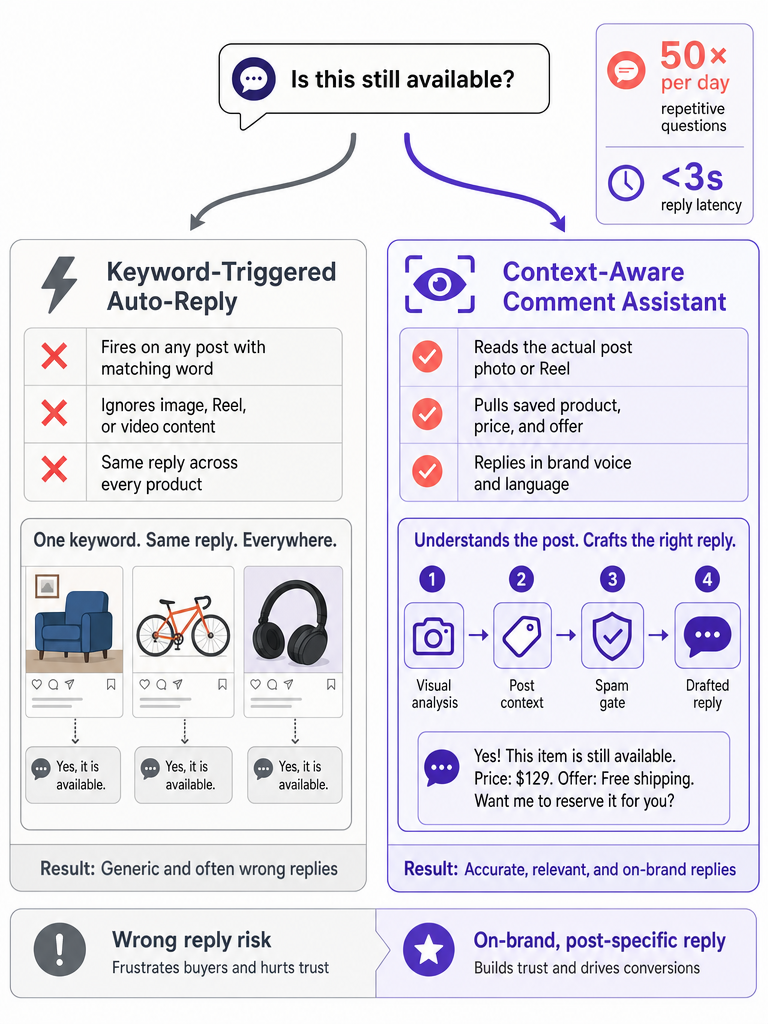
- Read the post. Before drafting, ReplyMagic uses Google Gemini to analyze the actual image, Reel, or video: colorways visible, who's on screen, which product is featured, what the on-screen text says. Captions alone aren't enough.
- Filter spam pre-LLM. Crypto bait, scam links, copy-paste abuse, and obvious junk are dropped before the model is ever called. No reply gets drafted, no quota gets burned.
- Draft in your voice. Replies are conditioned on your past replies, emoji habits, sign-offs, and tone preferences from the connected account.
- Auto-send or queue. Obvious questions (price, sizes, availability, hours, where to find the link) auto-send. Edge cases sit in the approval queue for one-tap review.
- Suggest DM where appropriate. Sensitive or high-context questions get a short public reply plus a "DM me" redirect, instead of being answered publicly with details that don't belong there.
| Step | What ReplyMagic uses | Why it matters |
|---|---|---|
| Comment ingest | Instagram Graph API | Real-time, no scraping |
| Post understanding | Google Gemini (image/Reel/video) | Reply matches what's actually on screen |
| Context match | Per-post saved facts | Right product, right price, right offer |
| Voice match | Past replies, tone, emoji, sign-offs | Sounds like you, not a chatbot |
| Send logic | Auto-send + approval queue | Control where it matters |
On permissions: comment automation on an Instagram Business account requires Meta-issued scopes such as instagram_business_basic, instagram_business_content_publish, and business_manage_comments (Source: YourAIAgent). You don't have to think about that: OAuth handles it: but it's worth knowing the assistant is operating inside Meta's official boundaries.
How Is a Comment AI Assistant Different From a Keyword-Triggered Auto-Reply?
A keyword auto-reply fires when a comment contains a string you pre-registered. A comment AI assistant reads the post first, then writes the answer for that specific thread.
That distinction sounds small until "PRICE" trips on the wrong post. Keyword tools commonly use registered terms like PRICING, HOURS, MENU, SIZES, or SHIPPING (Source: CreatorFlow), and tools like Maedix describe the classic flow as "set a keyword trigger, post an instant public reply, send a DM" (Source: Maedix). The problem: the same word means different things on different posts.
- "Price?" on a $89 hoodie post → answer is $89.
- "Price?" on a $297 cohort launch → answer is $297, early bird ends Friday.
- "Price?" on a Reel about a giveaway → there is no price, and answering one is embarrassing.
A keyword rule treats all three identically. A context-aware assistant doesn't.
Keyword rules answer the word. Context-aware AI answers the post.
| Approach | Trigger | Reply source | Failure mode |
|---|---|---|---|
| Keyword auto-reply | Matched word/phrase | Pre-written template | Fires on the wrong post |
| Comment-to-DM funnel | Trigger keyword | Template DM + canned public reply | Public reply is generic; conversation forced into DMs |
| Intent-based DM bot | Semantic intent | Pre-mapped intent answers | Still post-blind: doesn't know which product |
| Context-aware comment AI | Any comment | Saved post context + visual analysis + brand voice | Needs you to add post context once |
For the deeper breakdown of why keyword rules break at scale and what to use instead, see our companion piece on Instagram comment automation without keyword rules.
Can I Customize the Replies?
Yes: and the customization is the whole point. ReplyMagic conditions every draft on your real past replies, tone preferences, emoji habits, and sign-offs from the connected account, plus the per-post facts you save.
You control three layers:
- Account voice. Tone (casual, polished, witty, dry), emoji frequency (none, one max, expressive), sign-off style, and phrases you do and don't use. ReplyMagic learns from what's already public on your profile and refines from your edits.
- Per-post context. For each post you publish: product name, price, sizes, stock notes, offer/early-bird, launch window, enrollment dates, cancellation policy, shipping notes, booking availability, and the CTA. Save it once; every reply on that post uses it.
- Exclusion phrases. Words or claims the AI is not allowed to say (e.g., medical promises, "guaranteed results," competitor names, unreleased SKUs).
On language: ReplyMagic replies in whatever language the commenter wrote in. If a guest comments in Spanish on a hotel's Reel, the reply comes back in Spanish, in the brand's voice, with the same per-post facts. It's automatic, not a setting you have to flip.
Which Comments Should Auto-Send, and Which Should Stay in an Approval Queue?
Auto-send the obvious, low-risk, factual questions. Queue everything that's sensitive, ambiguous, or outside your saved post context.
A clean default split:
| Comment type | Recommended mode | Why |
|---|---|---|
| Price, sizes, stock, hours | Auto-send | One correct answer, lives on the post |
| Booking availability, course start dates | Auto-send | Saved per-post; low risk if accurate |
| "Where's the link?", "How do I sign up?" | Auto-send | Pure CTA pointer |
| Shipping countries, basic returns window | Auto-send | Static policy facts |
| Refund disputes, complaints | Approval queue | Tone matters; legal-adjacent |
| Health, wellness, medical specifics | Approval queue + DM redirect | Liability and individuality |
| Unusual requests, custom orders | Approval queue | Outside saved context |
| Spam, scam links, crypto bait, abuse | Spam gate (no reply) | Filtered pre-LLM |
The control mechanisms that make this safe:
- Approval queue: every draft sits one tap away from sending. Use it during launches if you want eyes on everything.
- Review mode: a softer middle ground where the assistant pre-writes but waits N minutes before sending unless you intervene.
- Per-post settings: turn auto-send on for a confident product post, off for a sensitive announcement.
- Exclusion phrases: the AI won't say what you've told it not to say, even if a commenter asks.
- Spam gates: pre-LLM filters drop scam links, copy-paste bait, and abuse before any reply is drafted.
- Safe DM redirects: a sensitive question gets a short, neutral public reply and a "DM me to chat" close.
What Are the Best AI Tools for Instagram Auto-Replies, Comments, and DMs?
The best AI tool for Instagram comments is a context-aware public-comment assistant that reads each post before drafting: most "best Instagram AI" lists conflate four different categories of tool, which is why buyers end up with a DM bot when they wanted a comment assistant. Here's the clean split.
| Category | What it actually does | Examples |
|---|---|---|
| Instagram's native DM AI suggestions | Two to four suggested message bubbles inside Meta's own DM UI (Source: InstantDM) | Instagram (built-in) |
| DM autoresponders | Reply to inbound DMs using intent or templates | ReplyAI / Ayeota |
| Profile-learning AI reply tools | Learn brand voice from public profile and reply to comments and DMs (Source: ReplyFox) | ReplyFox |
| Keyword FAQ + comment-to-DM tools | Trigger a public reply and a DM from a registered keyword (Source: CreatorFlow; InstantDM) | CreatorFlow, InstantDM |
| Comment moderation tools | Hide spam, sentiment-based moderation (Source: NapoleonCat) | NapoleonCat, CommentGuard |
| Prompt-based agent platforms | Configurable reply agents with OAuth scopes and prompt fields (Source: YourAIAgent) | YourAIAgent |
| Outbound comment generators | Generate comments to post on other people's posts (Source: SU Social; OpenTools) | SU Social, Insta Comment Generator |
| Context-aware public comment AI | Reads each post (image/Reel/video) and answers in-thread using saved post facts and brand voice | ReplyMagic |
If you're answering "is this still available?" on your own posts, the last row is the category you actually want.
How to Choose an Instagram Comment AI Assistant for Launches, Reels, and Product Drops
The right Instagram comment AI assistant for launches and viral Reels is the one that reads each post before replying, supports an approval queue for edge cases, and gives you per-post automation toggles: not a keyword bot dressed up with AI branding. Use this checklist.
- Public comment support, not just DMs. Confirm the tool replies in-thread on posts and Reels, not only inside Messenger.
- Instagram Business + Meta OAuth. Required for any compliant comment automation; needs scopes like
business_manage_comments. - Per-post context. Can you save product, price, sizes, offer, dates, and CTA for each post?
- Image/Reel/video understanding. Captions aren't enough. ReplyMagic uses Google Gemini to read the actual media before drafting.
- Brand voice mechanism. Look for explicit conditioning on past replies, tone, emoji habits, and sign-offs: not just a "tone slider."
- Multilingual replies. Should reply in the commenter's language automatically.
- Approval queue + review mode. Non-negotiable for launches.
- Per-post automation toggles. Auto-send on safe posts, off on sensitive ones.
- Exclusion phrases. Say-not lists for claims you can't make.
- Pre-LLM spam gates. Scam links and crypto bait should never reach the model.
- Clear plan limits. Know exactly how many replies you get and what happens at the cap.
ReplyMagic's plan limits, in plain numbers:
| Plan | Replies | Instagram accounts | Price |
|---|---|---|---|
| Free | 10 replies/day | 1 | $0 |
| Pro | 3,000 replies/month | 1 | Paid |
| Extra account add-on | +3,000 replies/month | +1 | $15/month |
For brands answering the same five questions on every Reel, the right Instagram comment AI assistant is the one that reads the post before it replies: and lets you keep the queue when you need it.
If you're heading into a launch, a viral push, a cohort window, or a booking spike, ReplyMagic handles the obvious questions in your voice and queues the rest for you. Get started with ReplyMagic and connect your Instagram Business account in under two minutes.
Frequently asked questions
Will the AI reply in the wrong language if someone comments in Spanish or French?
No: ReplyMagic replies in whatever language the commenter wrote in, automatically. If a follower comments in Spanish, the reply comes back in Spanish, in your brand voice, using the same saved post facts. There's no language setting to configure.
What happens when a post goes viral and comments spike past my plan limit?
On the Free plan, ReplyMagic handles 10 AI replies per day; on Pro, 3,000 per month. If you're heading into a launch or expect a viral spike, upgrading to Pro before the drop is the move: 3,000 replies a month covers most high-volume accounts, and extra accounts add another 3,000 for $15/month.
Is my Instagram account safe to connect: will this violate Meta's terms?
ReplyMagic connects through official Meta/Instagram OAuth and uses the Instagram Graph API with Meta-issued scopes like business_manage_comments: the same route any compliant tool uses. No scraping, no third-party session hijacking.
What stops the AI from posting a confidently wrong answer if I forgot to fill in the post context?
If a post's context fields: price, product, offer: are incomplete, routing those comments to the approval queue instead of auto-send is the safest call. A delayed right answer beats a confident wrong one going out publicly.
Can I stop the AI from making claims I'm not allowed to make: like health guarantees or unreleased products?
Yes: exclusion phrases let you list words, claims, or topics the AI is not allowed to use, even if a commenter asks directly. Wellness brands commonly use this for medical promises; e-commerce brands use it for unreleased SKUs or competitor names.
Sources
- Instagram Auto Reply: Complete Guide & Best Automation Tools 2026feedguardians.com
- Reply Quickly - Instagram Auto-Reply Platformreplyquickly.com
- Auto-Answer FAQ DMs on Instagram | CreatorFlowcreatorflow.so