
How Do You Auto-Reply to Instagram Comments in Your Own Brand Voice? (2026 Guide)
Start using AI to reply to Instagram comments in your own voice, with Google Gemini reading each post and safe auto-send for obvious questions.
How do you auto-reply to Instagram comments?
Auto-replying to Instagram comments means using software to respond automatically: either in the public thread or by sending a private DM after someone comments: and, done right, in your own brand voice rather than a canned template. Pick the job first: answer a visible repeat question in the thread, or move a link, lead magnet, or sensitive follow-up into DMs. According to Spur, brands get a 7-day window to send one private message after someone comments on Instagram content.
The decision comes down to what the comment is doing. "How much is this?" and "Do you ship to Canada?" belong in the public thread: everyone else scrolling has the same question. "Comment GUIDE and I'll DM you the link" belongs in a DM, because the payload is a link or file, not a two-line answer.
Most tools push you toward the DM path because it captures leads. That's why keyword comment-to-DM funnels dominate the coverage. But funnels only fire on chosen triggers. The pricing, sizing, and availability questions that fill your thread on a launch day never match a keyword, so they sit there unanswered.
Context-aware public replies close that gap. Instead of waiting for a trigger word, ReplyMagic reads each post and drafts a reply to the actual comment: in your voice, tied to what the post shows. Not keywords, actual facts.
Can Instagram automatically reply to comments, or are native tools only shortcuts?
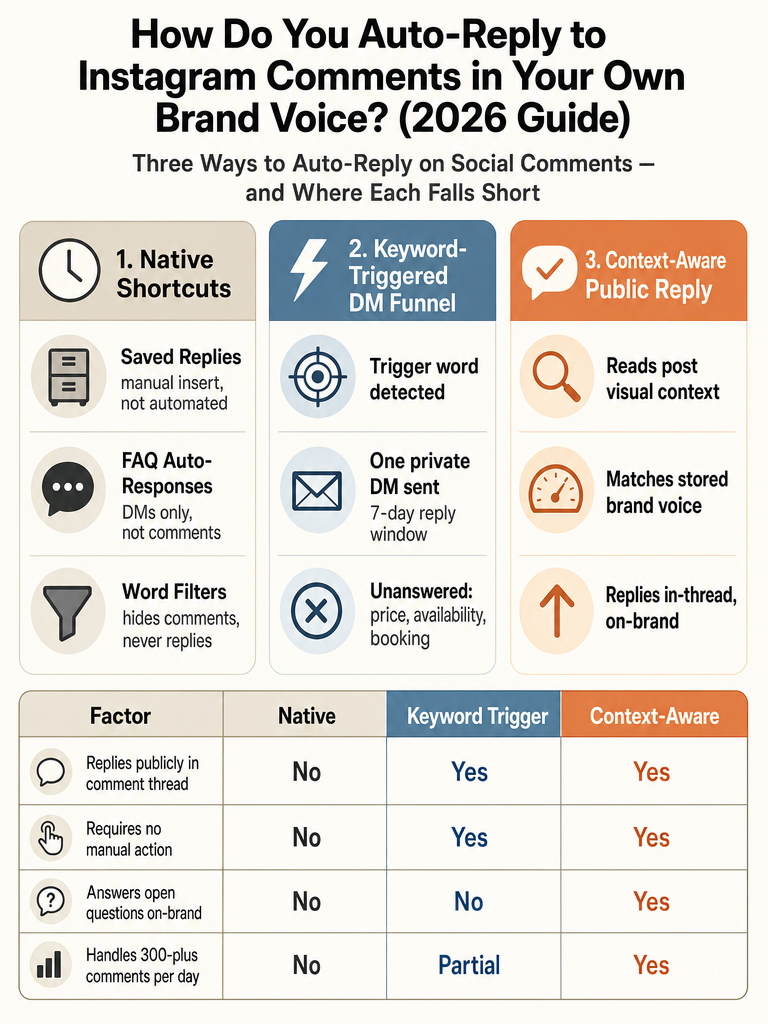
Instagram's native tools speed up manual replies: they don't automate the comment thread. Saved Replies, FAQ Auto-Responses, and Hidden Words each solve a narrow problem, but none of them read a comment and answer it on their own. According to Reply200, Saved Replies let you insert pre-written responses faster, but they aren't true comment automation because you still choose each reply manually.
Here's what each native tool actually does:
| Native tool | What it does | The catch |
|---|---|---|
| Saved Replies | Inserts pre-written text | You still tap each one manually |
| FAQ Auto-Responses | Auto-answers common questions | Works in DMs only, not comments |
| Hidden Words | Auto-hides comments with set words | Hiding isn't replying |
Reply200 notes FAQ Auto-Responses work in DMs only, not Instagram comments. Hidden Words can automatically hide comments containing specific words: useful for spam and abuse: but hiding a comment is the opposite of answering it.
Native features make you faster; true automation replies without you tapping anything. That's the line. If you want the comment section to answer itself while you sleep or film, you need software that runs through Instagram's official API, not a faster copy-paste button.
What does Instagram allow for comment automation?
Instagram allows comment automation only through the official Instagram Graph API: scraper tools and browser bots risk account flags. That distinction is the whole compliance story. According to Creator Lane, the only compliant path to Instagram comment auto-reply is the official Instagram Graph API, and tools that scrape comments or control accounts through headless browsers put the account at risk.
The API also enforces hard messaging rules. Creator Lane says Meta applies a strict 7-day private-reply window on post comments; after that, the API rejects the private reply call with error code 551. So automation can't quietly resurrect a three-week-old comment and DM the person: the platform blocks it.
There are pacing ceilings too. Creator Lane cites Meta's platform docs listing 300 messages per second for text and stickers and 750 private replies per hour for post comment replies. In practice, Creator Lane says reputable tools pace around 200 automated DMs per hour per account to stay well under the line.
ReplyMagic connects to an Instagram Business account through Meta/Instagram OAuth: the sanctioned path, not a browser workaround. For a deeper walkthrough, see the safe way to auto-reply to Instagram comments.
What account and permissions do I need for Instagram comment automation?
Instagram comment automation requires a Business or Creator account, a linked Facebook Page, and two specific API permissions granted through OAuth. Without all four pieces, no reply will send. According to Creator Lane, you need an Instagram Business or Creator account, a linked Facebook Page, and the instagram_manage_messages and instagram_manage_comments permissions via OAuth.
The checklist, in order:
- Switch to a Business or Creator account. A personal account can't grant API access.
- Link a Facebook Page. Meta ties Instagram business messaging permissions to a connected Page.
- Connect through OAuth. This is where the tool asks for access: no passwords handed over, no browser login.
- Grant
instagram_manage_comments. This lets the tool read and reply to comments. - Grant
instagram_manage_messages. This covers the private-reply DM path.
Sources don't cover the exact Meta UI screens for each step, so follow the connection flow inside your chosen tool. The permission model is Meta's, not any one vendor's: so setup looks similar across compliant tools.
Public comment replies vs comment-triggered DMs: which should you use?
Use public comment replies for visible repeat questions, and comment-triggered DMs when the answer is a link, file, or sensitive follow-up. The two are different jobs, not competing tools. A public reply answers everyone reading the thread; a DM moves one person into a private conversation.
| Public comment reply | Comment-triggered DM | |
|---|---|---|
| Best for | Price, sizes, availability, booking, shipping | Lead magnets, links, launch signups, sensitive info |
| Who sees it | Everyone on the post | Only the commenter |
| Reach benefit | Doubles comment count, feeds the algorithm | None on the public thread |
| Key limit | Public, so no private data | 7-day window, error code 551 after |
Comment-to-DM funnels convert well. According to Reply200, keyword-triggered DM funnels turn comment engagement into DM conversations at 40-60% opt-in rates, and Reply200 puts messenger open rates around 80% versus 20% for email. Those numbers explain why so many tools live entirely in the DM funnel.
But the funnel only answers comments that match your trigger word. The launch-day flood of "how much," "is this still available," and "do you have it in medium" doesn't match anything: so it goes unanswered in public, where the answer would help the most people.
The best setup runs both: public replies for the repeat questions, DM redirects for the link or the sensitive one. ReplyMagic answers public comments and can suggest a "DM me" redirect for questions better handled privately: it responds to comments, not a DM inbox.
How do you auto-reply to Instagram comments without sounding like a bot?
Sounding human means conditioning replies on your real voice and the actual comment: not dropping the same template on everyone. According to Spur, even when a bot is replying, it should sound like your brand voice: warm, conversational, and using the person's name or handle. Reply200 adds that good auto-replies avoid obvious template patterns and context-deaf responses that ignore what the commenter actually said.
Template rotation: the standard advice: helps a little. Creator Lane recommends rotating 3-5 variants to reduce spam-pattern matching. But five variants still can't answer five hundred different questions. Voice isn't a rotation problem; it's a context problem.
Real brand voice needs three inputs:
- Your past replies: how you actually phrase answers, not a generic template.
- Your tone habits: emoji use, sign-offs, whether you're formal or loose.
- The comment and the post: what this person asked, on this specific Reel or carousel.
That last one is where most tools fall down. A generic AI reads the caption and guesses. ReplyMagic uses Google Gemini to analyze the post's photo, Reel, or video before drafting, so the reply references what's actually shown: not just what the caption says. Replies are conditioned on the connected account's real past replies, tone preferences, emoji habits, and sign-offs.
A reply that names what's in the frame and sounds like your last hundred answers doesn't read like a bot: because it isn't running off a template. See how ReplyMagic reads each post before replying.
Why keyword-triggered replies miss most real comment volume
Keyword-triggered replies only fire on chosen trigger words, which leaves the majority of a comment thread unanswered. They're built for launches, giveaways, and lead magnets: "comment GUIDE and I'll send it": where you control the exact word. According to Reply200, these DM funnels convert at 40-60% opt-in rates, but they still don't handle the other comments in the thread.
The comments they miss are the ones that drive sales: price, sizing, availability, booking, enrollment, cancellation, shipping. Nobody comments the trigger word for those. They ask in their own words, and the keyword rule sees nothing.
There's a second cost. Creator Lane says generic keywords suppress comment volume by 30-50% versus story-specific keywords: so broad triggers actually shrink the engagement you're trying to capture. And a 2026 limit noted by Creator Lane allows only one automated DM per user per 24-hour window from comment triggers, which caps how much a funnel can do even when it fires.
Keyword rules aren't wrong; they're narrow. For the full breakdown, compare AI comment replies vs. keyword auto-responders. The gap they leave open is context: replying to what the comment actually says, on the post it was left on.
How do you start using AI to reply to Instagram comments?
Getting started with AI comment replies takes six steps: connect the account, pick your posts, define your repeat questions, draft in brand voice, review edge cases, then auto-send the obvious answers. The order matters: control first, automation second.
- Connect your Instagram account through Meta/Instagram OAuth. Business or Creator account plus a linked Facebook Page, per Creator Lane's permission requirements.
- Choose which posts to watch. Per-post settings let you turn automation on for a launch Reel and leave it off for a sensitive personal post.
- Define the repeat question types: price, sizes, availability, booking, enrollment, shipping, cancellation. These are the answers you already give the same way every time.
- Let the tool draft in your voice. ReplyMagic conditions replies on your past replies, tone, and emoji habits, and uses Google Gemini to read the post's image or Reel first.
- Review edge cases in an approval queue. Anything ambiguous or sensitive waits for your sign-off.
- Auto-send the obvious answers. Once you trust the drafts on price and availability, let those go out on their own.
Start small. ReplyMagic's Free plan includes 10 AI replies per day on 1 account: enough to test the voice before you scale. Pro moves to 3,000 replies per month, with an extra Instagram account add-on at $15/month for another 3,000 replies.
The point of the approval-queue-then-auto-send order is that you never hand over control blind. See approval queue or full auto.
How do you keep auto-replies from firing on the wrong comments?
You keep auto-replies from misfiring with layered controls: spam gates before AI runs, exclusion phrases, per-post settings, and a review mode for anything sensitive. The goal is that the obvious questions get answered automatically while the risky ones wait for a human. Reply200 warns that bad auto-replies fire on every low-value comment and ignore what the commenter actually said: control settings exist to prevent exactly that.
The controls, and what each one catches:
- Spam gates filter scams, link bait, and abuse before the AI is ever called: so crypto bots and scam links never trigger a reply.
- Exclusion phrases stop automation on comments containing words you flag, so it never answers something you'd want to handle personally.
- Per-post settings let you run auto-send on a product-drop Reel and review mode on a wellness post where a wrong answer carries real risk.
- Approval queue / review mode holds every draft for your sign-off until you trust a category enough to let it auto-send.
This matters most on sensitive topics. Wellness and health-adjacent brands can auto-send "what time is the class" and route "will this help my condition" to review or a DM redirect. See review vs auto for wellness brands.
The safe default is auto-send the repeat questions you answer identically every time, and review everything else. Context, not triggers: and control on the edge cases.
What happens when a Reel gets 5,000 comments in twelve hours?
When a Reel floods with thousands of comments, DM delivery gets rate-limited and queues, so public replies become the faster way to answer at scale. Meta's pacing limits mean a tool can't blast unlimited DMs, no matter how many comments land. Creator Lane's viral example: 5,000 keyword comments in twelve hours, worked through at roughly 200 automated DMs per hour per account, would take about 25 hours to clear.
That backlog is the problem with a DM-only strategy on a viral post. Meta caps private replies at 750 per hour and messaging at 300 per second platform-wide, per Creator Lane, and the 7-day private-reply window means old comments in the queue eventually hit error code 551 before the tool reaches them.
Public comment replies dodge the DM bottleneck. They answer everyone reading the thread at once, and they don't burn the per-user, per-24-hour DM allowance. On a launch or a viral Reel, that's where the repeat questions actually are anyway: price, availability, sizing: asked hundreds of times in public.
ReplyMagic answers public comments in whatever language the commenter wrote in: automatic, not a setting: which matters when a Reel goes global overnight. See reply in 100+ languages and how to survive a viral post.
Ready to answer your comment section in your own voice? Get started with ReplyMagic and test it on your next launch.
Frequently asked questions
How do I start using AI to reply to Instagram comments?
Connect your Instagram Business or Creator account through Meta OAuth, then let the AI draft replies conditioned on your actual past replies, tone, and emoji habits. ReplyMagic's Free plan covers 10 AI replies per day on one account: enough to test voice accuracy before committing. Start with the approval queue so every draft waits for your sign-off, then flip obvious repeat questions like price and availability to auto-send once you trust the output.
What's the best alternative to keyword-rule builders for Instagram comments?
Context-aware AI reply tools answer what the comment actually says: no trigger word required. Keyword rules only fire when a commenter uses your exact phrase, which means every "how much is this?" and "do you have it in medium?" on a launch day goes unanswered in public. An AI that reads each post's image or Reel before drafting handles those questions automatically, in your voice, without a trigger list.
How do I find an AI Instagram comment assistant with safe auto-send?
Look for four things: Meta OAuth connection (not a browser bot), pre-AI spam gates that block scams before a reply is drafted, an approval queue so sensitive replies wait for human review, and per-post settings so you can run auto-send on a product Reel and review mode on a personal post. ReplyMagic includes all four: spam gates, exclusion phrases, per-post controls, and approval queue: so auto-send only fires on the answers you've already validated.
Does auto-replying to Instagram comments actually require a Business account?
Yes. Instagram comment automation requires a Business or Creator account, a linked Facebook Page, and two OAuth permissions: instagram_manage_comments and instagram_manage_messages. A personal account can't grant API access at all. The permission model is Meta's: every compliant tool follows the same checklist, so setup looks similar across platforms.
What happens to comment auto-replies when a Reel goes viral and gets thousands of comments fast?
DM-based replies hit a hard ceiling: Meta caps private replies at 750 per hour per account, and 5,000 comments would take roughly 25 hours to clear at the safe automated pace of ~200 DMs per hour. Public comment replies bypass that bottleneck entirely: they answer everyone reading the thread at once and don't burn the per-user daily DM allowance. During a viral spike, public replies for repeat questions clear the thread far faster than a DM queue.
How do auto-replies stay in my brand voice instead of sounding like a template?
Voice accuracy comes from three inputs: your real past replies, your tone habits (emoji use, sign-offs, formality level), and the specific post the comment was left on. Rotating 3, 5 template variants helps avoid spam-pattern flags, but it can't answer hundreds of different questions. ReplyMagic uses Google Gemini to analyze the actual photo, Reel, or video before drafting: so replies reference what's in the frame, not just the caption, and are conditioned on the connected account's real reply history.
Sources
- Instagram Auto Reply to Comments (2026 Guide) - Spurwww.spurnow.com
- Instagram Comment to DM Automation: The Complete 2026 ...www.smartreply.io