

Reply in 100+ Languages to Instagram Comments
Reply to Instagram comments in multiple languages automatically with 100+ auto-detected languages, post facts, and brand voice on every reply.

How to reply to Instagram comments in multiple languages
Replying to Instagram comments in multiple languages means answering each public comment in the same language the commenter wrote in. ReplyMagic says it does this automatically across 100+ auto-detected languages: someone comments in Spanish, the reply comes back in Spanish (Source: ReplyMagic). No language picker, no manual switch.
The harder part isn't the language. It's the facts inside the reply. A Portuguese comment asking "quanto custa?" needs your actual price. A Japanese comment about sizing needs your real size range. ReplyMagic answers those using context saved for that exact post: product, price, sizes, offer, CTA, tone (Source: ReplyMagic).
That's what separates a multilingual reply from a multilingual autoresponder. The recurring questions on Instagram are the same everywhere:
- Price and offers
- Sizes and availability
- Booking and dates
- Enrollment and prerequisites
- Policies, cancellation, and shipping
ReplyMagic answers those in whatever language the commenter used, grounded in the facts of the post they're commenting on: not a keyword that fired a canned message. ReplyMagic responds to public Instagram comments; it's not a DM bot, though it can suggest a "DM me" redirect for sensitive questions.
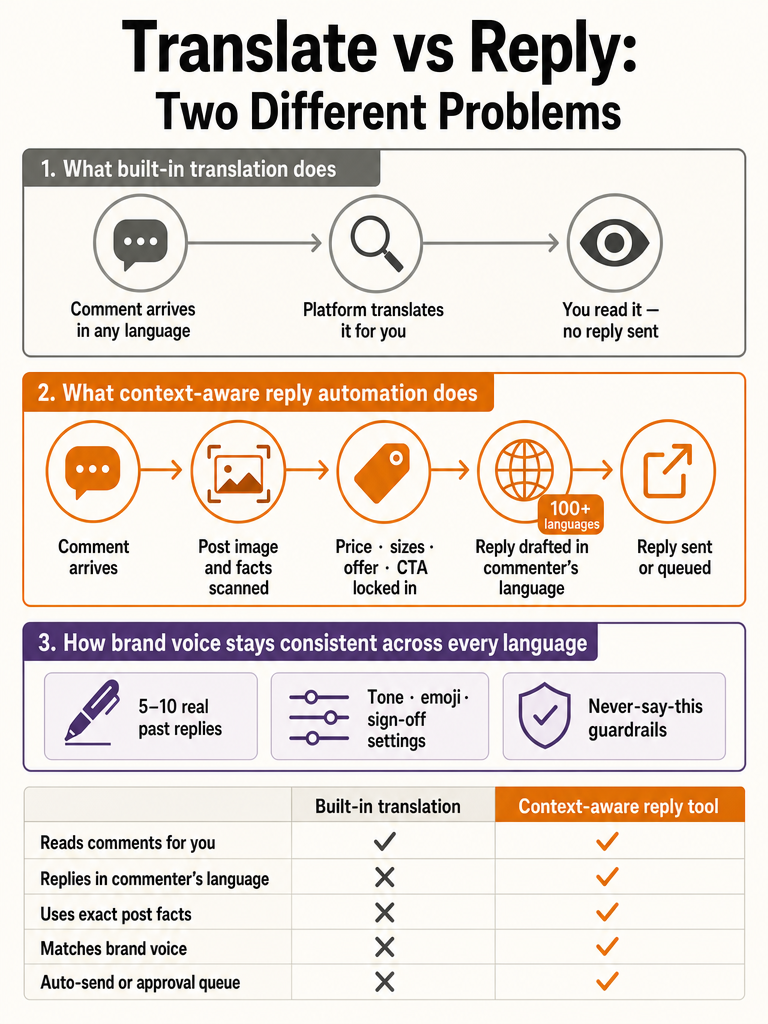
Instagram translation vs multilingual comment replies: what is the difference?
Translation and replying are two different jobs. Instagram's built-in translation lets you read a comment in your own language; a multilingual reply tool writes and posts a response back in the commenter's language. According to Thunderclap, Instagram's translation feature translates comments into the language set in the viewer's app settings: so it helps you understand what was said, nothing more.
That gap is where most "multilingual Instagram" pages get vague. Reading a comment in Arabic doesn't answer it. You still have to type a reply, in Arabic, with the right price or booking detail: for every comment, all day.
ReplyMagic closes that gap by drafting the reply itself. It says it replies in the commenter's language automatically and supports 100+ auto-detected languages (Source: ReplyMagic). Detection, drafting, and language matching happen in one pass.
Translation tells you what a comment says; a multilingual reply tool answers it in the same language, using your post's real facts.
One honest limit: public detail on Instagram's exact translation language count is limited. The corpus doesn't include a Meta primary source stating how many languages Instagram comment translation covers, so treat any specific number you see elsewhere with caution.
What is the best way to reply to Instagram comments in the commenter's language?
The best method pairs language detection with post context and brand voice: not trigger words. A keyword rule fires the same canned line no matter the language or the post; a context-aware agent detects the language, reads what the post actually shows, and answers with the right facts. ReplyMagic says it handles 100+ auto-detected languages and has sent 50,000+ replies on creator accounts (Source: ReplyMagic).
Language detection alone isn't enough. A perfectly Spanish reply that quotes last season's price still fails. The answer has to carry the facts of the specific post: the launch, the Reel, the product drop it's attached to.
Here's how that plays out across common Instagram scenarios:
| Comment (language) | Post type | What a good reply needs |
|---|---|---|
| "¿Qué tallas hay?" (Spanish) | Product drop | Real size range + starting price |
| "É para iniciantes?" (Portuguese) | Course launch | Prerequisites + enrollment CTA |
| "Do you travel?" (English) | Service booking | Availability + location + next step |
| "空きはありますか?" (Japanese) | Hotel/tour Reel | Dates + booking route |
Each reply lands in the commenter's own language, carrying that post's actual details. Not keywords: actual facts. For the mechanics behind reading a post first, see how ReplyMagic reads each Instagram post before replying.
How do multilingual Instagram chatbots work for public comments?
Most "Instagram chatbot" tools are built for DMs and keyword flows, not public comment replies: so read carefully before assuming they do your job. Mark360.ai markets Instagram DM and comment automation with "50+ languages supported" and drag-and-drop flows (Source: Mark360.ai). ReplyKaro describes comment-to-DM automation that fires "the moment someone comments your keyword" (Source: ReplyKaro). Blabla runs a unified inbox across Instagram, TikTok, YouTube, and Facebook with keyword- and intent-triggered flows (Source: Blabla).
Notice the pattern: keywords, DMs, and multi-channel inboxes. Useful for lead funnels, but that's a different task than replying in public, under the post, in the commenter's language.
Your actual job is the public comment thread: the flood of price, size, booking, and enrollment questions that pile up under a viral Reel or a launch post. That's a comment-reply problem, not a DM-funnel problem.
ReplyMagic focuses on that thread specifically. It watches public comments, reads the post, and drafts a reply in the commenter's language (Source: ReplyMagic). It can suggest a "DM me" redirect for sensitive questions, but it answers in public first: it is not a DM bot.
How does a tool avoid sending the wrong reply when prices, sizes, or offers change?
It avoids the wrong reply by tying every answer to the specific post, not to a trigger word. Before drafting, ReplyMagic uses Google Gemini to read the post's image, Reel, or video: so the reply references what's actually shown, not just the caption (Source: ReplyMagic). Then it draws on facts you saved for that exact post: product, price, sizes, offer, CTA, location, and tone.
This is where keyword automation breaks. A rule watching for "price" fires the same message everywhere: including the post where the price changed or the offer ended. It has no idea which post it's on.
ReplyMagic works the other way. Context, not triggers.
Take the homepage example: a Summer Collection drop saved as "from $45, sizes XS, XXL, link in bio." A comment reads "OMG what sizes do you have??" A generic bot answers "Thanks for the love! Check out our website." ReplyMagic answers "We've got XS through XXL in the summer drop! Everything starts at $45: tap the link in bio to see what's left" (Source: ReplyMagic).
Because the facts are stored per post, changing a price on one drop never poisons replies on another.
When an offer expires, you update that post's context: old prices don't leak into new threads. See how ReplyMagic handles "is this still available?" questions for the recurring-availability case.
How can multilingual replies still sound like the brand?
Multilingual replies stay on-brand because the voice is grounded in your real writing, not a generic model default. ReplyMagic anchors replies to the connected account using default tone, emoji habits, sign-offs, "never say this" phrases, and 5, 10 example replies you actually wrote (Source: ReplyMagic). Those examples teach the agent how you sound before it drafts a word.
Voice conditioning travels across languages. If your English is warm and uses one emoji, the Spanish or Japanese reply carries the same restraint: same length, same energy, same sign-off.
The creator @frankiandfreddi, described with 115K+ followers, puts it plainly: "My followers don't realize a bot is helping me, because the replies sound like me and reference what I posted" (Source: ReplyMagic).
The "never say this" list matters most for teams. When multiple people reply, phrasing drifts; a fixed exclusion list keeps everyone off the words you don't want in public: in any language.
Which multilingual comments should auto-send, and which should go to review?
Send the obvious repeats automatically; route the judgment calls to review. Price, sizes, availability, booking, and shipping are answered the same way every time: good auto-send candidates. Refunds, health questions, complaints, and anything sensitive belong in an approval queue. ReplyMagic lets you auto-send the obvious ones and queue the rest for one-tap approval (Source: ReplyMagic).
The control mechanisms, by name:
- Approval queue: every reply waits for a tap before going live
- Review mode: spot-check drafts instead of approving each one
- Per-post settings: auto-send on a low-risk drop, review on a sensitive launch
- Exclusion phrases: words the agent must never say
- Spam gates: pre-LLM filters that block scams, link bait, and abuse before AI is even called
A rough split by comment type:
| Comment type | Suggested mode |
|---|---|
| Price, sizes, availability | Auto-send |
| Booking, shipping, general policy | Auto-send |
| Cancellation, refunds | Review |
| Health or wellness questions | Review + DM redirect |
| Complaints, edge cases | Review |
Map it to your accounts: approval queue vs. full auto covers when to stay hands-on, and wellness review vs. auto shows how sensitive-topic accounts split the difference.
What happens when the comment language is unclear or emoji-only?
Unclear and emoji-only comments need a fallback rule, or the tool guesses wrong. The ig-reply open-source project handles this two ways: it replies in the commenter's own language when detectable, and for emoji-only comments it guesses language from the username, defaulting to English when the language can't be determined (Source: ig-reply). That fallback keeps a reply landing instead of stalling.
The ig-reply project lists detected languages including English, Spanish, Portuguese, Italian, Japanese, Turkish, German, Indonesian, Malay, and Farsi (Source: ig-reply): a useful signal that per-comment language detection is realistic, not marketing.
Timing matters too. Firing a burst of instant replies reads like a bot. ig-reply inserts a random 30, 90 second gap between replies as an anti-bot throttle (Source: ig-reply). Human-paced replies look human.
ReplyMagic frames its own timing as always replying, 24/7, at human pace (Source: ReplyMagic). The principle holds across tools: detect the language, fall back sensibly, and don't machine-gun the thread.
Can Instagram automation reply in Arabic and multiple languages?
The honest answer: ReplyMagic supports 100+ auto-detected languages and replies in whatever language the commenter used, which by that claim includes Arabic (Source: ReplyMagic). But the public material stops there.
What the sources don't cover, as of this writing:
- A full, published list of every supported language
- Arabic-specific proof, examples, or accuracy data
- Dialect handling: regional Arabic variants, for instance
- Right-to-left script behavior in the comment field
If Arabic comments are core to your account, test it directly on your own posts before trusting it at launch scale. The "100+ auto-detected" claim is the ceiling of what's publicly verifiable; anything more specific isn't in the record. No independent accuracy data on multilingual reply quality exists in the corpus either: treat marketing claims as claims until you've seen it on your thread.
How to start using AI to reply to Instagram comments before a launch
Getting live before a launch takes a short, ordered setup. ReplyMagic lists ~5 minutes for setup and 20 minutes from signup to live (Source: ReplyMagic). That's enough runway to have it working before the post drops.
- Connect your Instagram Business account through Meta/Instagram OAuth. ReplyMagic is listed as an Official Meta Tech Provider (Source: ReplyMagic).
- Add per-post facts for the launch post: product, price, sizes, offer, CTA, location. This is what keeps replies tied to that exact post.
- Set tone and guardrails: default tone, emoji habits, sign-off, "never say this" phrases, and 5, 10 example replies (Source: ReplyMagic).
- Choose approval or auto-send: queue everything for review, or auto-send the obvious price/size/availability questions.
- Turn on spam gates so scams and link bait are filtered before AI runs.
For the full launch-day playbook, see how to survive a viral post's comment flood. Do the setup the day before, not during the flood.
Frequently asked questions
How do I implement Instagram comment automation before my launch?
Setup takes about 5 minutes: connect your Instagram Business account via Meta OAuth, then save per-post facts (product, price, sizes, offer, CTA) for your launch post before it drops. Set your tone, add 5, 10 example replies you've actually written, configure exclusion phrases, and choose approval queue or auto-send. ReplyMagic reports 20 minutes from signup to live, which is enough runway to be ready before the first comment lands.
How do you reply to Instagram comments in multiple languages automatically?
ReplyMagic detects the commenter's language and replies in that same language: no picker, no manual switch, across 100+ auto-detected languages. A Portuguese comment asking "quanto custa?" gets your actual price back in Portuguese. The reply pulls from facts saved for that specific post, so every language gets the right detail, not a canned message that ignores what the post is actually about.
What are the best alternatives to keyword-rule builders for Instagram comments?
Keyword rules fire the same canned line on every post: they have no idea which post triggered them, so they quote wrong prices and embarrass the brand. Context-aware tools read the actual post before drafting. ReplyMagic uses Google Gemini to analyze the post's image or Reel, then answers using facts saved for that exact post: price, sizes, offer, and CTA. The result is a reply that references what's actually shown, not a trigger word match.
How is a creator voice AI for Instagram comments different from keyword-rule automation?
Keyword tools match a word and fire a preset reply: same message, every post, every time. A voice AI conditions replies on your real past replies, tone preferences, emoji habits, and sign-offs, then reads each post before drafting. ReplyMagic anchors to 5, 10 example replies you wrote, so the Spanish reply carries the same energy as your English one. Creator @frankiandfreddi (115K+ followers) notes followers don't realize a bot is helping because replies reference what was actually posted.
Which Instagram comment types should auto-send and which should go to an approval queue?
Price, sizes, availability, booking, and shipping questions repeat the same answer every time: strong auto-send candidates. Refunds, cancellations, health questions, and complaints need human judgment and belong in the approval queue. ReplyMagic lets you set this per post: auto-send on a low-risk product drop, full review mode on a sensitive wellness launch. Spam gates run before AI is called, so scams and link bait never reach the drafting step.
How does AI avoid sending the wrong reply when prices or offers change?
Facts are stored per post, not per account: so a price change on one drop never poisons replies on another. Before drafting, ReplyMagic uses Google Gemini to read the post's image or Reel, then pulls the saved context for that exact post: current price, active offer, correct CTA. When an offer expires, you update that post's context. Old prices stay locked to old posts; new threads get new facts.
Sources
- Instagram Reply Generator | Free AI Tool for Instagramvideodubber.ai
- ReplyKaro: #1 Instagram AutoDM Tool | $3/mo · ₹99/mo Indiawww.replykaro.com
- FlowGent | Turn Instagram DMs into Revenueflowgent.ai
- limyikyik/ig-replygithub.com