
Instagram Comment Automation for Wellness Brands: Review vs Auto
Context-aware Instagram comment automation for wellness brands: auto-send logistics, review health questions, and use post context, not keywords.

When should you automate Instagram comments and when should you reply manually?
Automate the logistics, review the risk, and let a human handle anything that touches someone's health. That's the whole matrix for a wellness brand. Sift AI describes Instagram comments as a mixed stream of support tickets, sales intent, spam, trolling, and the occasional crisis signal hidden under a Reel: so the job isn't "reply faster," it's to route each type correctly and automate only what's safe, relevant, and measurable.
For wellness accounts, three buckets work:
| Comment type | Handling | Examples |
|---|---|---|
| Auto-safe | Auto-send fine | Class times, price, booking link, "where do I sign up," beginner-fit |
| Review-first | Draft, human approves | Vague "will this help my back?", refund asks, offer questions |
| Human-only | No automation | Symptom detail, medication, mental health distress, crisis language |
The volume problem is real. CreatorFlow uses the example of a wellness coach waking to 40+ comments and DMs by Sunday morning: mostly the same five questions. Those repeats belong in the auto-safe bucket.
The mistake most brands make is treating the feed as one queue. It isn't. Build the matrix first, then decide which tool enforces it.
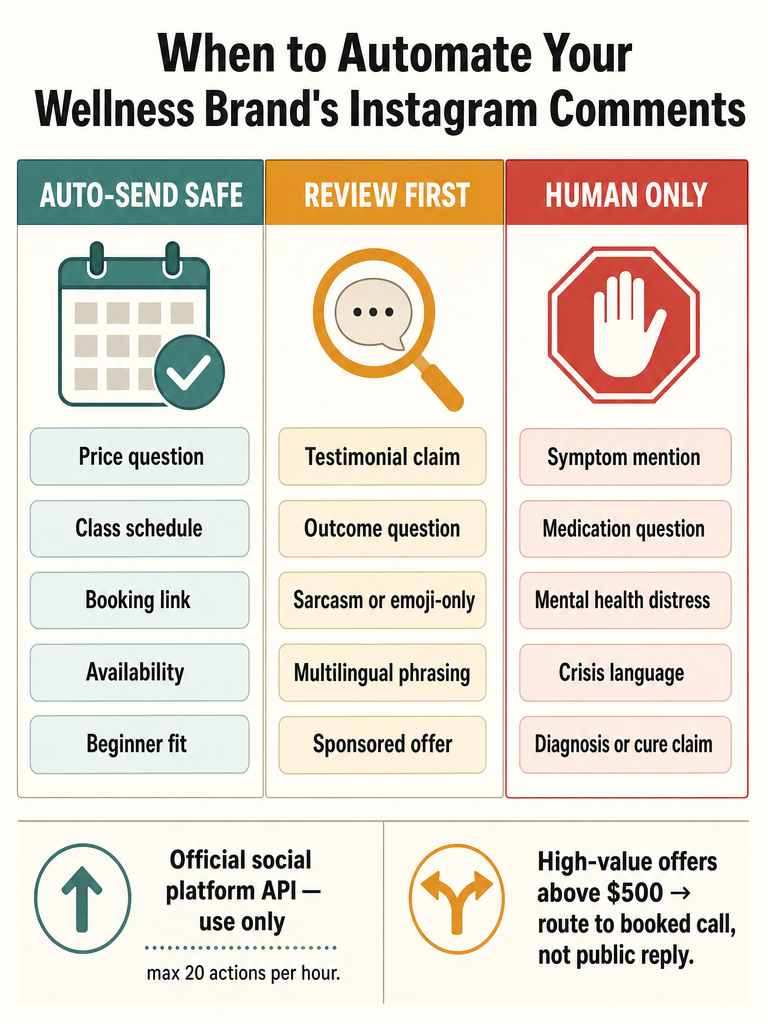
Which wellness comments are safe to auto-reply to?
Logistics questions are the safe auto-send zone: price, booking, class schedules, availability, beginner-fit, intake steps, and sign-up links. These are factual, repeatable, and carry no health-claim risk. CreatorFlow's guidance for wellness coaches is direct: automation should send booking links, class schedules, and intake forms, not diagnostic, treatment, or cure claims.
Comments that usually auto-send cleanly:
- "How much is the 6-week program?": send the price and the sign-up link.
- "What time is Saturday class?": send the schedule.
- "Is this good for total beginners?": a pre-vetted "yes, here's how we onboard beginners" line.
- "How do I book?": send the booking path.
- "Do you have spots left?": availability plus next step.
These are the questions a VA answers fifty times a launch week. Automating them frees the human for the comments that actually need judgment.
The safe test for auto-send: could you print the reply on a flyer without a lawyer flinching? If yes, automate it. If the honest answer depends on someone's body, condition, or symptoms, it's not logistics anymore: it moves to review or human-only. See how service businesses answer Instagram price questions fast for the pricing-reply pattern.
Which wellness comments need review mode or human-only replies?
Anything touching a person's health, money dispute, or emotional state needs a human in the loop. Symptom mentions, medication questions, treatment or cure claims, refund requests, and mental health distress should never auto-send. CreatorFlow is explicit that wellness automation should not make diagnostic, treatment, or cure claims: and that automation should never be the front line for mental health crisis support.
The escalation rules:
- Symptom or medication detail → human-only. "My knee locks up, will yoga fix it?" is not a logistics question.
- Refund or billing dispute → review mode at minimum; often human.
- Treatment or cure framing → block from auto-send entirely.
- Mental health distress or crisis language → human immediately, and reference 988 in the US (the Suicide and Crisis Lifeline).
Review mode is the middle gear here. The reply gets drafted, a person approves or edits, and nothing sensitive goes public unchecked. For anything crisis-adjacent, skip the draft: pick up the thread yourself.
How do you keep automation compliant around wellness claims, testimonials, and sponsored offers?
Block anything that promises an outcome. The compliance line for wellness automation runs through claims: an auto-reply can confirm a class time, but it can't say the program "cures" anxiety, "heals" your gut, or "treats" a condition. CreatorFlow's rule for wellness coaches is to keep automation on logistics and away from diagnostic, treatment, or cure language.
Keep these off auto-send:
- Outcome promises ("you'll lose 20 pounds," "this fixes insomnia").
- Testimonial-style claims restated as fact ("everyone gets results").
- Sponsored or affiliate wellness offers where disclosure matters.
- Anything a commenter frames as medical advice.
The safer pattern, per CreatorFlow, is vetted standard language instead of tired late-night manual replies: pre-approved phrasing your team already knows is compliant. Public detail on specific FTC disclosure requirements for these threads is limited in the sources here, so treat sponsored-offer replies as review-first until your own counsel signs off.
When a comment asks for a result, redirect to a conversation, not a claim: "Happy to talk through whether it's a fit: DM me."
What is Instagram comment automation for wellness brands?
Instagram comment automation is software that responds to public post comments automatically using Meta's official Instagram Graph API, available on Business and Creator accounts, replying with a public comment, a private DM, or both. It runs through approved API tooling rather than scraper bots. AutoDM says a comment auto-reply setup can be completed in under 5 minutes with no coding.
The head-term definition, plainly: it turns the repetitive part of your comment section into automatic, on-brand replies while leaving edge cases to a person.
Two channels matter and they're not the same job:
- Public comment replies: visible under the post. Best for shared questions like price and class times, where one answer helps everyone reading.
- DM handoff: moves the conversation private. Best for personal intake or higher-ticket offers.
Meta Business Suite has native quick-reply and saved-response tools, but those are keyword-driven and don't read what the post actually shows. That gap: trigger versus context: is the difference that matters for wellness brands, covered in what context-aware Instagram comment automation is and why keyword bots keep failing.
How to auto-reply to Instagram comments safely without account-risk patterns?
Run on official API tooling, pace your sends conservatively, and gate spam before any reply fires. That's the safe operating model. Turba Media recommends aiming for 20 actions per hour maximum to avoid the repetitive-behavior patterns Instagram flags: and notes that only professional accounts, meaning Business and Creator profiles, can use automation at all.
Turba Media lists what Instagram permits versus prohibits:
| Permitted | Prohibited |
|---|---|
| Customer service with predetermined responses | Mass following or unfollowing |
| Comment moderation for spam | Bulk liking without genuine engagement |
| Content scheduling via approved tools | Generic automated commenting |
| Analytics and reporting | Fake engagement through bots |
| Advertising optimization via API partners | Unauthorized API access, credential sharing |
The safe operating steps:
- Connect via official Meta OAuth on a Business or Creator account: never a scraper or browser-simulating bot.
- Filter spam, scam links, and crypto bait before AI ever drafts a reply.
- Use pre-vetted language for anything sensitive.
- Keep pacing conservative; bursts look automated.
The split is simple: official API tooling stays inside Instagram's rules, while scraper and browser-simulating bots are exactly what gets accounts flagged or suspended. More depth in are Instagram comment bots safe in 2026.
Context-aware Instagram comment automation tool vs keyword triggers
Post-aware replies read what the Reel, photo, or caption actually shows; keyword triggers only match words. That difference cuts wellness-brand risk. Sift AI notes that basic keyword bots break on sarcasm, abbreviations, emoji-only replies, multilingual phrasing, and comments that reference the post itself: all common in a busy comment section.
Consider an emoji-plus-"how much??" comment under a Reel showing a specific class. A keyword rule sees no matched trigger, or fires the wrong canned line. A context-aware tool reads the post, understands the class shown, and answers the price for that offer.
| Keyword triggers | Context-aware replies | |
|---|---|---|
| Reads the post | No | Yes |
| Handles emoji-only / slang | Poorly | Better |
| Multilingual comments | Needs setup | Reads the language written |
| Wrong-post misfires | Common | Reduced |
Sift, citing Spur, notes Instagram messaging limits around roughly 750 calls per hour for standard messaging and up to 100 automated replies per second for Live comments: capacity exists; accuracy is the constraint. The wellness risk with triggers is a canned reply firing on the wrong post, in front of everyone. Context, not triggers. Compare both approaches in AI comment replies vs keyword auto-responders.
When should a wellness brand move a public comment into DM?
Keep general answers public; move anything personal to DM. Booking, schedule, price, and beginner-fit questions belong in the public thread because one answer serves everyone reading. Personal intake, sensitive health context, and high-ticket offers move private. CreatorFlow says service offers above $500 should route to a booked call rather than being sold in DM chat.
The public-versus-DM line:
- Stay public: general price, class times, availability, "how do I book."
- Move to DM: personal intake questions, symptom-specific asks, anything the commenter clearly wants private.
- Route to a booked call: high-ticket programs above $500: a "DM me and let's find a time" redirect.
One constraint to plan around: CreatorFlow notes Meta's Graph API enforces a 7-day window from the original comment for the comment-to-DM flow. After that window, the automated handoff can't reach them.
For sensitive wellness questions, a "DM me" redirect in the public reply is safer than answering in the open: it protects the commenter and keeps health specifics off the public thread. See how hotels apply the same public-then-private logic in handling Instagram booking questions after hours.
How ReplyMagic handles review mode vs auto-send for wellness comments
ReplyMagic lets a wellness brand pick its control level per situation: approval-queue mode where every reply gets reviewed, or auto-send for the obvious logistics questions. Before drafting anything, ReplyMagic uses Google Gemini to analyze the post's photo, Reel, or video: so replies reference what's actually shown, not just the caption. That's the difference between "which class is this?" and answering the right class.
The controls that map to the wellness matrix:
- Approval queue / review mode: draft every reply, approve or edit before it posts. Use this for review-first comments.
- Auto-send: let price, availability, sizing, and booking questions answer automatically.
- Per-post settings: turn auto-send on for a logistics carousel, keep it in review for a sensitive Reel.
- Exclusion phrases: stop automation on comments that mention specific terms.
- Spam gates: filter scams, link bait, and abuse before AI is ever called.
Voice comes from mechanism: replies are conditioned on the connected account's past replies, tone preferences, emoji habits, and sign-offs: so a teammate's draft still sounds like the brand. And ReplyMagic replies in whatever language the commenter wrote in, automatically, which matters for wellness brands serving audiences across time zones.
Plan limits: Free is 10 AI replies per day; Pro is 3,000 replies per month; each extra Instagram account is +$15/month for 3,000 more replies. Note ReplyMagic answers public comments: it can suggest "DM me" redirects, but it isn't a DM bot. Setup approach in how to auto-reply to Instagram comments safely.
How do you find an AI Instagram comment assistant with safe auto-send before launch?
Score any tool against seven things before a launch: official API access, context-aware drafting, review controls, spam gates, per-post settings, safe auto-send, and language coverage. A launch is the worst time to discover a keyword bot firing on the wrong Reel. Sift AI, citing Spur, shows the upside when it works: a brand using personalized auto-replies handled more than 100 commenters and generated 64 orders at a 6% conversion rate.
Pre-launch checklist:
- Official Meta Graph API: Business or Creator account, no scrapers.
- Context-aware drafting: reads the post's image or Reel, not just keywords.
- Review mode + approval queue: for the sensitive bucket.
- Spam gates: before any AI runs.
- Per-post settings: auto-send logistics posts, review sensitive ones.
- Safe auto-send: pacing that stays inside Instagram's rules.
- Multilingual replies: answers in the commenter's language.
Adjacent tools show up in this space: GoHighLevel, Vista Social, Chatfuel, Tidio, Customers.ai, and others: but many are DM-funnel or general social tools, not context-aware public-comment assistants. Public detail comparing them head-to-head on wellness safety is limited in the sources here, so demo against the checklist rather than the feature list.
Prep the launch itself with how to survive a viral post, and for enrollment floods see Instagram comment automation for course launch FAQs.
Frequently asked questions
Which Instagram comments are safe to auto-send for a wellness brand?
Logistics questions are the safe auto-send zone: class times, pricing, booking links, availability, and beginner-fit confirmations. These are factual, repeatable, and carry no health-claim risk. The test is simple: could you print the reply on a flyer without a lawyer flinching? If yes, automate it. If the honest answer depends on someone's body, condition, or symptoms, it moves to review or human-only.
Which wellness comments should never be automated and need a human reply?
Symptom mentions, medication questions, treatment or cure claims, refund disputes, and any mental health distress language must never auto-send. A keyword bot can't tell "I'm dying to try this class" from actual crisis language: that misread is exactly why crisis comments must sit outside any trigger-based flow. In the US, crisis replies should reference 988, the Suicide and Crisis Lifeline.
Context-aware Instagram comment automation tool: how does it differ from keyword triggers?
Post-aware tools read the actual Reel, photo, or caption before drafting a reply. Keyword triggers only match words. ReplyMagic uses Google Gemini to analyze each post's image or video, so a reply references the specific class or product shown: not a canned line that misfires on the wrong post. That gap matters most for wellness brands where a wrong-post reply is a public compliance risk.
How do I implement Instagram comment automation before my launch?
Score any tool against seven things before going live: official Meta Graph API access, context-aware drafting, an approval queue for sensitive replies, spam gates before AI runs, per-post settings, conservative send pacing, and multilingual reply support. A launch is the worst time to find a keyword bot firing on the wrong Reel. ReplyMagic's Free plan covers 10 AI replies per day to test the setup before you flip to Pro.
How to auto-reply to Instagram comments safely without risking the account?
Connect via official Meta OAuth on a Business or Creator account: never a scraper or browser-simulating bot. Turba Media recommends a maximum of 20 actions per hour to avoid the repetitive-behavior patterns Instagram flags. Filter spam, scam links, and crypto bait before any reply drafts. Only Business and Creator profiles can use automation at all under Instagram's rules.
What does Instagram comment automation for a wellness brand cost?
ReplyMagic's Free plan is 10 AI replies per day on one Instagram account: enough to test reply quality before a launch. Pro is 3,000 replies per month on one account. Each additional Instagram account adds $15/month and 3,000 more replies. All plans run on official Meta API access with approval-queue mode, spam gates, and per-post controls included.
Sources
- Comment & DM Automation: Instagram Auto-Reply Guidescreatorflow.so
- Instagram Automated Comments: A Guide for Ops Leaders | Sift AIwww.instagram.com
- How To Do Instagram DM Automation WITHOUT MANYCHATturbamedia.io