How to Survive a Viral Post: Replying to a Comment Flood After an Instagram Launch
Learn how to survive a viral Instagram launch comment flood with context-aware replies, approval mode, and safe auto-send for repeat questions.

What should you do when a post goes viral on Instagram?
Pin a next-step comment, triage the thread like an inbound queue, reply with substance to high-intent and high-risk comments, and automate only the obvious repeat questions: with controls on. That is the entire job for the next 24 hours.
A viral Instagram launch is not a notification problem. It is a queue problem. According to Orphiq, a breakout post pulls 10 to 50 times your normal engagement and gives you roughly 24 hours to convert that attention into followers, leads, or buyers before it cools. Mentionkit frames the same window differently: Instagram comments are an inbound queue, not a vanity metric, and the real failure mode is lack of prioritization.
Surviving an Instagram launch comment flood is a prioritization problem, not a speed problem. Speed without ranking burns your best people on emoji replies while a "what sizes are left?" comment sits unanswered for two hours.
Here is the order that actually works on launch day:
- Pin a comment that answers the top three questions the post will trigger.
- Reply by hand to buying, booking, and enrollment intent first.
- Answer public objections and risk comments (pricing complaints, "is this legit?") in the thread.
- Let automation handle the obvious repeats: price, sizes, availability, shipping: under approval queue or safe auto-send.
- Ignore spam, gate it before it ever reaches a reply.
This is a guide for public Instagram comments on a launch post. DMs are a different queue with different rules.
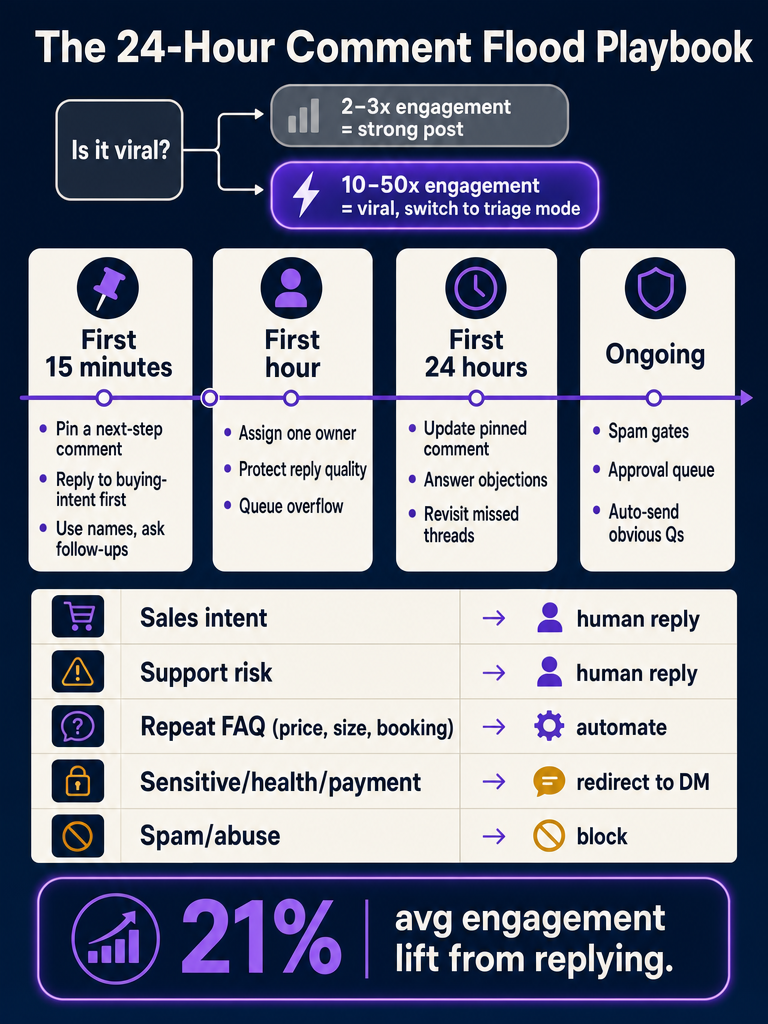
How do I know whether my Instagram launch post is truly viral?
A post is viral when it is pulling 10 to 50x your normal engagement, according to Orphiq. At 2 to 3x, you have a good post: not a viral moment, and not a reason to switch into launch triage.
The distinction matters because the response cost is different. A 2 to 3x post can be handled inside your normal community management cadence. A 10x+ post needs an owner, a queue, and rules about what gets auto-sent versus reviewed. If you wait until the post is at 30x to assign someone, you will already be three hours behind on price, size, availability, and shipping questions.
Switch into launch triage mode the moment you see all three signals at once:
- Comment velocity is 5x+ what the account normally sees in the first hour
- Repeat questions are stacking: same price, sizing, booking, enrollment, or policy question three or more times
- New commenters (not your usual community) are outnumbering regulars
What should I do in the first 15 minutes after a launch post takes off?
Do not panic-scroll. The first 15 minutes are for setting the queue up, not clearing it.
An Instagram creator-advice source recommends replying to comments inside the first 15 minutes after posting, because early engagement compounds. But on a launch post, the goal is not volume: it is making sure the most valuable comments get a human reply before they scroll off-screen.
Here is the 15-minute workflow:
- Pin a next-step comment. Orphiq calls this the single most important immediate action when a post goes viral. Cover the top three questions the launch will trigger.
- Reply first to buying or booking intent. "How do I order?" "Spots left?" "Is the early-bird still open?" These are revenue, not chatter.
- Use the commenter's name and answer specifically. A LinkedIn comment-strategy post puts it bluntly: thank them, use their name, ask a question back. Heart-only replies waste the moment.
- Hold back on automation. The first 15 minutes are for tone-setting. You do not want your first 50 replies to look templated.
- Flag anything sensitive for review. Health questions, refund threats, account-specific issues: those go to a hold queue, not into the thread.
Pinned-comment patterns that work for the three most common launch types:
| Launch type | Pinned comment template |
|---|---|
| Product drop | "Sizes + restock info → [link]. Shipping to [region]: [timeframe]. Returns: [policy]." |
| Cohort enrollment | "Doors close [date]. Prerequisites: [list]. Payment plan available: link in bio." |
| Service booking | "Booking [month] now. Pricing starts at [$X]. DM for availability: replies in order." |
What should happen in the first hour and first 24 hours of a comment flood?
In the first hour, assign one owner, turn approval mode on, and protect reply quality; across the first 24 hours, update the pinned comment as new questions emerge, answer objections publicly, and revisit missed threads before the window closes.
The first hour
Assign one person: or a small team with clear lanes: whose only job is replying. A LinkedIn post on comment strategy says it directly: have someone whose only job in the first hour is to reply, in a human way, using the commenter's name and asking a question back.
In practice, that hour looks like this:
- One owner watches the queue. Everyone else stops posting in it.
- Approval queue or review mode is on. No auto-send yet: the brand voice is still being calibrated against real launch comments.
- Missed comments go into a "come back to this" list, not lost.
- Spam gates filter scam links, crypto bait, and abuse before they touch the AI or your team.
The first 24 hours
Orphiq's roughly 24-hour window is when attention converts: or evaporates. Use the next 23 hours to:
- Update the pinned comment as new questions emerge. If "do you ship to Canada?" shows up ten times in hour two, edit the pin.
- Answer objections publicly. Pricing pushback, "is this worth it?", competitor comparisons: these are buying-intent in disguise. A clear public answer converts the 50 lurkers reading it.
- Revisit missed threads. The Facebook creator discussion recommends asking open-ended questions and using voice-to-text when manual replying gets tiring. Going back the next day to detail-rich comments is fine: it is also when a thoughtful reply stands out.
- Switch on safe auto-send for the obvious. By hour three or four, the repeat questions are clear. That is when automation earns its keep.
How important is replying to comments: and is it just for the algorithm?
Replying matters because it cuts missed buyers, not because it games the algorithm. The engagement boost is real: Mentionkit cites a Buffer-attributed 21% average engagement boost from replies: but treating that as the goal is how brands end up with 200 emoji replies and zero booked calls.
The business case for replying isn't reach. It's the public answer that ten more people read before they ask the same question.
Every unanswered "is this still available?" or "what time is the workshop?" on a launch post is a buyer reading the silence and leaving. Every clear public reply does double duty: it answers the commenter and pre-answers everyone scrolling past.
The algorithm is a side effect. The actual return is:
- Fewer repeated questions because the thread already shows the answer
- Fewer DMs about price, shipping, sizing, booking, and cancellation
- More conversion because objections get addressed where they are raised
- A public record that the brand is responsive: which matters more than reach
Mentionkit also notes a gap in the standard advice: timing rules tell you to reply early, but they do not explain what happens when teams reply late. The honest answer is that a substantive reply at hour six still beats a heart emoji at minute fifteen.
Should you reply to every Instagram comment or prioritize certain ones?
Prioritize. Reply-to-all burns your best hour on low-value comments; urgent-only silence trains your audience that public questions get ignored. Mentionkit identifies lack of prioritization: not lack of speed: as the real comment-management problem for high-volume accounts.
Here is the launch-day priority order:
| Priority | Comment type | Action |
|---|---|---|
| 1 | Sales / booking / enrollment intent | Human reply, named, with the next step |
| 2 | Public support risk (refund, complaint, "is this legit?") | Human reply in thread, calm and specific |
| 3 | Detail-rich community comments (questions, stories, tags) | Human reply with a follow-up question |
| 4 | Influential or high-following accounts engaging genuinely | Human reply, warm, no pitch |
| 5 | Repetitive obvious questions (price, sizes, shipping, hours) | Safe auto-send or approval queue with a templated answer |
| 6 | Emoji-only or low-substance comments | Like, no reply, or batched later |
| 7 | Spam, scam links, crypto bait, abuse | Spam gate filters before AI or human ever sees it |
Orphiq's guidance lines up here: prioritize questions, detail-rich comments, and accounts with significant followings: and do not just heart things.
If you would rather stop hand-typing the same five answers on every launch post, Get started with ReplyMagic and set up approval mode before your next drop goes live.
When should a public Instagram comment move to DM instead of staying in the thread?
Answer general questions publicly. Redirect anything personal, sensitive, or account-specific to DM. Hold risky comments for review before any reply goes out.
The rule of thumb: if the answer helps the next ten people reading the thread, it stays public. If the answer only helps the one person who asked: and could embarrass them, expose private info, or escalate a conflict: it moves to DM.
| Keep in thread | Redirect to DM | Hold for review |
|---|---|---|
| General pricing | Refund or chargeback disputes | Legal threats |
| Sizing, availability, shipping | Account-specific orders ("where is order #4421?") | Health or medical claims |
| Enrollment dates, prerequisites | Payment, billing, card issues | Public conflicts with another user |
| Booking windows, hours | Personal health or wellness specifics | Coordinated negative pile-ons |
| Policies, returns | Cancellation requests with context | Anything mentioning a minor |
ReplyMagic can suggest a "DM me" redirect on a public comment when the question crosses into sensitive territory: but it is not a DM bot. It replies in the public comment thread. The DM is where your team or your DM tool takes over.
What is a context-aware Instagram comment automation tool?
A context-aware Instagram comment automation tool reads what each specific post actually shows: the photo, Reel, or video: before drafting a reply to a comment on that post. It uses real visual and caption context, not keyword triggers, to decide what to say.
This is the distinction that matters: context, not triggers. A trigger-based tool sees the word "price" in a comment and fires a templated reply, regardless of which post the comment is on. A context-aware tool sees that the comment is on a Reel showing the new ceramic mug, reads the caption about the launch, references the past replies the brand has written about pricing, and drafts an answer that fits that post.
ReplyMagic works like this:
- Connects to your Instagram Business account through Meta/Instagram OAuth.
- Watches incoming comments on your posts in real time.
- Uses Google Gemini to analyze the post's image, Reel, or video before drafting: so the reply references what is actually shown, not just the caption.
- Conditions the draft on your past replies, tone settings, emoji habits, and sign-offs.
- Runs the comment through pre-LLM spam gates first, filtering scam links, crypto bait, and abuse before AI is ever called.
- Replies in whatever language the commenter wrote in: automatically, no setting to flip.
Context-aware automation is the difference between a reply that says "DM us about pricing!" on a sunset photo (because someone said "wow priceless view") and a reply that says "The ceramic mug is $32 with free U.S. shipping on the launch bundle" on the actual product Reel.
Trigger-based tools like ManyChat or InstaReply fire on keywords. That works for predictable flows. It fails on a viral launch post where commenters use slang, sarcasm, foreign languages, and questions the keyword list never anticipated.
How do I implement Instagram comment automation before my launch?
Set it up at least 48 hours before the launch post goes live, in approval queue mode, with spam gates on and auto-send off for everything except your most repeatable question types.
The sequence:
- Connect the Instagram Business account through Meta/Instagram OAuth. ReplyMagic needs Business or Creator account access to read post comments in real time.
- Configure per-post settings. Decide which upcoming posts get automation and which stay manual. A high-stakes launch post can start in approval-only mode while evergreen posts run on safe auto-send.
- Train the voice. Add tone preferences, emoji habits, sign-offs, and a sample of real past replies the brand actually wrote. This is what makes the draft sound like you and not like a generic bot.
- Set exclusion phrases. Words or topics the AI should never auto-reply to: competitor names, refund-related language, anything legally sensitive.
- Turn on pre-LLM spam gates. These filter scam links, crypto bait, abuse, and irrelevant comments before AI processing: saving replies and protecting the thread.
- Start in approval queue or review mode. Every draft goes to a human first. Watch the first 100 drafts during the launch hour. Edit the ones that miss.
- Enable safe auto-send only for obvious repeats. Price, sizes, availability, booking windows, enrollment dates, shipping times. Keep auto-send off for anything with risk.
The controls: approval queue, review mode, per-post settings, exclusion phrases, spam gates: are the entire reason context-aware automation is safer than keyword rules. You decide what ships. The AI just drafts faster than your team can type.
For more on keeping your account safe while automating, see Can AI Reply to Instagram Comments Without Getting Your Account Flagged? and How ReplyMagic Reads Each Instagram Post Before Replying.
How can I try an AI Instagram comment assistant with approval mode, safe auto-send, and enough launch capacity?
Start on the Free plan to test voice and approval flow, upgrade to Pro before any post you expect to flood, and add an extra Instagram account if you run more than one brand handle.
The buyer checklist:
| Plan | What it covers | When it fits |
|---|---|---|
| Free | 10 AI replies/day, 1 Instagram account, full approval queue | Testing voice, reviewing draft quality, small accounts |
| Pro | 3,000 replies/month, 1 Instagram account, approval + safe auto-send | Any launch you expect to break 10x normal engagement |
| +Extra account | +$15/month per additional account, +3,000 replies | Multi-brand teams, agencies, sub-accounts |
Before turning on auto-send for a launch, confirm every control is set:
- Approval queue is active for the launch post specifically
- Review mode catches anything outside your exclusion phrases
- Per-post settings exclude sensitive topics from auto-send
- Exclusion phrases cover refund, legal, health-sensitive, and competitor terms
- Spam gates are filtering scam links, crypto bait, abuse, and irrelevant comments
- The voice profile includes at least 30 real past replies, not just tone sliders
If you want to see how this plays out across an actual launch with hundreds of comments, How ReplyMagic Survives Instagram Launches walks through the full workflow. For the repetitive availability question that haunts every launch post, Stop Answering "Is This Still Available?" on Instagram covers the auto-send pattern in detail. And if you are still comparing options, Best AI Tools to Automatically Reply to Instagram Comments in 2026 lays out the criteria.
A viral launch post is not the time to learn your automation tool. Set it up before, run it in approval mode through the flood, and let safe auto-send carry the repeats while your team handles the high-intent comments by hand. Get started with ReplyMagic and have it ready before your next launch goes live.
Frequently asked questions
How is context-aware Instagram comment automation different from keyword-rule tools?
Keyword rules fire on a word: so "priceless" triggers your pricing reply on a sunset photo. Context-aware automation reads the actual post image or Reel before drafting, so the reply references what's genuinely shown. That's the difference between an embarrassing misfire and a reply that sounds like you wrote it yourself.
Will the AI reply in Spanish (or whatever language my commenter used)?
ReplyMagic replies in whatever language the commenter wrote in: automatically, with no setting to flip. If a French speaker comments on your English-caption launch post, the reply goes back in French.
What's the difference between approval queue mode and safe auto-send?
Approval queue holds every draft for a human to review before it posts: ideal for the first hour of a launch when brand voice is still being calibrated. Safe auto-send lets obvious repeats like price, sizing, and shipping go out automatically, while anything sensitive or outside your exclusion phrases stays in the review queue.
How much does it cost to automate Instagram comment replies at launch volume?
The Free plan covers 10 AI replies per day on one account: enough to test voice and approval flow before launch day. Pro is 3,000 replies per month on one account, which is the realistic floor for a single viral launch post. Each additional Instagram account adds $15/month and another 3,000 replies.
How does the spam filter work: does AI still process every comment?
No. Pre-LLM spam gates run before any AI is called, filtering scam links, crypto bait, and abuse out of the queue entirely. Only comments that clear the gate reach the reply-drafting step, which keeps your thread clean and your reply quota focused on real questions.
Can the tool reply to DMs, or does it only handle public comments?
It handles public Instagram comments only: not DMs. When a comment touches something sensitive, it can suggest a "DM me" redirect in the public reply, but the DM conversation itself is your team's (or a separate DM tool's) territory.
Sources
- Do you reply to viral posts for algorithm? - Facebookwww.facebook.com
- One Workflow That Scales Any LinkedIn Post Nobody is ... - Instagramwww.instagram.com