How Do Service Businesses Auto-Reply to Booking Questions on Instagram?
Instagram comment automation for booking inquiries can answer price, availability, and booking links in comments, while routing sensitive questions to DM.
How do service businesses auto-reply to booking questions on Instagram?
Service businesses can auto-reply to booking questions on Instagram, but the right setup depends on where the question lands. Public comments under a Reel or post need a different tool than DMs. Instagram auto reply can respond to DMs, post comments, and story replies (Source: Omnichat), and it requires an Instagram Business account to work fully.
Most booking questions repeat: "How much?", "Do you have availability this weekend?", "How do I book?" Chatling gives the example of a clinic answering "Are you open this weekend?" and sending the right booking page automatically. Those are the questions worth handling without a human every time.
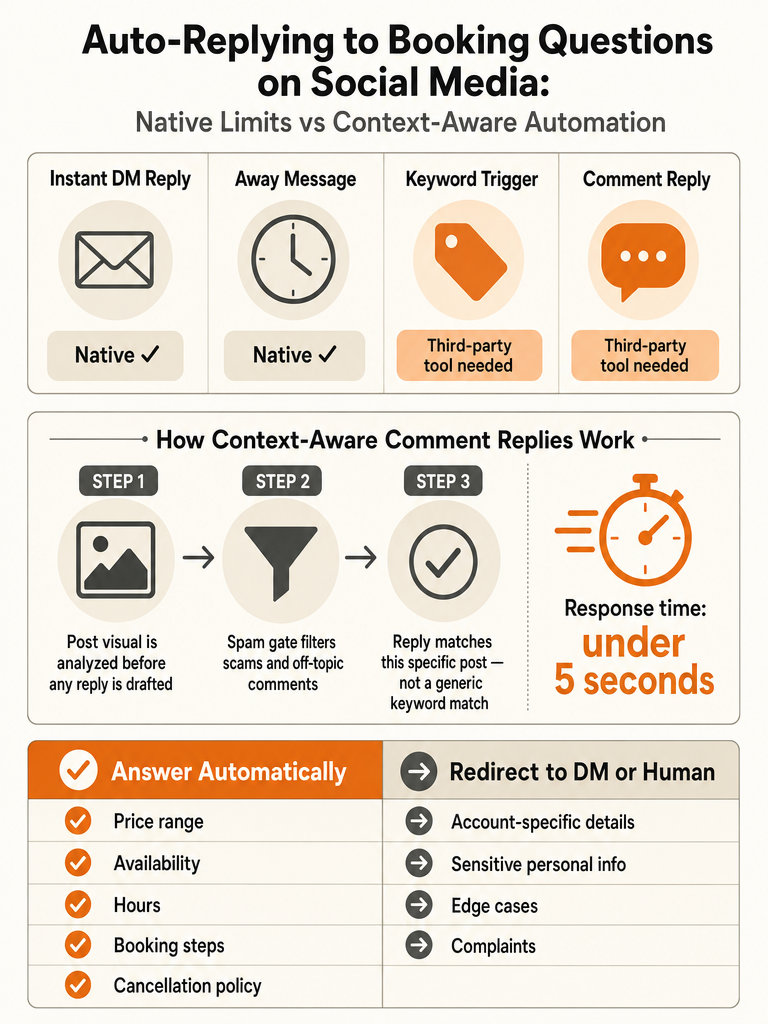
The split matters more than most guides admit. Native Instagram tools and Meta Business Suite are documented mostly around DMs: instant replies to a first message, away messages, saved responses. Public comments under your service posts are a different lane, and native support there is thin.
So the practical answer has two parts. Answer the obvious, repeatable stuff in public comments where everyone can see it: general availability, price ranges, booking links. Route anything account-specific or sensitive to a DM or a person.
Speed is the reason to bother. Omnichat says auto replies can respond in under 5 seconds, and Inrō cites a survey where lead conversions rose 391% when businesses replied within one minute.
Can Instagram auto reply to comments and DMs?
Instagram auto reply can technically cover both comments and DMs, but native tooling is built almost entirely for DMs. Omnichat says Instagram auto reply can automatically respond to DMs, post comments, and story replies. Inrō contradicts part of that: it says native Instagram and Meta Business Suite do not support keyword-triggered auto replies, comment-to-DM automation, story reply automation, or AI FAQ answers.
That contradiction is the whole story. The sources agree Meta Business Suite handles the basics: instant replies to a first DM and scheduled away messages. They disagree on how far native automation reaches into comments and keyword logic.
BotPenguin frames it plainly: Instagram auto reply is a native feature that sends an instant, predefined message when someone sends a direct message. Note "direct message": not a comment. It's also professional-accounts-only, meaning Business or Creator, not personal (Source: BotPenguin).
Native Instagram automation is a DM feature first. Public comment automation is where third-party tools do the real work.
One more limitation from Inrō: native auto replies send the same message to everyone. That's fine for a greeting. It's a problem when a booking question under one Reel needs a different answer than a comment under another.
What booking questions should be answered automatically in public comments?
The safe automation lane in public comments is the repetitive, non-sensitive stuff: price ranges, general availability, hours, booking steps, locations, service details, and cancellation policies. Chatling says Instagram automation can answer repetitive questions about pricing, availability, shipping, returns, store hours, bookings, service areas, and support policies: and for bookings specifically, it can share booking links, opening hours, locations, service details, and appointment options.
These questions are safe because the answer is the same for everyone and nothing private is exposed in a public thread.
What should not auto-send publicly:
- Account-specific details ("Did my payment go through?")
- Anything with personal or health context: route these to DM or a human
- One-off negotiations, complaints, or refund disputes
- Anything requiring a name, order number, or booking reference
For wellness and health-adjacent brands, the line is stricter. A public reply that reads like advice can cause real problems, so those threads belong in review mode for wellness comments.
The rule of thumb: automate the answer you'd happily pin to the post. Everything else gets a "DM me" redirect.
How do I automate booking questions on Instagram without wrong-post replies?
Match each reply to the actual post it's under: not to a keyword that fires everywhere. Keyword rules match text and don't know whether the comment sits under your Tuesday yoga Reel or your weekend retreat carousel. That's how a booking answer lands on the wrong post and embarrasses the brand.
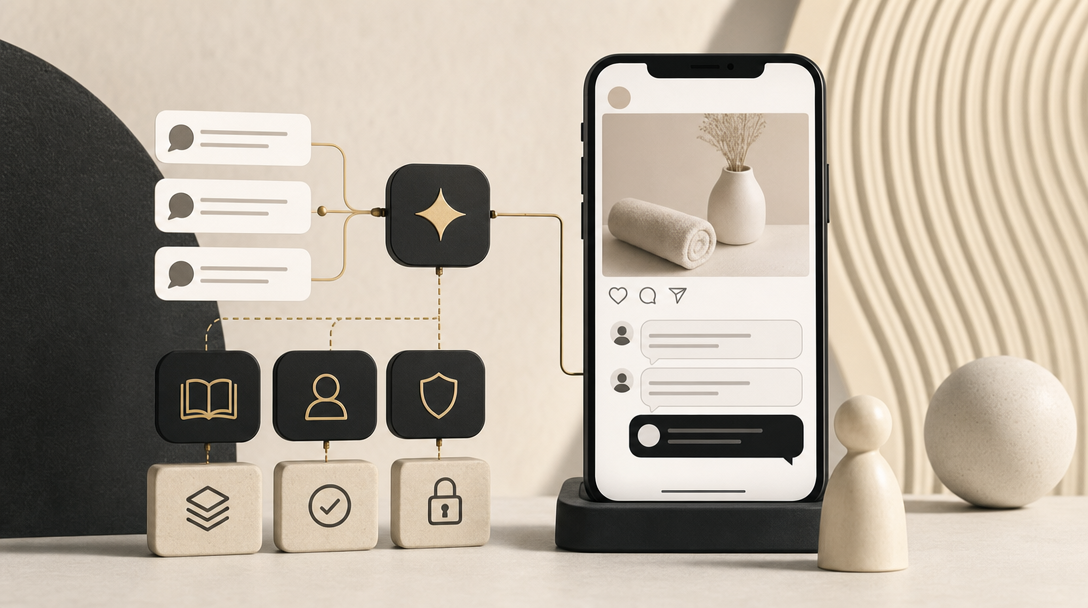
ReplyMagic reads the post before it drafts. It uses Google Gemini to analyze the post's photo, Reel, or video, so the reply references what the post actually shows: not just the caption. A comment asking "how do I sign up?" under a specific cohort Reel gets an answer tied to that cohort, not a generic one.
Brand voice is the second half. ReplyMagic anchors replies in your past replies, tone settings, emoji habits, and sign-offs from the connected account. So the answer sounds like you, whether it's you or a teammate behind it.
Context, not triggers: a reply should match the exact Reel or service post, not just a matched word.
That's the difference between automation that helps and automation that fires blind. For a deeper look at why keyword bots misfire, see context-aware Instagram comment automation.
How to set up Instagram auto reply messages for simple booking questions?
For simple booking questions, set up native auto replies through Meta Business Suite in a few steps. This handles instant DM greetings and saved responses: the basics before you add outside software.
- Switch to a professional account. Auto replies are only available to Business and Creator accounts, not personal ones (Source: BotPenguin).
- Open Meta Business Suite and go to Inbox, then Automation (Source: Omnichat).
- Enable Instant Reply so a predefined message sends the moment someone DMs you. When a user messages, Instagram checks active auto reply rules and, if Instant Reply is on, sends the predefined message right away (Source: BotPenguin).
- Add Frequently Asked Questions. In Automated Responses, select Frequently Asked Questions, add questions, link each to a short message, and save (Source: BotPenguin).
- Write short answers for common booking questions: availability, hours, and a booking link.
The catch: Stepper notes Saved Replies aren't fully automatic: someone still has to choose and send them. Stepper also says Instagram's native options speed up manual work but aren't good at actual workflow logic. Fine for a solo operator at moderate volume; thin for a launch-day comment flood.
How do comment-to-DM automations work for appointments and bookings?
A comment-to-DM automation turns a public comment into a private message carrying a booking or registration link. SendSeven describes it: a comment under an Instagram post can be turned into a private direct message with a booking or registration link within seconds. The public comment stays brief; the sensitive details move to the DM.
The pattern usually looks like this: someone comments a word or phrase, an automation acknowledges it publicly, then sends the booking link privately. Inrō notes native Instagram and Meta Business Suite do not support comment-to-DM automation, so this needs a third-party tool.
Worth being clear about the boundary. Some comment tools reply to public comments and can suggest "DM me" redirects for sensitive questions, but that's not the same as running a full DM funnel: comment assistants keep the public reply on-brand and point people to the right next step, not into a scripted DM sequence.
For after-hours booking specifically, hotels handle this by acknowledging publicly and routing to a private path: the pattern in how hotels handle Instagram booking questions after hours.
Keyword triggers vs post-aware AI replies for booking questions
Keyword triggers match words; post-aware AI replies match the whole post. For booking questions tied to a specific Reel, photo, or service post, that gap decides whether the reply makes sense. Stepper suggests starting keyword triggers with common terms like "pricing" or "price" for service businesses: useful, but blind to which post the comment is under.
| Keyword-trigger automation | Post-aware AI replies | |
|---|---|---|
| What it reads | A matched word or phrase | The post's image/Reel/video plus the comment (Source: ReplyMagic brief) |
| Wrong-post risk | High: fires anywhere the word appears | Low: reply is tied to the specific post |
| Brand voice | Fixed canned text | Conditioned on past replies, tone, emoji habits |
| Native support | Inrō says native tools don't support keyword-triggered auto replies | N/A (third-party) |
| Best for | One clear, universal answer | Varied posts, launches, viral Reels |
Inrō also notes native auto replies send the same message to everyone. That works for a greeting and breaks for booking answers that differ by post.
Keyword rules answer the word; post-aware replies answer the question the post actually raised.
For a conversion-focused comparison, see AI comment replies vs keyword auto-responders.
What controls should be in place before auto-send handles booking comments?
Before letting auto-send answer booking comments, put five controls in place: an approval queue, review mode, per-post settings, exclusion phrases, and spam gates. These let you automate the obvious answers without losing control of edge cases: the whole point for a service business that can't afford a wrong public reply.
- Approval queue: every draft waits for a human before it posts. Start here.
- Review mode vs auto-send: auto-send the questions you answer the same way every time (price, availability, hours); keep everything else in review. The split is covered in approval queue vs auto-send.
- Per-post settings: turn automation on for a launch Reel, off for a sensitive announcement.
- Exclusion phrases: words or topics that force a comment out of auto-send and into review.
- Spam gates: ReplyMagic runs pre-LLM spam gates that filter scams, link bait, and abuse before AI is ever called, so crypto bait and scam links don't reach a drafted reply.
Chatling puts it well: automation should clear the simple, repetitive questions so fewer messages slip through, not replace your team. The goal is fewer missed comments, not a hands-off inbox. For the safe end-to-end path, see how to auto-reply to Instagram comments safely.
How do multilingual booking replies work when commenters use different languages?
Replies match the language the commenter used. ReplyMagic replies in whatever language the commenter wrote in: it's automatic, not a setting you toggle. For travel, hospitality, and service brands fielding guest questions across time zones, that means a comment in Spanish gets a Spanish reply and a comment in German gets a German one, under the same post.
The facts stay constant even when the language changes. Availability, booking links, hours, and cancellation policies should read the same in every language: only the words shift. Guardrails carry over too: a sensitive question still gets a "DM me" redirect regardless of the language it arrived in.
For brands that field comments in many languages at once, see reply in 100+ languages to Instagram comments.
What should you check before installing Instagram comment automation for booking inquiries?
Before installing Instagram comment automation for booking inquiries, check eight things. This is the difference between a tool that answers booking questions cleanly and one that fires wrong replies in your public thread.
- Professional account access: auto replies require a Business or Creator account (Source: BotPenguin). Confirm the tool connects through official Meta/Instagram access.
- Public comment support: many tools only touch DMs. Confirm it handles comments, since Inrō says native tools don't automate comment-to-DM.
- Booking-link handling: can it share the right booking link or availability answer per post?
- Public-comment safety controls: approval queue, review mode, exclusion phrases.
- Post context: does it read the actual Reel, photo, or video, or just match keywords?
- Brand voice: is the reply conditioned on past replies, tone, and sign-offs?
- Spam filtering: does it block scam links and abuse before drafting?
- Safe auto-send limits: can you cap which question types auto-send and keep the rest in review?
Also check the plan math. ReplyMagic's Free plan is 10 AI replies per day on one account; Pro is 3,000 replies per month; extra Instagram accounts are $15/month each, adding 3,000 more replies. Match the limit to your comment volume during launches and viral Reels.
When is native Instagram setup enough, and when do you need AI comment automation?
Native Instagram setup is enough for simple, low-volume situations; AI comment automation earns its place when volume, variety, and voice get complicated. Meta Business Suite handles instant DM replies and saved responses well: Stepper says native options are good at speeding up manual work but not at actual workflow logic.
Use native tools when:
- You're a solo operator or small team at moderate volume
- You mostly answer in DMs, not public comments
- One saved answer fits nearly every question
Move to AI comment automation when:
- A launch, product drop, or viral Reel floods comments: Stepper describes exactly this, where a reel performs well and dozens of "link?" comments pile up
- The same booking questions repeat across many different posts
- Wrong-post replies are a real risk, because native auto replies send the same message to everyone (Source: Inrō)
- Commenters write in multiple languages
- Multiple teammates reply and brand voice drifts
Native setup speeds up manual work; AI comment automation handles the volume and post-specific context native tools can't.
For a fuller decision guide, see best AI tools to automatically reply to Instagram comments in 2026.
Frequently asked questions
How do I install Instagram comment automation for booking inquiries?
Connect a Business or Creator account through official Meta/Instagram OAuth: auto replies aren't available on personal accounts. From there, configure per-post settings so replies match the specific Reel or service post a booking question lands under, not a keyword that fires everywhere. Before going live, turn on an approval queue, set exclusion phrases for sensitive questions, and confirm spam gates are active to block scam links before any AI reply is drafted.
How do I start using AI to reply to Instagram comments about bookings and pricing?
ReplyMagic connects to your Instagram Business account, then uses Google Gemini to read each post's photo, Reel, or video before drafting a reply: so a comment asking "how do I book?" under a specific service Reel gets an answer tied to that post, not a generic one. The Free plan covers 10 AI replies per day on one account; Pro handles 3,000 replies per month. Start in approval-queue mode, watch what the AI drafts for a week, then promote reliably correct question types to auto-send.
What makes an AI Instagram comment assistant safe for auto-send on booking questions?
Five controls separate safe auto-send from a liability: an approval queue, review mode, per-post settings, exclusion phrases, and pre-LLM spam gates that filter scams and link bait before AI is ever called. Auto-send belongs on questions you'd answer identically every time: price ranges, hours, booking links. Anything requiring personal details, account-specific info, or sensitive context should route to a DM or stay in review, never auto-post publicly.
Why do keyword-triggered auto replies fire on the wrong post for booking questions?
Keyword rules match text, not context: they don't know whether "how do I book?" appears under a Tuesday yoga Reel or a weekend retreat carousel. Native auto replies also send the same message to everyone regardless of which post triggered them. Post-aware AI reads the actual image, Reel, or video before drafting, so the reply references what the post shows rather than just a matched word. That's the difference between a reply that fits and one that embarrasses the brand.
What booking questions are safe to answer automatically in public Instagram comments?
Price ranges, general availability, hours, booking links, service details, locations, and cancellation policies are the safe lane: same answer for everyone, nothing private exposed. Keep out of auto-send: anything referencing a specific order, payment, or personal detail; refund disputes; and health-adjacent questions that could read as advice. The rule: automate the answer you'd happily pin to the post. Everything else gets a "DM me" redirect.
When is native Meta Business Suite enough, and when do you need AI comment automation for bookings?
Native Meta Business Suite handles instant DM greetings and saved responses well for solo operators at moderate volume: it speeds up manual work but has no real workflow logic. Move to AI comment automation when a launch or viral Reel floods your comment thread, the same booking questions repeat across many different posts, commenters write in multiple languages, or wrong-post replies become a real risk. ReplyMagic replies in whatever language the commenter wrote in, automatically, with no toggle required.
Sources
- Instagram Auto Reply: Set Up Automated Messages Guideblog.omnichat.ai
- AI Automation on Instagram: "Comment “NEED” if you want my ...www.instagram.com