

AI Instagram Comment Assistant With Approval Mode
AI Instagram comment assistant with approval queue for public replies, plus safe auto-send for price, sizes, booking, and shipping on Instagram.

AI Instagram comment assistant with approval queue: what should approval mode do first?
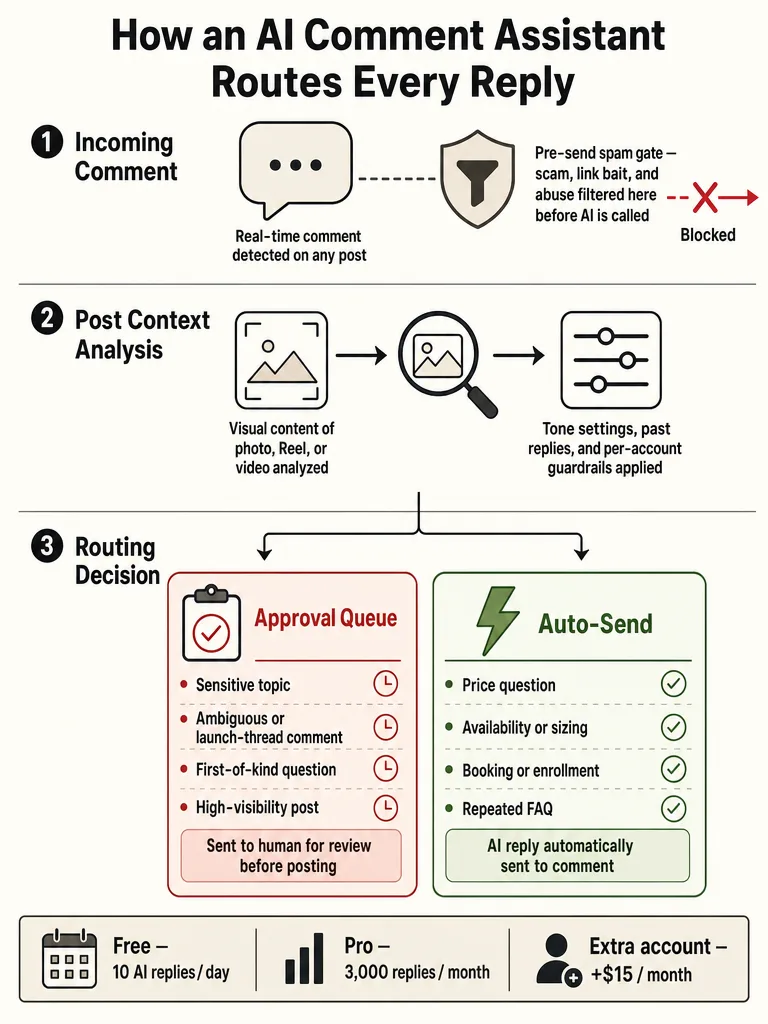
Approval mode's first job is to draft a reply to every public comment, then hold it for a human before anything posts. Public comment mistakes are visible to everyone in the thread, so the queue exists to catch a wrong tone or a wrong fact before it goes live under a launch, Reel, or product-drop post. Approval matters most for sensitive replies, first-contact messages, and public brand issues.
The order matters. A good queue drafts first so a reviewer isn't staring at a blank box during a spike, then presents the draft alongside the comment and the post it belongs to. From there the reviewer approves, edits, or skips. Solo creators building this by hand describe the same shape: they generate the AI reply, approve or edit it, then send the approved version through the Instagram API.
An AI Instagram comment assistant with approval mode is a tool that drafts replies to public Instagram comments and holds them for human review before posting. ReplyMagic runs this as approval-queue mode, where you review every reply, or auto-send mode for the obvious questions. During a launch flood, approval mode is the safe default: it keeps the drafting speed while a person still signs off on what the public sees.
Ready to keep every launch-day reply on-brand? Get started with ReplyMagic.
Find AI Instagram comment assistant with safe auto-send: which comments can post without review?
Safe auto-send belongs to the repeat questions you already answer the same way every time: price, sizes, availability, booking, enrollment, shipping, and policies. These are low-risk because the answer is a fact, not a judgment call, and the assistant can pull it from the post context. Everything ambiguous, emotional, or account-specific should route to the approval queue instead.
The split is about risk. A comment reading "how much?" under a product drop has one correct answer. A comment reading "will this work for my situation?" does not, and it should wait for a human.
| Comment type | Route |
|---|---|
| Price, sizes, availability | Auto-send |
| Booking, enrollment slots open | Auto-send |
| Shipping and standard policies | Auto-send |
| Cancellation or refund specifics | Approval queue |
| Health, medical, or fit questions | Approval queue or DM redirect |
| Complaints and public brand issues | Approval queue |
| Anything the assistant can't ground in the post | Skip or escalate |
ReplyMagic lets teams run auto-send for those obvious questions while keeping edge cases in review mode. Per-post settings and exclusion phrases tighten this further, so a specific launch post can force review on every comment even when the rest of your account auto-sends.
Does the assistant use the actual post context, or just keywords?
Context beats keywords because the same word means different things across posts. A keyword rule that fires on "price" replies with the same canned line whether the post shows a $12 sticker pack or a $2,000 coaching cohort. A context-aware assistant reads the post first, then answers what's actually being asked about the thing on screen.
Before drafting, ReplyMagic uses Google Gemini to analyze the post's photo, Reel, or video, so the reply references real visual context, not just the caption. Reading the image or Reel, not just the caption, is what stops a keyword bot from firing on the wrong post. The DIY builders in the corpus reach for the same idea more crudely: an n8n workflow combines the comment with the original post caption so replies stay relevant, and a Make.com build used Gemini 2.5 Flash to detect intent per comment.
Caption-only understanding still misses what a viewer sees. If a Reel shows three color options but the caption never lists them, a caption-reading tool can't answer "does it come in green?" ReplyMagic's visual read can, because it looked at the frames.
Context-aware Instagram comment automation tool vs keyword triggers
Context-aware automation drafts from what the post shows and what the commenter asked; keyword triggers fire a fixed reply the moment a matched word appears. The difference is visible in public, where a mismatched auto-reply embarrasses the brand in front of the whole thread.
| Keyword triggers | Context-aware assistant | |
|---|---|---|
| What decides the reply | A matched word | The post's image/Reel plus the comment |
| "Price" on two different posts | Same canned line | Answer specific to each post |
| Wrong-post risk | High | Low |
| Handles a question phrased in a new way | Misses it | Reads intent |
| Control layer | On/off per keyword | Approval queue, review mode, per-post settings |
Keyword rules work fine when a post says "comment YES for the link" and the answer never changes. They fall apart on real questions, where phrasing varies and one word covers a dozen intents.
For a deeper breakdown, see what context-aware Instagram comment automation is.
What should reviewers check before a public reply goes live?
A reviewer's job in approval mode is fast triage against a short checklist, not rewriting from scratch. The draft should already be close; the human confirms it's safe to show the world. Approval matters most for sensitive replies, complaints, and public brand issues, which is exactly where reviewers should slow down.
Run each draft through these checks:
- Tone: does it sound like the brand, with the right emoji habit and sign-off?
- Factual fit: is the price, date, size, or availability correct for this specific post?
- Sensitive-topic risk: health, money, or personal details that shouldn't be answered in public?
- Public vs DM: should this redirect to a "DM me" instead of answering in the thread?
- Per-post settings: does this post have exclusion phrases or a force-review rule?
- Skip test: is this comment better left unanswered or reported?
ReplyMagic anchors the tone check by conditioning drafts on the connected account's past replies, tone preferences, emoji habits, and sign-offs, so reviewers approve more and rewrite less. For the full workflow logic, see approval queue or full auto.
How does the assistant handle spam, scam links, and abuse before AI writes anything?
A spam gate runs before the AI is ever called, so scams, link bait, and abuse never reach reply generation. Filtering first saves reply budget and keeps the assistant from drafting a polite response to a crypto scam. ReplyMagic's pre-LLM spam gates filter scams, link bait, and abuse before AI is invoked at all.
DIY builders use the same order. The n8n workflow runs a spam filter that blocks spam keywords, empty or one-word comments, excessive emojis, and known spam patterns, plus a duplicate check so the same comment never gets two replies. Its final logic gate skips anything already replied to or flagged as spam before it proceeds.
Filtering spam before the AI runs means you never spend a reply, or a reviewer's attention, on a scam link. The payoff: your public thread stays clean, your approval queue holds real questions instead of junk, and your reply allowance goes to commenters who actually want an answer.
Connect Instagram account to AI comment assistant: what Meta setup is required?
You need three things before any assistant can read or reply to comments: an Instagram Business or Creator account, a linked Facebook Page, and approved Meta permissions granted through official OAuth login. Instagram comment automation requires the right account setup, a linked Facebook Page, and approved Meta permissions before a tool can touch comments.
The corpus is consistent here. A Make.com build lists the prerequisites as a Facebook account with admin access to a Page, and that Page connected to a Business Instagram account. A comment-to-DM guide starts the same way: switch to a Business or Creator account, then connect a Meta-approved tool, because only professional accounts can use automation.
ReplyMagic connects to an Instagram Business account through Meta/Instagram OAuth, then watches incoming post comments in real time. That's the official path, so you're not handing over a password or scraping the site.
For a fuller walkthrough of permissions, see how to auto-reply to Instagram comments safely.
What is Instagram comment to DM automation, and where does a public comment assistant stop?
Instagram comment-to-DM automation sends a private message to anyone who comments a specific keyword; a public comment assistant answers in the thread itself. They solve different jobs. Comment-to-DM instantly messages users who comment a specific keyword, which suits giveaways, waitlists, and lead-magnet links.
A public comment assistant stays in the visible thread, answering the price, sizing, and availability questions everyone else in the comments also wants answered. Some builds do both: a Make.com flow replies publicly for appreciation and adds a DM only when someone asks for a tool or link.
ReplyMagic responds to public Instagram comments and can suggest a "DM me" redirect for sensitive questions, but it is not a DM bot. That line is deliberate. When a commenter asks something account-specific or private, the right move is a public reply that points them to DMs, not a public answer exposing their details. The public comment assistant answers what the whole thread is asking; the DM redirect handles what belongs in private.
See Instagram comment automation rules and what Meta allows for how these limits differ.
How much does ReplyMagic cost for one Instagram account or multiple accounts?
ReplyMagic's Free plan includes 10 AI replies per day for one Instagram account, and Pro includes 3,000 replies per month for one account. Each extra Instagram account is $15/month, which adds one more account and 3,000 more replies. That's the whole pricing shape, so a solo creator and a small team with three brand accounts can size it quickly.
| Plan | Replies | Accounts |
|---|---|---|
| Free | 10 AI replies/day | 1 |
| Pro | 3,000 replies/month | 1 |
| Extra account add-on | +3,000 replies/month | +1 per $15/month |
Free is enough to test approval mode on a normal posting week. Pro fits accounts that spike during launches, viral Reels, and product drops, where a single flood can burn through a daily cap fast. The per-account add-on is for teams running several Instagram brands from one workflow.
Which deeper setup guide fits your next Instagram comment risk?
Pick the guide that matches the comment problem you're about to hit, whether that's a launch flood, a booking spike, or a health-sensitive thread. Each one goes deeper than this overview on a single scenario.
- Launches and viral Reels: how to survive a viral post and a comment flood covers what to auto-send when volume explodes.
- Safe rollout: Instagram auto replies in 2026, a safe setup guide maps which questions to automate first.
- Brand voice: how to auto-reply in your own brand voice explains conditioning replies on past replies and tone.
- Service bookings: how service businesses auto-reply to booking questions.
- Course launches: Instagram comment automation for course launch FAQs.
- Travel and multilingual: multilingual replies that stay on topic, since ReplyMagic replies in whatever language the commenter wrote in.
- Wellness: review vs auto for health-adjacent brands.
Start with the risk that's closest, then layer approval mode and per-post settings around it. Want every reply on-brand from day one? Get started with ReplyMagic.
Frequently asked questions
What does an AI Instagram comment assistant with approval queue actually do?
It drafts a reply to every public comment, then holds each one for human review before anything posts. The reviewer sees the draft alongside the comment and the post it belongs to, then approves, edits, or skips. That order matters: a reviewer never stares at a blank box during a launch spike, and no wrong tone or wrong fact goes live in a public thread where the whole audience can see it.
Which Instagram comments are safe to auto-send without review?
Price, sizes, availability, booking slots, shipping, and standard policy questions are safe to auto-send: the answer is a fact, not a judgment call. Cancellation specifics, health or fit questions, complaints, and anything account-specific should stay in the approval queue or get a "DM me" redirect. Per-post settings let you override this per campaign, so a launch post can force review on every comment even when the rest of the account auto-sends.
How does a context-aware Instagram comment automation tool differ from keyword triggers?
Keyword triggers fire a fixed reply the moment a matched word appears: the same canned line whether the post shows a $12 sticker pack or a $2,000 coaching cohort. A context-aware tool reads the post's image or Reel before drafting, so the reply references what's actually on screen. ReplyMagic uses Google Gemini to analyze each post visually, which means it can answer "does it come in green?" even when the caption never lists the colors.
How do I connect my Instagram account to an AI comment assistant?
You need three things: an Instagram Business or Creator account, a linked Facebook Page, and approved Meta permissions granted through official OAuth login. Only professional accounts can use comment automation: a personal account with no connected Page is the most common reason a first connection fails. ReplyMagic connects through Meta/Instagram OAuth, so you grant permissions through the official flow rather than sharing a password.
How does the assistant handle spam and scam comments before AI writes anything?
A pre-LLM spam gate runs before the AI is ever called, filtering scam links, crypto bait, link bait, empty or one-word comments, excessive emojis, and known spam patterns. Filtering first means you never spend a reply or a reviewer's attention on junk. The payoff: your approval queue holds real questions, your public thread stays clean, and your monthly reply allowance goes to commenters who actually want an answer.
How much does ReplyMagic cost for one Instagram account or multiple accounts?
The Free plan includes 10 AI replies per day on one Instagram account. Pro includes 3,000 replies per month on one account. Each extra Instagram account is $15/month and adds one more account plus 3,000 more replies. Free is enough to test approval mode on a normal posting week; Pro covers accounts that spike during launches or viral Reels, where a single flood can burn through a daily cap fast.
Sources
- I Reply to Every Instagram Comment in Minutescommunity.make.com
- How to Set Up Instagram Comment to DM Automation in ...www.facebook.com
- Auto-reply Instagram Comments with DMs. Free Workflow ...www.swipereply.com
- Instagram Comment Tool: AI Replies | replient.aiwww.reddit.com