Instagram Auto Replies in 2026: Safe Setup Guide
Instagram auto replies 2026: use Meta OAuth or official API, not password bots, and automate price, sizes, booking, shipping, and enrollment replies.
What is Instagram auto reply in 2026?
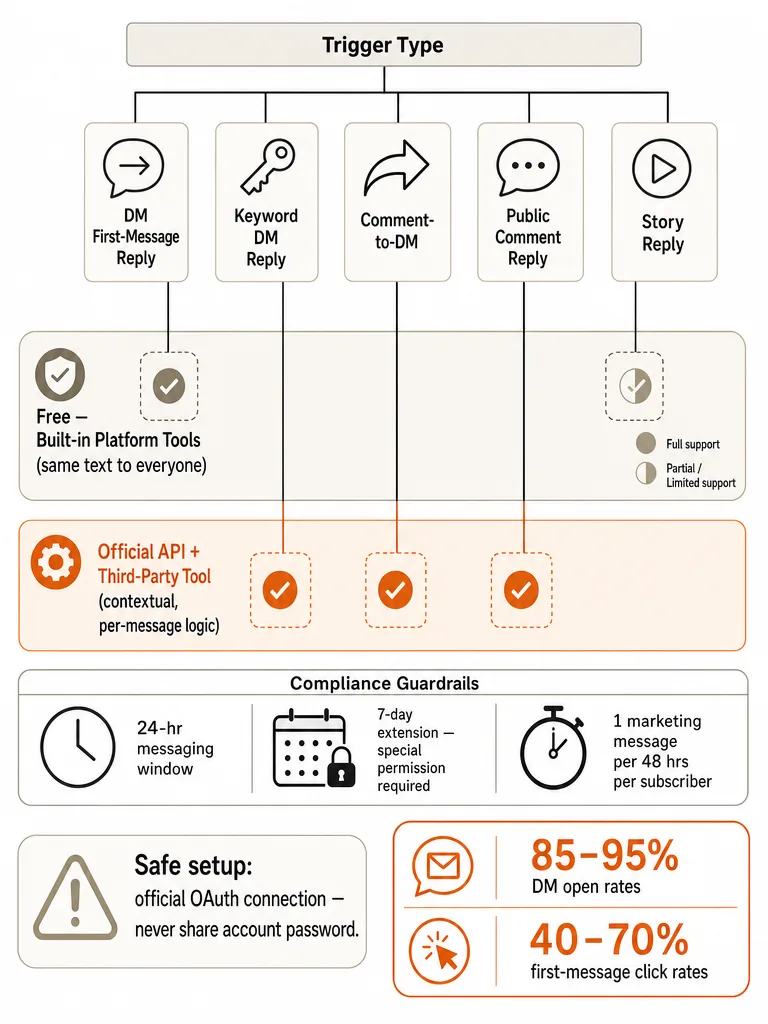
Instagram auto reply in 2026 is any automated response tied to a specific trigger: a DM first message, a keyword in a DM, a comment-to-DM handoff, a public reply in the comment thread, or a Story reply. The trigger decides what's safe and what's even possible. According to CreatorFlow's July 2026 summary of Meta's built-in tools, keyword and comment automations cap at five exact-match keywords with a documented 15-minute delay before they fire.
Treating all of these as one feature is the mistake that gets accounts embarrassed or restricted. A public comment reply lands in a thread anyone can see. A comment-to-DM opens a private message. A Story reply opens a DM thread from a person who already engaged. Each path has different visibility and different rules.
Here's the safe trigger map to hold in your head:
- DM first-message reply and keyword DM reply: private, reactive, native or API.
- Comment-to-DM: public trigger, private response, bound by messaging windows.
- Public comment reply: visible in the thread, good for repeat questions.
- Story reply DM: private, opens a thread that skips the Message Requests problem.
Does Instagram have built-in auto reply?
Instagram's native auto reply is real but basic. Professional accounts can use Meta Business Suite for DM automations like Instant Reply and Away Message, according to Inrō's guide to Instagram auto replies. The catch: those messages send the same text to everyone. They acknowledge a DM, but they can't answer what the person actually wrote.
That's the limit every native tool hits. Meta Business Suite keyword and comment automations cap at five exact-match keywords, per CreatorFlow's July 2026 summary, and Meta documents a 15-minute delay before they send. Canty Digital notes profile FAQs are capped at four questions. These are guardrails, not workflows.
| Native tool | What it does | Where it breaks |
|---|---|---|
| Instant Reply (DM) | Sends one greeting to new DMs | Same text to everyone |
| Away Message (DM) | Off-hours DM acknowledgement | No context awareness |
| Keyword automations | Fires on exact-match words | Capped at 5 keywords, 15-min delay |
| Profile FAQs | Prewritten quick questions | Capped at 4 questions |
Saved Replies feel automatic but aren't. Stepper's April 2026 guide points out that someone on your team still has to choose and send each one. Fine for a solo creator, painful during a launch.
How do I set up auto reply on Instagram DMs?
Setting up Instagram DM auto reply that goes beyond a single canned greeting means connecting to Meta's official infrastructure, not the app alone. Full automation runs through the official Instagram Messaging API via third-party platforms, according to Kanal's guide to Instagram auto reply automation. Before anything works, your account and permissions have to be in order.
Here's the safe setup order:
- Switch to a Business or Creator account. Personal accounts can't use these tools.
- Link a Facebook Page. Meta's API access is tied to the Page connected to your Instagram account.
- Connect through Meta OAuth or the official API. IGMsg's setup guide stresses using the official connection, not tools that ask for your Instagram password.
- Grant the right permissions. For public comment replies, the core permission is
instagram_manage_comments. Comment-triggered DM workflows also needinstagram_manage_messages, per Upgrow's guide to AI comment replies.
Native Saved Replies inside the app are simpler: on your profile, open the menu, then Settings, then Business or Creator, then Saved Replies, and add a shortcut plus the full reply, according to InstantDM. But that's still manual selection, not automation.
Can Instagram auto reply to comments?
Yes, and comment automation splits into three distinct jobs. A public comment reply posts a visible answer in the thread. A private reply from a comment sends a one-time DM triggered by that comment. A comment-to-DM workflow uses the comment as the trigger to open a private conversation. IGMsg's setup guide describes all three as common 2026 patterns.
The visibility difference matters more than people expect. When you DM a non-follower, that message can land in their Message Requests folder and get missed. A public comment reply skips that problem entirely because the answer sits right in the thread where everyone reading can see it. IGMsg notes this is exactly why public replies help for comment-triggered workflows aimed at people who don't follow you yet.
For repeat questions like price, sizing, or availability, a public reply is often the better move than a silent DM that may never get opened.
There's a mechanical safeguard worth knowing: IGMsg says deduplication guarantees one DM per person no matter how many times they comment, so a viral thread doesn't spray the same message at one commenter ten times. Public replies, by contrast, are only as good as the context behind them. A reply that ignores what the post actually shows reads worse than no reply. This is where reading the post beats matching a keyword. See more on safe Instagram comment auto-replies.
Native auto replies vs official API tools: which setup fits the trigger?
The right tool depends on the trigger, not on which product has the longest feature list. Meta Business Suite handles basic DM acknowledgements for free. Official API tools handle context-aware public replies, comment-to-DM at scale, and volume during spikes. Matching the tool to the job is what actually matters.
| Trigger | Native Meta Business Suite | Official API tool |
|---|---|---|
| DM greeting / away message | Yes, free, same text to all | Yes, personalized |
| Keyword DM reply | 5 exact-match keywords, 15-min delay | Flexible routing |
| Comment-to-DM | Limited | Full, dedup, windows respected |
| Public comment reply with context | No | Yes, reads the post |
| Viral-spike volume | Manual bottleneck | API rate limits apply |
Native tools win on price and simplicity. They're free, need no connection beyond your own account, and stay good enough for a solo creator answering moderate volume. They lose the moment a Reel takes off and every commenter gets the identical five-keyword reply on the wrong post.
Official API tools win on context and control. The tradeoff is that you're now inside Meta's rate limits and messaging windows, which the next sections cover. Automate the first response, not the whole relationship, as Stepper's guide puts it. That line is the honest boundary for both setups. For a fuller breakdown, see how context-aware automation beats keyword bots.
Is Instagram auto reply safe in 2026?
Instagram auto reply is safe in 2026 when you connect through Meta's official API and never through a password-sharing bot. IGMsg's guide is blunt about this: the safest setup uses Meta OAuth or the official API. InstantDM's 2026 roundup goes further, telling readers to avoid any tool that asks for your Instagram password, since browser bots and scrapers violate Meta's terms and risk suspension.
Safety is a checklist, not a vibe. Run this before you turn anything on:
- Account type: Business or Creator, never Personal.
- Facebook Page: linked, since API access depends on it.
- Connection: Meta OAuth or official API only, no password sharing.
- Permissions:
instagram_manage_commentsfor public replies,instagram_manage_messagesfor DM workflows. - Message windows: reply inside the 24-hour window and don't cold-message people who never engaged.
- Outbound behavior: no bulk identical DMs to strangers, no payment-off-platform asks, no unlabeled bot spam.
The consequences are concrete. The author of a 2026 LinkedIn guide on safe DM broadcasts tried to DM 500 people, hit the per-second cap, and had the account limited for 48 hours: no DMs, no comments, no Story replies. The trigger wasn't the message content. It was the pattern.
Filtering scams and link bait before a reply ever generates keeps your thread clean and your account pattern normal. Spam gates that run before the AI is called do exactly that.
What are Instagram's auto reply limits and rules?
Instagram's messaging rules in 2026 draw a hard line between replying to people who contacted you and pushing messages at people who didn't. The core constraint is the 24-hour window: once a user messages you, comments, replies to a Story, or hits a keyword trigger, you can reply freely for 24 hours, according to the 2026 LinkedIn guide on safe DM broadcasts. After that, standard replies stop.
The rest of the boundaries:
| Rule | Limit | Source |
|---|---|---|
| Standard messaging window | 24 hours after user initiates | LinkedIn 2026 guide |
| HUMAN_AGENT extension | 7 days, needs Meta permission | LinkedIn 2026 guide |
| Marketing Messages API | Live since Feb 10, 2026 | Kanal |
| Marketing message cap | 1 per subscriber per 48-hour window | Kanal |
| General API rate | 200 calls/hour per account | LinkedIn 2026 guide |
| Private comment replies | 750 calls/hour | LinkedIn 2026 guide |
| Per-second text limit | ~100 calls | LinkedIn 2026 guide |
Two dates matter most. The HUMAN_AGENT tag extends the reply window to 7 days, but only with special permission from Meta. And since February 10, 2026, recurring marketing messages on Instagram and Messenger are governed by Meta's Marketing Messages API, capped at one marketing message per subscriber per 48-hour window, per Kanal.
The safe automation lives inside the reply window; recurring marketing is a separate, tightly capped lane. If a Reel spikes and comments flood in, the rate limits, not your enthusiasm, set the ceiling. Route overflow to a review queue rather than firing past the cap. More on what Meta allows for comment automation.
When should you use a public reply plus a DM?
Use a public reply plus a DM when the answer helps the whole thread and the follow-up needs privacy. The public reply gives everyone reading the same quick answer. The DM handles the detail that shouldn't sit in an open comment section. This combo also solves the Message Requests problem: IGMsg notes that DMs to non-followers can land in Message Requests and get missed, so the visible public reply guarantees at least one answer they'll see.
Reach for the combo when:
- A launch post gets 50 identical "price?" comments: post the price publicly, DM the checkout link.
- A guest asks about availability on a hotel Reel: answer generally in the thread, take booking details to DM.
- A sensitive or edge-case question appears: give a short public acknowledgement, then redirect with a "DM me" for the private part.
A Story reply is different again. IGMsg points out that a Story reply already opens a DM thread, so it sidesteps the Message Requests issue by design. Match the path to the question, not to a habit. When a reply touches something sensitive, the safer move is a warm public line plus a DM redirect, keeping the specifics private.
Which repetitive Instagram questions are safe to automate first?
The safest questions to automate first are the ones you already answer the same way every time: price, sizes, availability, booking, shipping, policies, cancellation, and enrollment. Stepper's 2026 guide lists exactly these as Saved Reply candidates, from price requests to booking links to shipping and turnaround policy language. They're factual, low-risk, and don't change based on who's asking.
Start here:
- Price and offers on product drops and launch posts.
- Sizes and availability on ecommerce Reels.
- Booking and appointment routing for service accounts.
- Shipping and turnaround with clear policy text.
- Enrollment, prerequisites, and dates for cohort launches.
- Support triage that asks for an order number or email.
Route everything else to a human. Anything sensitive, medical, refund-disputed, or genuinely one-off belongs in review mode, not on auto-send. Wellness and health-adjacent accounts should draw that line early: keep the repeatable stuff automated, keep anything advice-shaped in human hands. See review vs auto for wellness brands.
The point of starting narrow is that a wrong answer to "what size?" is cheap to fix, while a wrong answer to a sensitive question is not. Approval-queue mode lets you auto-send the boring stuff and hold the rest.
Keyword triggers vs post-context replies: what prevents embarrassing auto replies?
Post-context replies prevent the embarrassing auto reply that keyword triggers cause. A keyword rule fires on an exact word regardless of what the post shows, which is how the same canned line ends up under the wrong Reel. CreatorFlow's July 2026 summary notes Meta's native keyword automations cap at five exact-match keywords, a blunt instrument by design. Context-aware replies read the post first, then answer.
| Approach | How it triggers | Failure mode |
|---|---|---|
| Keyword rules | Exact-match word | Fires on the wrong post, ignores what's shown |
| Post-context replies | Reads the post's media and past replies | Reply matches the actual content |
This is where ReplyMagic differs from keyword automation. Before drafting, ReplyMagic uses Google Gemini to analyze the post's photo, Reel, or video, so a reply references what's actually in the post, not just the caption. Context, not triggers.
The voice comes from the same source: replies are conditioned on the connected account's real past replies, tone preferences, emoji habits, and sign-offs. That's how multiple teammates stay on one voice.
Control mechanisms catch the rest. The approval queue and review mode let you check replies before they post. Per-post settings tune behavior on a single launch or Reel. Exclusion phrases block topics you never want auto-answered. Pre-LLM spam gates filter scams and link bait before the AI is ever called. On language, ReplyMagic replies in whatever language the commenter wrote in, automatically, no setting to flip. More on AI replies vs keyword auto-responders.
How do I turn on AI Auto Replies on Instagram?
Meta is rolling out a generative feature called AI Auto Replies for creators, a DM responder that appears in the thread labeled "AI + your name," according to CreatorFlow's summary of Instagram's built-in automation. Beyond that label and description, verified step-by-step setup instructions for the 2026 rollout are thin in the available sources.
So the honest answer: public detail on the exact enable-flow is limited as of this writing, and this guide won't invent steps Meta hasn't documented publicly. What's confirmed is the shape of it, a native generative responder for creator DMs, and the same messaging-window rules covered above still apply to anything it sends. If you want context-aware public comment replies today rather than a DM-only native feature still rolling out, that's a different job with a different tool.
Where to go deeper on comment safety, Meta rules, and brand-voice replies
The trigger-by-trigger safety map here is the foundation; these guides go deeper on the parts you'll actually configure. Pick the one that matches your next problem.
- How to auto-reply to Instagram comments safely: the Meta-access, post-context, and human-control setup in full.
- Instagram comment automation rules: what Meta allows: public replies, private comment-triggered replies, and DM follow-ups, each with its own limit.
- What is context-aware comment automation: why reading the post beats matching a keyword.
- Approval queue or full auto: when to review and when to auto-send.
- Surviving a viral post's comment flood: handling hundreds of comments after a launch without hiring a VA.
If you want context-aware public comment replies that read each post and stay in your voice, get started with ReplyMagic.
Frequently asked questions
Keyword-rule builders vs AI post-context Instagram replies: which actually works?
Post-context replies win on accuracy; keyword rules win on simplicity but fail under pressure. Meta's native keyword automations cap at five exact-match words and fire with a 15-minute delay: regardless of what the post shows. A context-aware tool reads the actual photo, Reel, or video before drafting, so the reply matches what's in the post, not just a word that appeared in the comment. Keyword rules are fast to set up; they embarrass you the moment the wrong trigger fires on the wrong Reel.
Is Instagram auto reply safe in 2026?
Yes: if you connect through Meta's official API and never share your Instagram password. Browser bots and scrapers violate Meta's terms and risk suspension. The concrete ceiling: Instagram's general Messaging API allows 200 calls per hour per account, private comment replies up to 750 per hour. One creator hit a 48-hour account restriction: no DMs, no comments, no Story replies: just from sending identical messages too fast. Pattern matters more than volume.
Find AI Instagram comment assistant with safe auto-send: what should I look for?
Look for three things: Meta OAuth connection (no password required), pre-send spam filtering before the AI is called, and an approval queue so you review before anything posts publicly. Auto-send is safe for factual repeat questions: price, sizes, availability, booking, enrollment: where a wrong answer is cheap to fix. Edge cases, sensitive topics, and anything advice-shaped belong in review mode, not on auto-send.
Get started with multilingual Instagram comment replies: how does language detection work?
ReplyMagic replies in whatever language the commenter wrote in: automatically, with no setting to flip. A French comment gets a French reply; a Spanish comment gets Spanish. This matters most for travel, hospitality, and creator accounts with international audiences who comment across time zones. The reply language follows the commenter, not the account's home locale.
Which repetitive Instagram questions are safe to automate first?
Start with the questions you already answer the same way every time: price, sizes, availability, booking, shipping, cancellation policy, and enrollment dates. These are factual, low-risk, and don't change based on who's asking. Anything sensitive, medical, refund-disputed, or genuinely one-off belongs in human hands. Approval-queue mode lets you auto-send the boring stuff and hold everything else for review.
What are Instagram's auto reply limits and rules in 2026?
The core rule is the 24-hour window: once a user comments, DMs, or replies to a Story, you can reply freely for 24 hours. After that, standard replies stop. The HUMAN_AGENT tag extends this to 7 days but requires special Meta permission. Since February 10, 2026, recurring marketing messages are capped at one per subscriber per 48-hour window. Rate limits: 200 API calls per hour per account for general messaging, 750 per hour for private comment replies.
Sources
- Best Instagram Auto-Responder Tools (2026)instantdm.com
- IG auto-reply to Direct Messages (DMs)www.linkedin.com