What Is Context-Aware Instagram Comment Automation: and Why Keyword Bots Keep Failing?
Learn what context-aware Instagram comment automation is, why keyword bots fail, and how ReplyMagic uses post visuals plus brand voice to reply better.

What is context-aware AI, and why does it matter for Instagram comments?
Context-aware AI is software that decides what to say or do based on the surrounding situation: who is asking, what they are looking at, what already happened: instead of treating each input as an isolated string of text. Wikipedia defines context awareness as the capability of a system to take into account the situation of entities such as users or devices, with location being only one possible part of that situation. DataWalk frames it more sharply: meaning is what something is; context is what to do with it in the current situation.
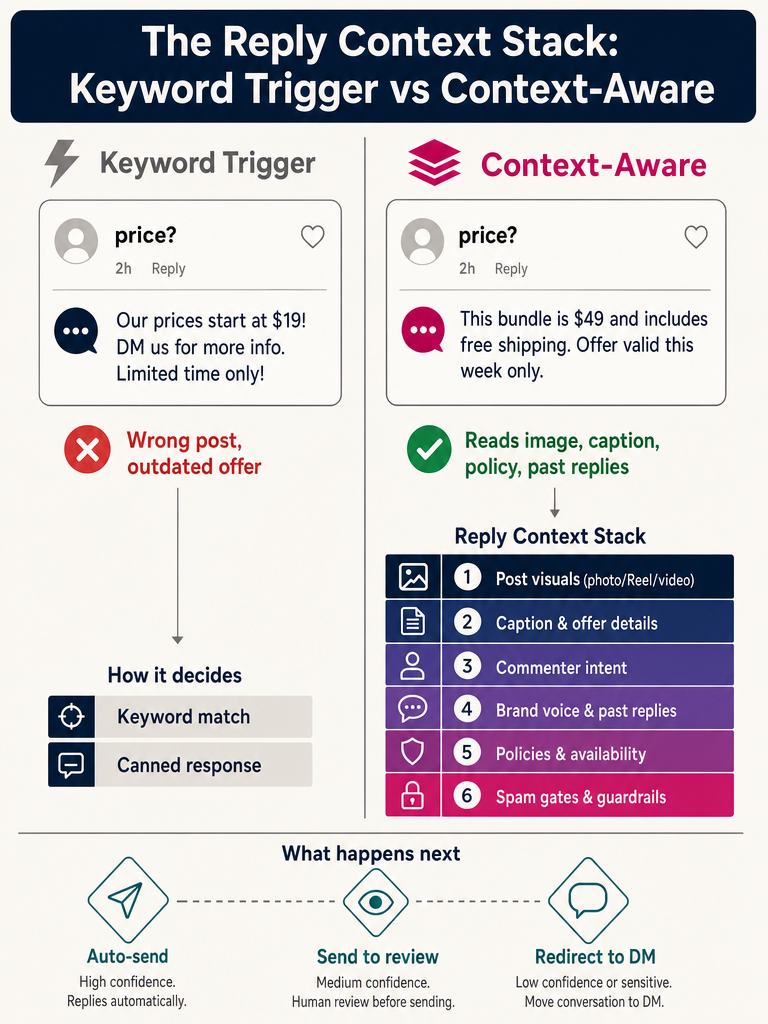
For Instagram, that distinction is the whole game. A comment saying "price?" on a launch Reel is not the same comment as "price?" on an archived post about a sold-out cohort. The words are identical. The right reply is not.
Context-aware AI for Instagram comments means the model reads the post, the caption, the commenter's intent, your offer rules, and your past replies before it drafts a single word. Modern models: ChatGPT, Gemini, Claude, LLaMA, GPT-5: are capable, but they still need that context handed to them. Retrieval-Augmented Generation (RAG) can help fetch it, but the underlying point Elastic makes about context engineering applies here: the goal is better input, not a cleverer prompt.
What is a context-aware Instagram comment automation tool?
A context-aware Instagram comment automation tool watches public comments on your posts in real time, understands what each specific post is about, reads what the commenter actually asked, and drafts a reply grounded in your brand's facts and voice. It is not a DM bot. It is not a keyword trigger. It is a reply system that sees the situation.
ReplyMagic is the concrete example. It connects to an Instagram Business account through Meta/Instagram OAuth, listens to incoming comments through the official Instagram Graph API, and uses Google Gemini to analyze each post's photo, Reel, or video before drafting. That means a reply on a Reel showing three different sneakers can reference the actual sneakers shown: not just whatever the caption happened to mention. Replies are conditioned on real past replies, tone settings, emoji habits, and sign-offs from the connected account, so the output sounds like you, not a generic assistant.
ReplyMagic replies to public Instagram comments: not DMs. It can suggest a "DM me" redirect when a question is sensitive or account-specific, but the core job is the comment thread itself. The Meta Messenger API and comment-to-DM flows are a different category; mixing them up is the root cause of most "why isn't this working on my Reel?" complaints in tools that try to do both at once.
What is the difference between prompt engineering and context engineering?
Prompt engineering is writing the instruction. Context engineering is designing the information environment around that instruction. According to TECHSY, Andrej Karpathy popularized the term context engineering in mid-2025, and Elastic defines it as the practice of giving AI systems the right information at the right time so they produce grounded answers instead of generic responses.
For Instagram comments, that means the prompt is the easy part. The hard part is assembling the post visuals, the caption, your current offer, your policies, your past replies, your tone preferences, and your control rules: every time, automatically, for every comment. A perfect prompt with no context still produces a guess. Mediocre prompts with the right context produce a reply that sounds like you wrote it yourself.
What belongs in the Instagram reply context stack?
A real Instagram reply context stack pulls from every signal that changes what a good reply looks like. Most "AI comment" tools use two inputs: the comment text and the post caption. That is not a context stack. That is a sentence and a label.
| Layer | What it includes | Why it matters |
|---|---|---|
| Visual context | Photo, Reel frames, video content | A "size?" comment on a Reel showing three jackets needs the right jacket named |
| Post metadata | Caption, hashtags, post date, post type | Tells the model if this is a launch, a throwback, an offer, or a tutorial |
| Comment signal | Comment text, commenter username, prior comments | Reveals intent: question, complaint, spam, fan reply |
| Brand facts | Price, sizes, availability, shipping, cancellation, booking, enrollment, policies | The actual answers the reply needs to contain |
| Voice anchors | Past replies, tone settings, emoji habits, sign-offs | Keeps the reply sounding like the brand, not the model |
| Control gates | Per-post settings, exclusion phrases, spam filters, duplicate checks | Stops wrong, off-brand, or repeat replies before they post |
A DEV Community walkthrough on building Instagram comment automation in n8n with Google Sheets notes that the core issue is not automation alone: it is context plus control. Bad input leads to bad replies and low engagement. The author lists comment text, username, and post caption as inputs, then explicitly flags filtering already-replied comments, duplicate users, and spam as required steps. That workflow is honest about its limits: it reads captions, not visuals.
ReplyMagic builds the full stack by default: Google Gemini reads each post's visuals, OAuth pulls captions and comments, the account history conditions tone, and pre-LLM spam gates filter scams and link bait before the model is ever called.
Context-aware comment assistants vs keyword-trigger bots: what changes?
Keyword bots react to words. Context-aware assistants evaluate situations. That is the whole comparison, and it explains every failure mode you have seen in the wild.
A help-desk article from VBOUT describes traditional Instagram comment automation as "scanning posts and comments for particular keywords, hashtags, or phrases and triggering when the bot detects a match." That works when "price" only ever appears on one product. It breaks the moment a customer types "price" on a Reel where you are not selling anything, an archived post with an expired offer, or a Story about a cohort that already closed.
| Scenario | Keyword bot behavior | Context-aware behavior |
|---|---|---|
| "price?" on a current product drop | Sends generic price DM | Replies with the actual price shown in the Reel |
| "price?" on a 2-year-old post | Sends the same DM, now wrong | Recognizes the offer expired, suggests current options |
| "size?" on a Reel showing 3 items | Triggers on the word; no idea which item | Reads the visual, names the specific item |
| "book?" on a hotel Reel | Triggers booking funnel | Confirms hotel availability path |
| "book?" on a coaching cohort post | Wrong funnel fires | Replies with cohort enrollment info |
| Spam: "DM for 🚀💰" | Often slips through | Filtered by pre-LLM spam gate |
Context, not triggers. Actual facts, not keyword guesses.
The shift from keyword bots to context-aware assistants is not a quality upgrade: it is a category change. One reacts to strings. The other reads the room.
Why do keyword bots fail during launches, viral Reels, and product drops?
Three reasons, all visible the moment volume spikes.
- Volume collides with ambiguity. During a launch, the same keyword: "available," "shipping," "discount": hits dozens of posts simultaneously. A keyword bot can only fire one rule. The wrong rule fires often.
- Old posts catch new attention. Viral Reels surface archived content. A keyword trigger built for a sold-out drop happily answers as if the offer is still live, and the public comment thread now contains a wrong, embarrassing reply.
- Spam and crypto bait look like keywords too. "DM me for huge gains" matches "DM" rules. Without a pre-LLM spam gate, the bot engages with the scam.
Sensitive comments are the worst failure. A wellness brand getting "is this safe for me?" on a Reel does not want a keyword bot answering. It wants the comment routed to review, or a polite DM redirect. Keyword rules cannot make that judgment. Context-aware systems can.
Which comments should be automated, reviewed, or redirected to DMs?
Some comments are safe to auto-answer, some need a human glance, and some should never be answered in public. The decision matrix is simpler than most teams assume.
| Comment type | Action | Why |
|---|---|---|
| Price, sizes, availability, shipping, cancellation, policies | Auto-send | Facts are known; the answer is the same every time |
| Booking, enrollment, course start dates | Auto-send if dates are loaded | Same as above; pulls from your fact set |
| Ambiguous intent ("is this for me?") | Approval queue | Needs human judgment on fit |
| Complaints, refunds, order issues | DM redirect | Personal info should not be public |
| Sensitive wellness or health questions | DM redirect or review | Guardrails matter; public answers create risk |
| Spam, scam links, crypto bait | Block at spam gate | Never reaches the model |
| Off-topic but friendly fan replies | Approval queue or skip | Light brand-voice reply or none at all |
ReplyMagic exposes these as named controls: approval queue (review every draft before it posts), review mode (mixed: auto-send the safe categories, queue the rest), per-post settings (override behavior for a single launch or Reel), exclusion phrases (never reply when certain words appear), duplicate checks (don't double-reply to the same user), and pre-LLM spam gates (filter scams before any AI is called).
How does context-aware automation keep replies in the brand's voice and language?
Voice is a mechanism question, not a vibe question. Generic "AI for social" tools produce generic replies because they have no anchor. ReplyMagic anchors brand voice by conditioning each reply on real past replies, tone settings, emoji habits, and sign-offs pulled from the connected Instagram account. The model is not guessing what you sound like: it is being shown what you sound like, every time it drafts.
That matters most when more than one person is replying. Coaches running cohort launches, hotels with front-desk teams covering Instagram, and creators with a community manager all face the same problem: replies start sounding like whoever happened to be online. A voice anchor flattens that variance without flattening personality.
Language works the same way, but automatically. ReplyMagic replies in whatever language the commenter wrote in: no setting, no per-account language toggle, no separate workflow for international audiences. A Spanish comment on a Madrid hotel Reel gets a Spanish reply. A Hindi comment on a creator's product drop gets a Hindi reply. A Portuguese comment on a wellness post gets a Portuguese reply. The model handles it because the commenter's language is part of the context stack.
For travel brands, hospitality teams, and creators with global audiences, that single behavior is often the difference between answering 70% of your comments and answering all of them.
If your next launch is on the calendar and the comment volume is about to outrun the inbox, get started with ReplyMagic and connect your Instagram account before the first comment lands.
How should you set up context-aware comment automation before a launch?
Set up the context stack and the control gates before the volume hits, not during. Launches, viral Reels, cohort enrollment pushes, and product drops are when keyword bots break and when manual replies fall behind, so the work has to be done in advance.
- Connect the Instagram Business account through Meta/Instagram OAuth. This is the official Instagram Graph API path. Skip any tool that asks for your password.
- Load offer and policy facts. Current price, sizes, shipping cutoff, cancellation rules, enrollment dates, booking links. The model can only answer with facts you have given it.
- Review recent brand replies. Pull a sample of the last few weeks of replies you wrote by hand. This is what anchors the voice.
- Configure per-post settings on the launch posts. Specific Reels, specific drops. Override defaults where the launch differs from your usual flow.
- Add exclusion phrases. Things that should never auto-reply: complaints, refund language, anything sensitive to your category.
- Choose the mode. Approval queue if this is your first launch on the tool. Review mode (auto-send for price/sizes/availability, queue everything else) for most teams. Full auto-send only after a few launches of clean output.
- Test the recurring questions. Price, sizes, availability, booking, enrollment, shipping, cancellation. Drop test comments on a draft post. Read the drafts. Adjust tone settings if needed.
- Monitor the queue during the first surge. The first 30 minutes after a launch post or a Reel going viral is where you want eyes on the queue, not on Stories.
For deeper walkthroughs, see the internal guides on how ReplyMagic survives Instagram launches and stopping the "is this still available?" loop.
Frequently asked questions
Does context-aware comment automation actually read the image or video in my post, or just the caption?
ReplyMagic uses Google Gemini to analyze each post's photo, Reel, or video before drafting a reply: so a comment asking "which size?" on a Reel showing three products gets an answer that names the actual items shown, not a generic sizing line pulled from the caption.
Will auto-replies sound like me or like a generic chatbot?
Voice is anchored to mechanism, not vibes. Every draft is conditioned on your real past replies, tone settings, emoji habits, and sign-offs from the connected account: so the output reflects how you actually write, not how a default AI model talks.
What happens to spam comments and scam links: does the AI try to reply to those too?
Pre-LLM spam gates filter scam links, crypto bait, and abuse before the model is ever called, so the AI never engages with junk and you never see a drafted reply to a "DM me for 🚀💰" comment.
Can I review replies before they post, or does everything go out automatically?
You choose the mode. Approval queue holds every draft for your review; review mode auto-sends safe categories like price, sizing, and availability while queuing everything else; full auto-send is available once you trust the output. Per-post settings let you override the default for a single launch or Reel.
Does it reply in languages other than English if my followers comment in Spanish, French, or Hindi?
ReplyMagic replies in whatever language the commenter wrote in: automatically, with no per-account language toggle or separate workflow required.
How much does it cost if I manage more than one Instagram account?
The Pro plan covers one account at 3,000 replies per month; each additional Instagram account is $15/month and adds another 3,000 replies: there's no per-comment markup beyond the plan limits.
Sources
- Instagram Comment to DM Automation not working for most accountscommunity.manychat.com
- Instagram Comment to DM automation - VBOUT Help Centerhelp.vbout.com