Are Instagram Comment Bots Safe in 2026? Official Meta Graph API vs. Scraping
Are Instagram comment bots safe? Learn the official Meta OAuth path, avoid scraping, and automate public replies with control, context, and review.

What Are Instagram Comment Bots, and Which Ones Are Safe in 2026?
An Instagram comment bot is safe in 2026 only if it does one specific job: reply to comments that real people leave on your own posts, through Meta's official Instagram Graph API, with OAuth login and human controls on top. Everything else: bots that spray generic comments on strangers' posts, browser scripts that log in with your password, scraping tools that fake human clicks: is the unsafe category.
The phrase "Instagram comment bot" gets used for two completely different things, and conflating them is how brands get burned.
| Type | What it does | Safety profile |
|---|---|---|
| Outbound spam bot | Posts comments on other accounts' posts to manufacture attention | Violates Instagram's Terms of Service; flagged, restricted, or banned (Source: IceKulfi) |
| Inbound reply automation | Drafts replies to comments left on your own posts | Safe when built on Meta OAuth + Instagram Graph API with approval controls (Source: CreatorFlow) |
This article is about the second category: the kind of automation a creator, coach, hotel, or product brand actually needs when a Reel goes viral and the same five questions about price, sizes, booking, and availability flood one inbox. The safety question is not "is automation allowed?": it's "what method, what permissions, and what controls?" Get those three right and inbound comment automation is boring infrastructure. Get them wrong and you're one bad reply away from a reputation problem on a public thread.
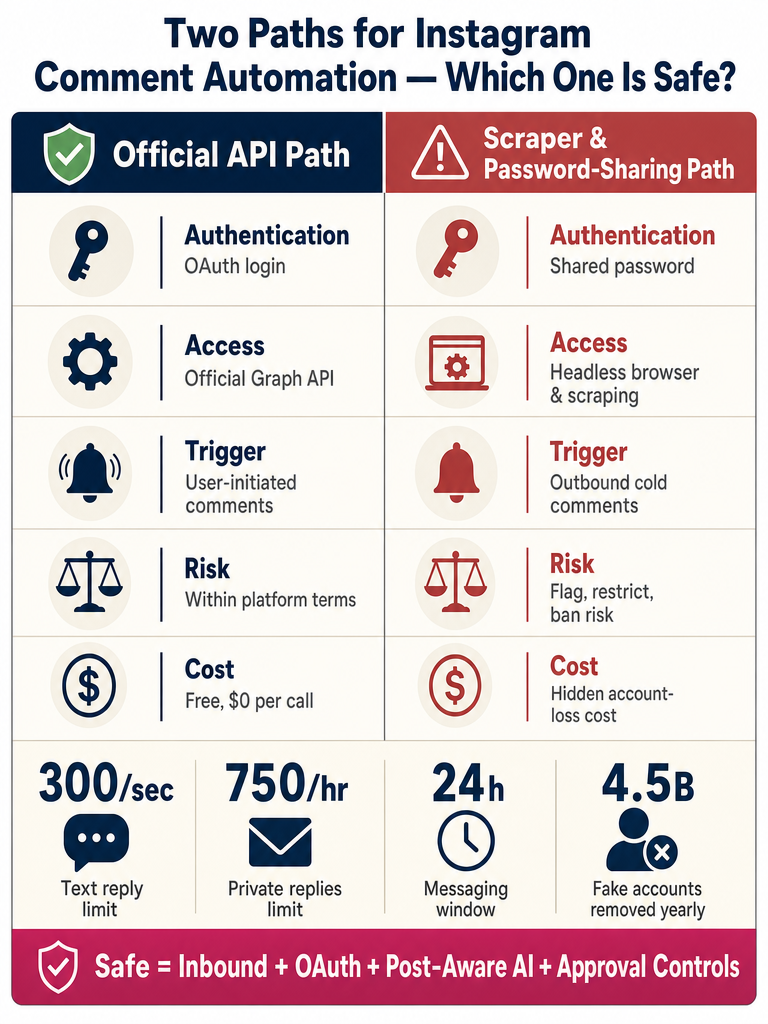
Are Instagram Comment Bots Safe When They Use Meta OAuth and the Instagram Graph API?
Yes: comment automation built on Meta OAuth and the Instagram Graph API is the safe path, because Meta itself is in the loop on every request. OAuth and the Instagram Graph API remove platform-policy risk; they do not remove brand risk.
Here's the mechanism. When a tool uses Meta OAuth, you connect your Instagram Business or Creator account through Meta's own consent screen. You never share a password. The tool gets scoped permissions like instagram_basic, instagram_manage_comments, and pages_manage_metadata: the exact ones Aunimeda lists as standard for an official Instagram automation app. Webhooks then push new comments to the tool in real time, and replies are sent back through Instagram's own systems. Meta sees and approves the traffic (Source: CreatorFlow).
Compare that to password-sharing tools, browser extensions, and scrapers that simulate human clicks. According to CreatorFlow, those methods are explicitly what Instagram's detection systems are built to catch.
But "API-safe" is not the same as "reply-safe." Meta won't ban you for using the Graph API correctly. Meta also won't stop your tool from posting the wrong price, contradicting your refund policy on a public thread, or replying to a wellness question it has no business answering. Platform-policy risk and brand risk are two different problems: a serious tool has to solve both.
What Is the Right Way to Do It: Official API vs. Bot Scrapers?
The right way is Meta OAuth plus the Instagram Graph API. The wrong way is anything that logs into Instagram the way a human would and then pretends not to be a bot.
Scraper-based tools log into Instagram like a normal user and simulate actions; according to Insteed, these violate Instagram's Terms of Service, risk account bans, and are increasingly being shut down by Meta. A public GitHub project called instagram-ai-commenter-bot openly advertises Playwright, Google Gemini, browser fingerprinting, human-like mouse movement, typing delays, deliberate typos, and randomized delays: all of it framed as features. Every one of those "features" is a buying red flag. If a vendor needs typing typos to look human, the tool is not on the official API.
| Approach | How it connects | What can break |
|---|---|---|
| Meta OAuth + Instagram Graph API | Meta consent screen, scoped permissions, Webhooks | Bad replies, weak controls: but no policy violation |
| Password-sharing bot | You give the tool your IG password | TOS violation; password breach; account lockout |
| Headless browser / Playwright / Chromium | Tool logs in as a fake human and clicks the UI | Detection, restrictions, permanent ban (Source: BotSpace) |
| Unofficial mobile endpoints | Tool calls private Instagram APIs directly | Endpoints break; account flagged when they do |
BotSpace puts it bluntly: the single most devastating risk of using an unofficial Instagram API is permanent loss of the account. That is not theoretical: Replient.ai cites Digital Information World, 2026, noting Meta removes 4.5 billion fake accounts from Facebook alone each year. The detection works.
How to verify a vendor in 60 seconds:
- Does the connection flow go through Meta's OAuth consent screen, or does it ask for your password?
- Does the vendor name the specific Graph API permissions they request (e.g.
instagram_manage_comments)? - Do they list a Meta for Developers app ID, or refuse to say?
- Is the product page bragging about "undetectable," "human-like delays," or "browser automation"?
Three yeses and a no means you're probably looking at a real API tool. Anything else, keep shopping.
Can Instagram Automation Reply to Public Comments, or Is It Only for DMs?
Both are possible through the Instagram Graph API, but they are different products solving different problems. Public comment replies are about handling the visible thread under a post: price, sizes, availability, "is this still available?": where the answer needs to live where everyone else can see it. DM bots handle private one-to-one conversations.
According to Aunimeda, the Instagram Graph API can support replying to comments on your own posts, receiving and replying to DMs, story mention notifications, template messages, and profile info for users who message the account. So a tool can legitimately do either, both, or just one.
ReplyMagic intentionally does one: it replies to public Instagram comments on your own posts. It can suggest a "DM me" redirect when a commenter asks something sensitive: a refund, a private booking detail, a wellness question: but it is not a DM bot. For public comment overload during launches, Reels, and product drops, that focus is the point, not a limitation.
What User-Initiated Actions and Limits Matter for Instagram Automation?
Meta allows automation to respond to user-initiated actions: comments on your posts, story replies, and DMs that someone sent you first. Cold outreach, mass-following, and unauthorized API access are the banned categories (Source: CreatorFlow).
A few numbers worth knowing before you set automation loose:
- According to CreatorFlow, Meta's official limits include 300 per second for text and 750 per hour for post-comment private replies.
- The commonly cited 200 DMs per hour figure is a behavioral pacing convention many tools enforce, not a Meta-published limit (Source: CreatorFlow).
- A 24-hour messaging window applies to messaging flows: auto-DMs are only allowed to users who engaged in the last 24 hours (Source: CreatorFlow).
- Replient.ai cites TechCrunch, 2025, reporting Meta reduced DM rate limits from 5,000 to 200 per hour in October 2025: a 96% cut.
For public comment automation specifically, the practical ceiling is whatever your tool's plan allows: not a Meta-imposed cost.
How Do You Automate Instagram Comments Safely, Step by Step?
The safe rollout is boring on purpose. Connect through official channels, start in review mode, then graduate only the obvious questions to auto-send.
- Switch to an Instagram Business or Creator account. The Graph API does not work with personal profiles.
- Connect through Meta/Instagram OAuth. You should land on Meta's own consent screen: not a vendor login that asks for your password.
- Confirm the permissions requested. For comment replies, expect at least
instagram_basicandinstagram_manage_comments. If a tool asks for more than it needs, ask why. - Verify Webhooks are configured. Webhooks are how new comments reach the tool in real time. Without them, you're polling: which is slow and burns rate limit.
- Start in approval queue mode. Every drafted reply goes to a queue. You approve, edit, or reject before anything posts publicly. This is how you tune the brand voice without risk.
- Set per-post settings. A product launch post needs different defaults than a behind-the-scenes Reel. Per-post settings let you change tone, what gets auto-answered, and what gets escalated for each piece of content.
- Add exclusion phrases. Words and topics that should never be auto-answered: competitor names, sensitive medical terms, anything you want a human on.
- Enable spam gates. Pre-LLM filtering catches scam links, crypto bait, and abuse before they ever hit the AI.
- Graduate to auto-send for the obvious stuff. Price, sizing, availability, shipping windows, enrollment dates: answers that don't change post-to-post. Keep everything else in the queue.
Get your Instagram comments under control before your next launch: Get started with ReplyMagic.
The shape of a safe rollout is one-way: from review mode toward selective auto-send, never the other direction. If something starts going wrong, the kill switch is just flipping back to approval queue.
When Do Keyword Auto-Replies Break, and Why Does Post Context Matter?
Keyword auto-replies break the moment a commenter doesn't use the exact trigger word: or worse, when they use it on the wrong post. A "price" rule fires on a behind-the-scenes Reel where you weren't selling anything. A "sizes" trigger answers with last season's size chart on a brand-new product drop. The result is replies that sound like a bot because they were written by a trigger, not a thought.
Context, not triggers, is what makes a public reply not look automated. ReplyMagic uses Google Gemini to read each post's image, Reel, or video before drafting a reply: so the answer references what's actually in the post, not just the caption or a keyword match. If the Reel shows three colorways and someone asks "does this come in green?", the reply talks about the green one. If the post is a Q&A about a cohort that starts in March, "when does it start?" gets answered with March, not a generic enrollment link.
| Approach | What it reads | What breaks |
|---|---|---|
| Keyword auto-reply | The commenter's word match | Wrong post, wrong product, wrong tone |
| Caption-only AI | The caption text | Misses everything shown in the image or Reel |
| Post-aware AI (image + Reel + caption) | The full visual context of the post | Far fewer mismatches; reply references actual facts |
This is the difference between automation that scales answers and automation that scales embarrassment. For deeper detail on the mechanism, see How ReplyMagic Reads Each Instagram Post Before Replying.
How Can Brands Keep Automated Public Replies Accurate, On-Brand, and Controlled?
Public threads are not DMs. A wrong price under a launch post is visible to every follower who shows up after. A tone-deaf reply on a wellness post gets screenshotted. The control surface: not the AI model: is what determines whether automation is safe to ship.
The controls that matter:
- Approval queue mode. Every drafted reply waits for human approval before posting. Standard during onboarding and during high-stakes launches.
- Review mode. A middle setting: most replies post automatically, but flagged categories (refunds, complaints, sensitive questions) stay in the queue.
- Auto-send for obvious questions only. Price, sizing, availability, booking windows, shipping, enrollment dates. Things where the answer doesn't change.
- Per-post settings. A product drop and a personal story Reel need different rules. Per-post lets you tune which categories auto-send on each post.
- Exclusion phrases. Words and topics that always escalate to a human: competitor names, medical terms, anything legal.
- Voice conditioning from real past replies. ReplyMagic conditions drafts on the connected account's actual reply history, tone preferences, emoji habits, and sign-offs: so a teammate's draft doesn't suddenly read like a stranger.
The control surface is what makes automation safe: the AI is just the writer. If a tool can't show you the controls, it's not ready for a public thread.
For launch-day specifics: the moment when everything is on fire and you need every reply to sound right: see How ReplyMagic Survives Instagram Launches.
According to a Gartner case study cited by Replient.ai, AI-powered comment tools can automatically resolve 75% of customer inquiries. That's a real ceiling: but only with the other 25% routed cleanly to humans.
When Should an Automated Comment Reply Redirect Someone to DM?
Move it to DM the moment the answer stops being safe to publish under the post. That includes:
- Refund and cancellation specifics tied to one order
- Private booking details, dates, or guest names
- Sensitive health or wellness questions
- Complaints that name a specific transaction or staff member
- Enrollment questions that require sharing private cohort details
- Anything where being wrong in public is worse than being slow in DM
A safe public-comment tool can suggest "DM me" without pretending to be a full DM bot. ReplyMagic drafts a short public reply that acknowledges the commenter and redirects to DM, then leaves the actual private conversation to a human or to whatever DM tool you already use. The public reply protects the brand; the DM handles the detail.
How Should a Safe Tool Handle Spam, Scam Links, Abuse, and Crypto Bait?
Before the AI ever sees a comment. Spam filtering belongs in front of the LLM, not after it. If a scam link goes through the language model first, you're paying for AI to write a polite reply to a crypto bot: and risking your AI engaging with content it shouldn't engage with at all.
A pre-LLM spam gate filters:
- Crypto and "investment" bait
- Scam links and lookalike URLs
- Repeated copy-paste abuse from sock-puppet accounts
- Suspicious prompts trying to inject instructions into the AI
- Fake giveaway and impersonation comments
- Slurs and harassment that should be hidden or deleted, not engaged
The fewer of these that reach the AI, the cleaner the reply queue and the lower the chance of an embarrassing auto-send. Given Meta removes 4.5 billion fake accounts from Facebook alone each year (Source: Replient.ai, citing Digital Information World, 2026), the volume hitting public comment threads is real. A safe tool treats spam as a separate problem from reply generation.
How Much Does Official Instagram API Access Cost, and What Does ReplyMagic Cost?
Meta's side is free. According to Blotato, the official Instagram Graph API is free for any Business or Creator account, with no per-call charges from Meta. What you pay for is the product sitting on top: moderation, post-aware AI, controls, reply volume, and the work of staying current with Meta's deprecations (Source: SociaVault).
ReplyMagic pricing is straightforward:
| Plan | Replies | Accounts |
|---|---|---|
| Free | 10 AI replies/day | 1 Instagram account |
| Pro | 3,000 replies/month | 1 Instagram account |
| Extra account add-on | +3,000 replies/month | +1 Instagram account at $15/month |
The Meta-side bill is $0. The tool-side bill is what matches your reply volume.
How to Choose a Safe Instagram Comment Automation Tool in 2026
Use this checklist. If a vendor fails more than one item, keep looking.
- Meta OAuth login only. No password sharing. Ever.
- Instagram Graph API, not scraping. No Playwright, no Chromium automation, no "human-like delays," no unofficial endpoints.
- Public comment support, not just DMs. Make sure the tool actually replies to comments on your posts: many "Instagram bots" only do DMs.
- Post-aware AI. Confirm the tool reads the actual image, Reel, or video: not just the caption. ReplyMagic uses Google Gemini for this; ask any competitor what they use and whether they read media.
- Multilingual by default. ReplyMagic replies in whatever language the commenter wrote in: automatic, no setting. Travel, hospitality, and international audiences need this.
- Approval queue and review mode. A queue is non-negotiable for launches.
- Per-post settings and exclusion phrases. Granular control beats a single global setting.
- Pre-LLM spam gates. Spam should never reach the AI.
- Voice conditioning from real past replies. Tone, emoji habits, sign-offs: the reply should sound like you, not like ChatGPT.
- Clear pricing and reply limits. Know the per-month ceiling and the per-account add-on cost before you commit.
For brands handling repetitive "is this still available?" questions on every product post, ReplyMagic's context-aware AI replies are built around this exact checklist.
Get your Instagram comment thread under control before your next launch, viral Reel, or product drop. Get started with ReplyMagic: the Free plan includes 10 replies a day, full Meta OAuth, no scraper tactics.
Frequently asked questions
Can Instagram ban my account for using a comment bot?
Yes: if the bot uses scraping, browser automation, or your password instead of Meta's official Graph API. Tools that simulate human clicks are exactly what Instagram's detection systems are built to catch, and the worst outcome is a permanent ban. Bots that connect through Meta OAuth and the Graph API don't carry that risk, because Meta is in the loop on every request.
Will automated replies sound robotic or off-brand on public posts?
They will if the tool only reads keywords or the caption: that's how you get a generic size-chart reply under a post that's not even selling anything. A post-aware tool reads the actual image or Reel before drafting, so the reply references what's genuinely in the content. Voice conditioning from real past replies, tone settings, and emoji habits keep the tone consistent with how the account already sounds.
Do Instagram comment automation tools work in multiple languages?
The right ones do automatically: no language setting required. ReplyMagic replies in whatever language the commenter wrote in, which matters most for travel brands, hospitality accounts, and anyone with an international following who shouldn't have to configure a separate rule for every language.
What's the difference between automating comment replies and automating DMs?
Comment replies are public: they live under the post where every future viewer can see them, which makes accuracy and tone especially high-stakes. DM bots handle private one-to-one conversations. ReplyMagic handles public comment replies only; for sensitive questions like refunds or private booking details, it can draft a short public reply that redirects the person to DM, leaving the private conversation to a human.
How do I verify that an Instagram automation tool is actually using the official API?
Check the login screen first: if it asks for your Instagram username and password instead of redirecting you to Meta's OAuth consent screen, it's not on the official API. Legitimate tools also name the specific Graph API permissions they request, like instagram_manage_comments, and never advertise features like "undetectable," "human-like delays," or "browser automation."
Sources
- Instagram API Pricing: Complete Guide for 2026 - Blotatowww.blotato.com
- Instagram Automation Rules 2026: Allowed vs Banned [Safe List]www.icekulfi.com
- Meta API vs Instagram Bots (2026 Guide) | CreatorFlowcreatorflow.so