
How to Reply to Hundreds of Instagram Comments a Day Without Hiring a VA
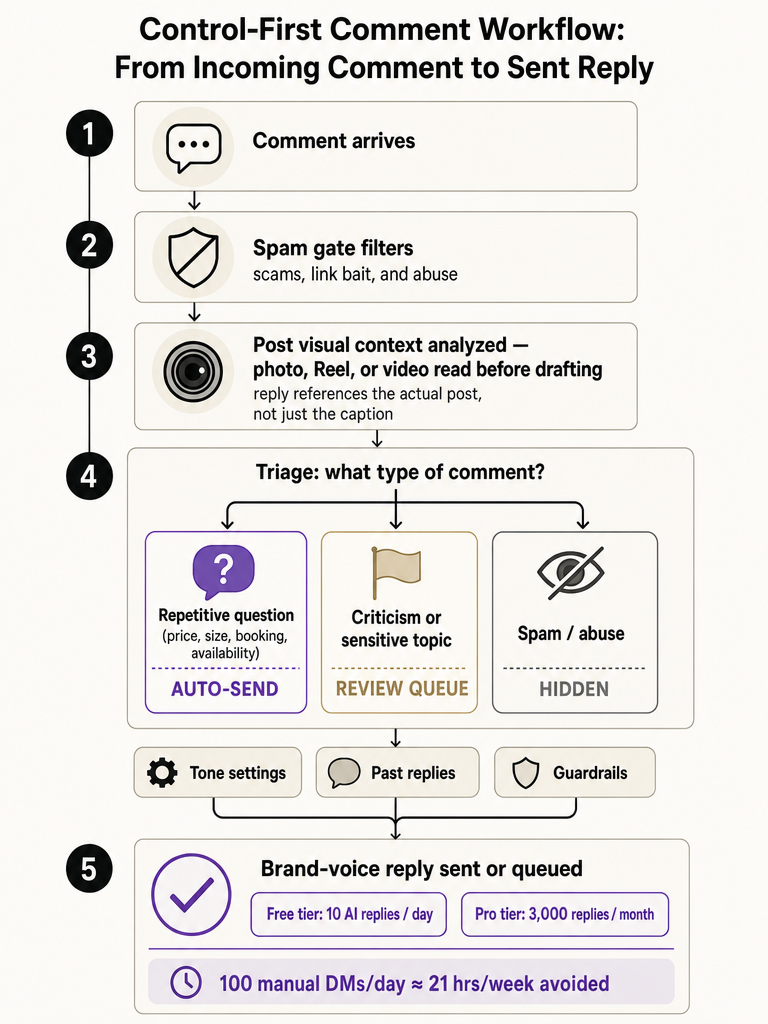
ReplyMagic drafts Instagram comment replies from the specific post, not keywords. It handles price, availability, and booking with approval controls.

How do you manage replying to a lot of Instagram comments and DMs?
The workable system is 80/20: automate the repetitive questions and reserve human time for the smaller share that needs judgment. Creatorflow estimates that 100 messages a day at 2 minutes each eats 3+ hours daily, roughly 21 hours a week, and that automating the repetitive volume can save 15 hours per week and drop manual work to about 30 minutes a day.
Most of your comment load is not personal. It's the same handful of questions on repeat: price, sizes, availability, booking, enrollment, shipping, cancellation, policies. Those answers don't change post to post. The edge cases: a confused customer, a complaint, a nuanced enrollment question: do.
So split the work. Let a tool draft answers to the obvious, recurring questions, and keep your hands on the rest.
One more distinction matters: comments are public, DMs are private. Most guides blur them. A viral Reel floods your public comment thread, and answering there does double duty: it reassures the next hundred people asking the same thing. Reserve DMs for what shouldn't be public.
The goal isn't to reply to everything yourself; it's to reply to everything without doing it manually.
ReplyMagic works this side of the line. It drafts replies to public Instagram comments, references what the specific post shows, and can suggest a "DM me" redirect when a question gets sensitive. It is not a DM bot.
How to auto-reply to Instagram comments without sounding robotic
Natural auto-replies come from conditioning the AI on real facts and your real voice: not from a shared template every account reuses. The robotic feeling starts when one canned line gets pasted under wildly different posts. The fix is to anchor each draft in two things: what the specific post is about, and how you actually talk.
ReplyMagic conditions replies on the connected account's past replies, tone settings, emoji habits, and sign-offs. So a reply lands in your cadence: the way you'd shorten a sentence, the emoji you always use, how you close.
The other half is facts. A reply that says the right thing in the wrong voice still fails, and a reply in the right voice with the wrong facts fails harder. So the draft pulls per-post context: the answer references what's actually in the post, plus the real price, date, or availability instead of a generic filler line.
For a full walkthrough, see how to set up Instagram comment auto-replies that sound like you. The mechanism matters here: context, not triggers; your facts, not a template.
Creator-voice AI vs keyword-trigger automation for Instagram comments
The decision that matters: does the tool fire on a word, or read the actual comment and post first? Keyword automation replies only when a comment contains a trigger word: AutoDM describes the common setup as keyword-triggered replies through Meta's Graph API, often with an optional DM, configurable in under 5 minutes. It's fast to set up and blind to context.
Context-aware AI reads the comment's intent and the post itself before drafting. That difference shows up on messy real comments.
| Keyword-trigger automation | Creator-voice AI (context-aware) | |
|---|---|---|
| Fires on | Matching trigger words | Comment intent + post content |
| Handles typos / phrasing | Misses non-matching wording | Reads meaning, not spelling |
| Post awareness | None: same reply everywhere | References the specific post |
| Voice | Fixed canned text | Conditioned on your past replies, tone, emoji |
| Wrong-post risk | High: fires anywhere the word appears | Low: reply is tied to the post |
The failure mode of triggers is public: a rule set for "price" fires under a post that has nothing to do with pricing, and the wrong reply sits there for everyone to see.
Triggers match words. Context-aware AI matches meaning: and only one of those knows what your post actually shows.
More on the tradeoff in context-aware Instagram comment automation vs keyword bots.
How do you keep AI replies matched to the specific Reel, photo, or video?
Match replies to the post by reading the post: its image, Reel, or video: before drafting, not by matching the caption or a keyword. A caption alone lies by omission: it might say "new drop" while the Reel shows three colorways and a price card. A reply built only from the caption misses what the commenter is actually looking at.
ReplyMagic uses Google Gemini to analyze each post's photo, Reel, or video before generating a reply. So when someone comments "how much?" under a product Reel, the draft can reference what the post shows: the item on screen: instead of guessing from text.
This is where the Medium workflow's per-post lookup and ReplyMagic diverge. That setup fetches post-specific details from a Google Sheet keyed to each Media ID: you preload the facts. ReplyMagic reads the visual content directly, so replies reference what's in the frame.
Per-post settings let you tune this further: what a given post should say, what it shouldn't, and where to route sensitive asks. See how ReplyMagic reads each post before replying.
When should a public Instagram comment turn into a DM redirect?
Answer general questions publicly; redirect to DM when the answer is private, account-specific, or sensitive. A public reply to "what's the price?" helps the next hundred people asking the same thing. A public reply to "what's my booking confirmation number?" or a health-specific question does not: it exposes something that shouldn't be in the thread.
The clean rule: if the answer is the same for everyone, keep it public. If it's about one person's data, money, or medical situation, move it to DM.
ReplyMagic responds to public Instagram comments and can suggest a "DM me" redirect for sensitive questions. It won't run a private funnel. It answers the public thread and points the edge cases where they belong.
The Medium workflow lands nearby: public reply for appreciation, public reply plus DM when someone wants links or resources.
Answering a private booking or enrollment detail in the open thread is a privacy slip, not a helpful reply. Route those to DM by default. Wellness and health-adjacent brands need this boundary hardest: see review vs auto for wellness comment automation.
How do you implement Instagram comment automation before my launch?
Set it up before the flood, not during it: audit your repeat questions, write the per-post rules, and turn on review mode first. Launches, product drops, and viral Reels are exactly when comment volume spikes and mistakes go public. The Medium case study saw 500+ comments in 48 hours; that's not the moment to be configuring.
A workable pre-launch sequence:
- Audit your last launch's comments. Pull the top 5 recurring questions: usually price, availability, sizing, enrollment dates, shipping.
- Load the real answers. Feed the exact price ranges, the booking link, the enrollment cutoff. Facts, not vibes.
- Set per-post rules. Decide what each launch post should and shouldn't say, and where sensitive asks route.
- Add exclusion phrases. Block auto-replies on comments you want to see yourself.
- Start in review mode or an approval queue. Watch the first batch of drafts before anything sends.
- Promote obvious questions to auto-send. Once price, availability, and booking answers look right, let those fire automatically.
ReplyMagic runs both modes: approval-queue mode to review every reply, auto-send mode for obvious questions like price, availability, sizing, and booking. Start conservative; loosen as trust builds. See approval queue or full auto and, for launch day itself, surviving a comment flood after a launch.
Get started with ReplyMagic before your next drop: Get started with ReplyMagic.
Is automation cheaper than hiring a VA for repetitive Instagram comments?
For repetitive comment volume, automation is far cheaper than a VA: Creatorflow puts automation at $15, 20/month against $500, 2,000/month for a virtual assistant. It also answers faster: Creatorflow cites automated responses landing in 1, 8 seconds versus 4, 12 hours for manual handling.
The workload math is the real argument. A VA hired to answer the same five questions all day is paying a person to do what a tool does in seconds. Creatorflow notes most creators hit unsustainable volume between 25K, 50K followers: the point where manual replies start crowding out content.
Here's how the numbers line up:
| Option | Monthly cost | Response time | Best for |
|---|---|---|---|
| Manual (you) | Your time: 3+ hrs/day at 100 msgs | 4, 12 hours | Low volume |
| Virtual assistant | $500, 2,000 (Creatorflow) | Human speed | Complex, personal work |
| Automation | $15, 20 (Creatorflow) | 1, 8 seconds | Repetitive questions |
ReplyMagic's Free plan includes 10 AI replies per day on 1 account; Pro includes 3,000 replies per month; and an extra Instagram account is $15/month for 1 more account and 3,000 more replies.
A VA still earns their keep on the 20% that needs a human. Automation just clears the repetitive 80% off their plate.
How do multilingual Instagram comments fit into the reply workflow?
Multilingual comments need no separate setup: a good tool replies in whatever language the commenter wrote in. Travel brands, hotels, tours, and creators with international audiences get comments in half a dozen languages across time zones, and switching a setting per commenter doesn't scale.
ReplyMagic replies in whatever language the commenter wrote in. It's automatic. The same post context, the same review controls, and the same brand-voice conditioning apply: a reply in Spanish still references what the Reel shows and still sounds like you.
That matters for the pain point behind it: a hotel guest asking about availability in French should get an answer about that post's rates in French, in your voice.
Keep the same approval queue on multilingual replies at first. Reviewing a few translated drafts early is how you confirm the tone survives the language switch. More on the multilingual workflow in replying in 100+ languages to Instagram comments.
How do you start using AI to reply to Instagram comments with control?
Start by pressure-testing any AI comment tool against a control-first checklist: connection method, post awareness, and human safeguards: before you turn on auto-send. The tools that fail do it in public: firing wrong replies, ignoring what the post shows, or answering private questions in the open thread.
Run any candidate through this:
- Meta connection. Does it connect through official Meta/Instagram OAuth, not scraping? ReplyMagic connects an Instagram Business account through Meta/Instagram OAuth.
- Public comment focus. Is it built for public comments, with clear DM-redirect handling instead of a private funnel?
- Post context. Does it read the actual image, Reel, or video? ReplyMagic uses Google Gemini to analyze each post first.
- Voice conditioning. Are replies anchored to your past replies, tone, emoji, and sign-offs?
- Spam gates. Does it filter scams and link bait before drafting? ReplyMagic runs pre-LLM spam gates.
- Approval controls. Can you review every reply, or auto-send only the obvious ones?
- Safe auto-send settings. Can you limit auto-send to price, availability, sizing, and booking, and keep the rest in review?
A tool that reads the post, sounds like you, and lets you hold the edge cases is worth more than one that just replies fast.
We built ReplyMagic around that order: context, then voice, then control: so you can automate the obvious without handing over the account. See how to auto-reply to Instagram comments safely to start.
Frequently asked questions
How do I implement Instagram comment automation before my launch?
Set it up before the flood, not during it. Audit your last launch's top 5 recurring questions: usually price, availability, sizing, enrollment dates, and shipping: then load the real answers and configure per-post rules. Start in approval-queue mode so you review the first batch of drafts before anything sends. Once price and availability replies look right, promote those to auto-send. A viral post can land 500+ comments in 48 hours; that's not the moment to be configuring.
Best alternatives to keyword-rule builders for Instagram comments
Context-aware AI is the practical alternative. Keyword rules fire on a trigger word regardless of which post it appears under: so a "price" rule fires under a post that has nothing to do with pricing, and the wrong reply sits publicly in the thread. Context-aware tools read the comment's intent and the actual post: its image, Reel, or video: before drafting. Replies reference what's in the frame, not just a matched word, which eliminates the wrong-post failure mode that embarrasses brands.
Is automation cheaper than hiring a VA for repetitive Instagram comments?
For repetitive volume, automation wins on cost and speed. Creatorflow puts automation at $15, 20/month versus $500, 2,000/month for a virtual assistant, and automated replies land in 1, 8 seconds versus 4, 12 hours manually. At 100 comments a day, manual handling consumes 3+ hours daily: about 21 hours a week. Automation clears the repetitive 80% (price, sizing, booking, availability) instantly, leaving a VA's time for the 20% that actually needs human judgment.
How do you keep AI replies matched to the specific Reel, photo, or video?
Read the post visually before drafting: not just the caption. A caption saying "new drop" while the Reel shows three colorways and a price card is missing half the context. ReplyMagic uses Google Gemini to analyze each post's photo, Reel, or video before generating a reply, so when someone asks "how much?" under a product Reel, the draft references what's actually on screen. Caption-only tools guess; visual analysis answers what the commenter is literally looking at.
How do you start using AI to reply to Instagram comments?
Run any candidate tool through a control-first checklist before turning on auto-send: Meta/Instagram OAuth connection (not scraping), public-comment focus with DM-redirect handling, visual post analysis, voice conditioning from your past replies, pre-LLM spam gates, and an approval queue. Start conservative: review every draft for the first batch: then promote obvious question types like price, availability, and booking to auto-send once the replies look right. The goal is automating the obvious without handing over edge cases.
How do multilingual Instagram comments fit into the reply workflow?
No separate setup is needed. A tool that handles multilingual volume correctly replies in whatever language the commenter wrote in: automatically. The same post context, approval queue, and brand-voice conditioning apply whether the comment arrives in English, Spanish, or French. For travel brands, hotels, and creators with international audiences, this matters most: a guest asking about availability in French should get an on-topic answer in French, in your voice, without a manual language-switching step.
Sources
- How to Respond to 100+ Instagram DMs Daily in 30 Minutescreatorflow.so
- How I Respond to Hundreds of Messages & Comments per Day on ...www.instagram.com
- How I Respond to Hundreds of Messages & Comments per Day on ...www.replyrush.com