How ReplyMagic Survives Instagram Launches: Replying to Hundreds of Comments Without Hiring a VA
Tame instagram launch comment management with context-aware replies that read each post, keep your voice, and automate price, size, and booking answers.

What Can You Do With Instagram Comment Management During a Launch?
Instagram launch comment management is a controlled public-reply workflow that decides which repetitive questions get answered automatically in the comment thread, which get drafted for human approval, and which get redirected to DM: while every reply still references the actual post it appears under. It is not a keyword-to-DM funnel, and it is not a moderation tool that just hides spam.
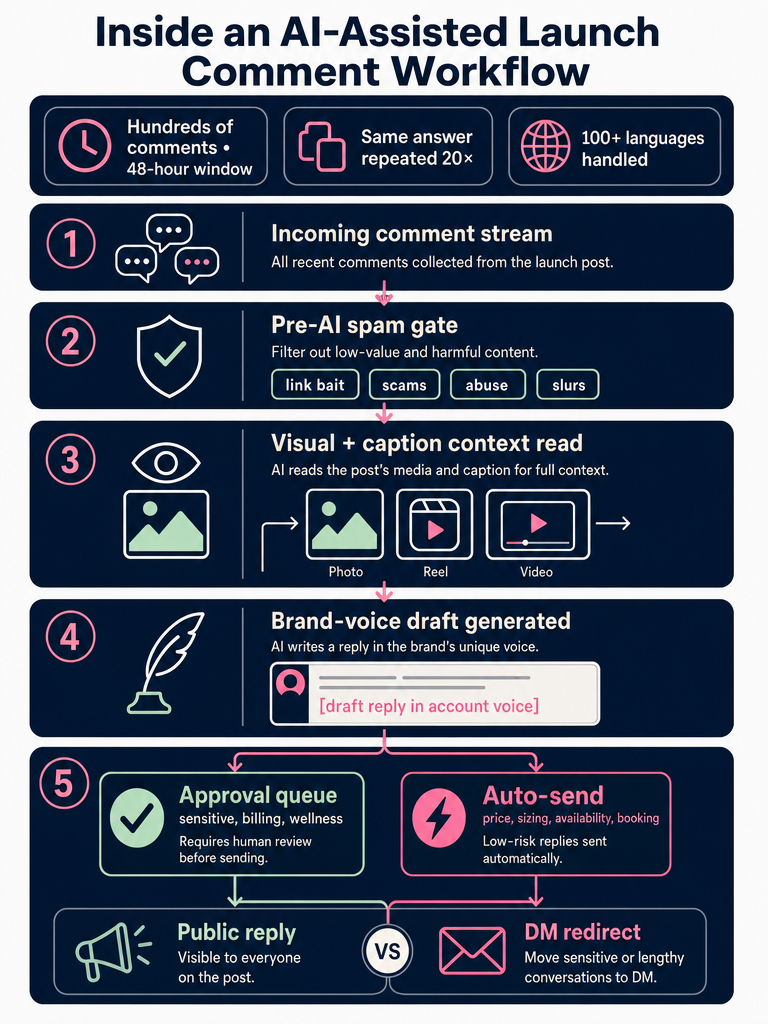
This matters because launches break the normal cadence. According to a Medium case study by MsquareAutomation, a single Instagram video pulled hundreds of comments within 48 hours, with the same question: price, size, link, availability: repeated dozens of times. Without a system, that means reading comments at stoplights and copy-pasting the same answer twenty times.
The job during a launch is to automate the obvious answers in public, escalate the edge cases, and keep every reply in your voice. ReplyMagic is an AI Instagram comment assistant built for that workflow: it reads each post: image, Reel, or video: and drafts a reply in the connected account's voice across 100+ languages (Source: ReplyMagic). Context, not triggers.
Why Does Instagram's Native Comment Interface Break During Launch Volume?
Instagram's native interface was not built for launch traffic. According to SocialEcho, the app forces you to open each post separately: there is no combined inbox spanning Reels, Feed, and Stories comments. That means tabbing through ten posts to chase the same five questions.
It gets worse. SocialEcho also notes that Instagram offers no bulk selection or moderation, no native saved-reply or quick-response template system for comments, and that Stories comments disappear permanently after 24 hours with no archive.
So during a launch you end up with three problems stacked on top of each other:
- Repetitive questions you have to answer one post at a time.
- No template system, so every reply is retyped or pasted from a notes app.
- No way to triage at volume: comments scroll, get buried, and leads go cold.
This is the moment teams hire a VA, not because the answers are hard, but because the interface forces manual work that does not scale. A VA solves the throughput problem and creates a new one: voice drift across the thread.
How Does Instagram Launch Comments Automation Work?
Instagram launch comment automation works in five steps, and the path you choose decides how much glue code you maintain.
- Connect an Instagram Business or Creator account through Meta OAuth, which links to a Facebook Page and unlocks the Instagram Graph API. CommentGuard confirms a Business or Creator account is the entry requirement for any comment API access.
- Watch new comments in real time via the API. The MsquareAutomation case study describes capturing every new comment the moment it lands on the post.
- Pull post context: the image, Reel, or video plus caption and any per-post details like price, sizes, or booking link.
- Draft a reply with an LLM, conditioned on the post context and brand voice.
- Route the reply: auto-send, push to an approval queue, or escalate to DM.
Here is how the DIY route compares to ReplyMagic:
| Step | DIY (Webhooks + Make.com + Sheets + Gemini) | ReplyMagic |
|---|---|---|
| OAuth & API setup | Manual: Meta App, permissions, Page link, webhook config | Built-in OAuth flow |
| Post context lookup | Media ID → Google Sheet row you maintain | Automatic per-post analysis |
| Visual understanding of Reels/photos | Not included; caption only unless you build it | Google Gemini reads the image, Reel, or video |
| Brand voice | Prompt engineering you tune yourself | Conditioned on real past replies |
| Approval queue, spam gates, exclusions | Build it | Included |
| Time to first reply | Days to weeks | Minutes |
The DIY route works. It also means you own the maintenance every time Meta changes a permission, a webhook drops, or your prompt drifts. Meta App approval is a real gate on the DIY path: every new app needs to clear review before it can act on public comments at scale.
How Does ReplyMagic Know Which Product, Reel, Cohort, or Booking Page the Comment Means?
Because Google Gemini reads the actual post before ReplyMagic drafts a reply. Not the caption alone: the photo, the Reel, the video frames.
That is the difference between a reply that says "DM us for details!" and a reply that says "The blue linen set in the carousel: the size 4 is back in stock Friday." One is generic. The other answers the question the commenter actually asked, under the post they actually asked it on.
The DIY equivalent, as described in the MsquareAutomation case study, is to look up each post's Media ID in a Google Sheet you maintain by hand: a row for each launch post with price, link, and offer details. That works until you launch three Reels in a week and forget to update one row. ReplyMagic skips the spreadsheet by reading the post directly.
This is what makes per-post settings useful. For a product drop, you can tell ReplyMagic the price, sizes, restock date, and shipping cutoff. For a cohort launch, you can specify enrollment deadline, prerequisites, and the booking link. For a hotel post, you can specify room type, rate, and availability window. The reply uses both the visual context and the per-post facts.
The slogan is short: context, not triggers. Recurring launch questions: price, sizes, offers, booking, availability, enrollment, policies, cancellation, shipping: get answered against the real post, not against a keyword that happened to appear in the comment.
How Do You Avoid Keyword-Triggered Replies Firing on the Wrong Post?
You stop using keywords as the primary trigger. Keyword and any-comment rules break the moment your feed has more than one active offer, because the same word means different things under different posts.
Consider a launch week with three live posts:
- A Reel for a $49 candle: someone comments "price?"
- A Reel for a coaching cohort opening at $1,200: someone comments "price?"
- A carousel for a free webinar: someone comments "link?"
A keyword-triggered system that fires on "price" or "link" sends the same canned reply to all three: or worse, fires the candle DM under the cohort Reel. Laylo is explicit that its launch comments feature triggers on any comment on the chosen post and does not respond to every fan's public comment with a tailored answer (Source: Laylo). Inrō's playbook recommends keyword-triggered DMs like "Comment WAITLIST and I'll DM you first access" (Source: Inrō). Both work as signup mechanics. Neither solves the public reply problem during a multi-post launch.
Context-aware replies solve it by reading the post first and the comment second. The system already knows which post the comment is under, what that post is selling, and what the per-post settings say. The keyword becomes irrelevant.
For a deeper walkthrough of why keyword rules backfire and how per-post context replaces them, see Instagram Comment Automation Without Keyword Rules.
Public Reply vs. DM Handoff: Which Launch Comments Go Where?
Answer in public what builds trust; move to DM what protects privacy. Mentionkit's guidance is exactly this: answer what can be answered publicly, redirect private details to DM, and avoid vague "Please message us" handoffs.
Here is a working decision tree for a launch:
| Comment type | Where it goes | Why |
|---|---|---|
| Price, sizes, availability, shipping cutoff | Public reply | Other commenters want the same answer; public answers reduce repeat questions |
| Booking, enrollment deadline, prerequisites | Public reply | Builds urgency and social proof |
| Order status, refund, account problem | DM redirect | Contains personal info |
| Sensitive wellness or health question | DM redirect with care | Liability and privacy |
| Spam, crypto bait, scam link | Hide via API, no reply | Do not engage |
| Negative or reputation risk | Approval queue, human reply | Voice and stakes matter |
Public answers cut repeat volume; DM handoffs protect anything tied to a specific account, order, or health detail.
ReplyMagic handles the public side: it watches comments, drafts in your voice, and can suggest a "DM me" redirect for sensitive threads. It is not a DM bot. Tools like Laylo, Inrō, and Linkdm are built around the comment-to-DM funnel: every comment fires a DM. That is a different job. During a launch you usually need both: a DM funnel for signups and a public reply system for the questions that build trust in front of everyone.
What Controls Should Exist Before an AI Reply Is Auto-Sent?
Six controls, in this order: spam gates, exclusion phrases, per-post settings, brand-voice anchoring, approval queue, and auto-send boundaries.
- Spam gates run before the LLM is ever called. Crypto bait, scam links, slurs, and abuse get filtered or hidden: no AI tokens spent, no risk of the model engaging.
- Exclusion phrases prevent the system from replying to specific comment patterns you want a human to handle.
- Per-post settings define what is true for this specific Reel or carousel: price, sizes, offer, deadline.
- Brand-voice anchoring conditions every draft on the connected account's actual past replies.
- Approval queue / review mode holds drafts for a human to approve, edit, or reject before they go live.
- Auto-send boundaries define which question types are safe to send without review.
Kicksta cautions against overusing AI in comment management, and the cure is exactly this layered control model: automate the boring 80%, queue the 20% that needs judgment.
How Do You Set Up Instagram Comment Moderation Step by Step?
Moderation runs before reply generation. The order matters: hide the garbage first, then let AI draft replies to what is left.
- Define unwanted patterns: scam links, crypto and giveaway bait, slurs, competitor link spam, repetitive promo, abuse.
- Add regex or phrase rules for known patterns. CommentGuard uses keyword and regex rules to hide matching comments through the Instagram Graph API rather than deleting them, which preserves API behavior and avoids escalating fights with commenters.
- Run pre-LLM spam gates so flagged comments never reach the reply pipeline. MyComments.io describes this as monitoring every new comment in real time and hiding matches within seconds, with logs preserved for review.
- Decide hide vs. escalate. Spam gets hidden. Genuine negative feedback goes to a human queue, not auto-hidden: silencing real customers backfires.
- Review logs weekly to catch false positives and tune rules.
Tools like CommentGuard, MyComments.io, Smart Moderation, and ShieldApp are moderation-first: they hide unwanted comments but do not draft public replies in your voice. Pair moderation with a reply system; do not expect a moderation tool to handle launch volume on its own.
How Do Teams Keep Launch Replies in One Brand Voice?
By conditioning every draft on the actual account, not on a generic prompt. ReplyMagic learns brand voice from real past replies, tone preferences, emoji habits, and sign-offs from the connected Instagram account: so a draft sounds like the founder, not like ChatGPT.
This matters most when multiple people touch a launch thread. The founder writes one way at 6am. The VA writes another way at noon. A teammate jumps in for the evening rush. Without anchoring, the public thread reads like three different brands. With anchoring, every draft already matches the account's pattern before any human edits it.
Practical effect during a launch:
- Emoji density stays consistent: if the brand uses one emoji per reply, drafts do not arrive with five.
- Sign-offs match: "x" vs. ", Jen" vs. nothing.
- Sentence length matches: punchy brands stay punchy, warm brands stay warm.
- Slang, in-jokes, and product nicknames carry across replies because the model has seen them before.
Approval mode catches the misses. Brand-voice anchoring makes sure there are fewer of them.
Can Instagram Launch Comment Replies Work Across Languages Automatically?
Yes: and it should not be a setting. ReplyMagic replies in whatever language the commenter wrote in. A comment in Spanish gets a reply in Spanish. A comment in Japanese gets a reply in Japanese. No toggle, no fallback to English, no manual review of which thread is in which language.
ReplyMagic's homepage states this directly: replies in 100+ languages (Source: ReplyMagic). For global launches, travel and hospitality accounts, and creators with international audiences, that means a Reel that goes viral overnight in Brazil gets answered in Portuguese before the team in New York wakes up. Time zones stop mattering.
How Do You Choose Between ReplyMagic, a VA, DIY Automation, and Broad Social Tools?
Pick based on five questions: launch volume, need for visual post context, public-reply vs. DM-funnel goal, control requirements, and cost.
| Option | Best for | Watch out |
|---|---|---|
| Hiring a VA | Brands with low launch volume and high voice sensitivity | Cost scales linearly; voice drift across teammates; same five answers all day |
| DIY (Make.com + Sheets + Gemini) | Engineering-comfortable teams who want full control | You maintain webhooks, Meta permissions, Sheet rows, and prompts forever |
| Comment-to-DM tools (signup mechanics) | Capturing leads, RSVPs, drop access | Not a public reply system; every commenter funneled to DM |
| Moderation-only tools | Hiding spam, crypto bait, abuse | No public reply drafting; pair with a reply system |
| Broad social suites | Multi-channel teams managing scheduling and analytics | Comment replies are usually a feature, not the focus; weak on per-post visual context |
| ReplyMagic | Public Instagram comment replies during launches with brand-voice and approval controls | Focused on Instagram comments, not DMs or all-channel support |
ReplyMagic plan limits, for the buyer-side math:
- Free: 10 AI replies per day, 1 Instagram account.
- Pro: 3,000 replies per month, 1 account.
- Extra Instagram account: +$15/month for 1 more account and 3,000 more replies.
DIY tutorials on YouTube and Make.com walk through Instagram webhooks, Google Sheets lookups, and Gemini prompts. According to Reply Pilot, its drag-and-drop builder includes 13+ node types for triggering automations from comments, DMs, and story replies. Broader roundups like Statusbrew, NapoleonCat, Sprout Social, Iconosquare, SocialPilot, Buffer, InstaCOM, InstantViews, and Kicksta cover the full social stack: but most are scheduling and analytics tools first, with comment replies bolted on. None of them read the actual Reel or photo before drafting.
If your job during a launch is answering hundreds of public comments, in your voice, across languages, without auto-sending the wrong thing: that is the workflow ReplyMagic is built for. Get started with ReplyMagic before your next post drop.
Frequently asked questions
Will the AI reply sound like me or like a robot?
ReplyMagic conditions every draft on the connected account's real past replies, tone preferences, emoji habits, and sign-offs: so the output matches your pattern, not a generic AI template. If you use one emoji per reply and sign off with "x", drafts arrive that way.
What happens if a comment is in Spanish or another language?
ReplyMagic replies in whatever language the commenter wrote in: automatic, not a setting. A comment in Spanish gets a Spanish reply, Japanese gets Japanese, no fallback to English and no manual routing required.
Can I review replies before they go live, or does everything auto-send?
You choose: approval queue holds every draft for human review before it posts, while auto-send handles the obvious repetitive questions: price, sizing, availability, shipping: without waiting. Sensitive threads, billing issues, or anything reputation-adjacent should stay in the queue.
How is this different from a keyword-triggered comment tool?
Keyword rules fire on the word, not the post: so "price?" under a $49 candle Reel gets the same reply as "price?" under a $1,200 coaching cohort. ReplyMagic reads the actual image or Reel with Google Gemini first, so the reply references what is genuinely in that post, not just a trigger word.
How much does it cost once the free plan runs out?
The Free plan covers 10 AI replies per day on one Instagram account. Pro is 3,000 replies per month for one account, and each additional Instagram account adds $15/month with its own 3,000-reply pool.
Sources
- Instagram has supported automated DM replies for YEARS. But ...www.instagram.com
- Instagram Comments → Voice Messages Automation - YouTubewww.youtube.com
- Portfolio - Saurabh Dhar | Full Stack Developer Projectswww.saurabhdhar.com