Best AI Tools to Automatically Reply to Instagram Comments in 2026
Compare the best AI tools to reply to Instagram comments. See which one uses post context, brand voice, and control for launches, Reels, and price questions.

What Is the Best AI Tool to Automatically Reply to Instagram Comments in 2026?
For automating public Instagram comments specifically, ReplyMagic is the best fit when the priority is per-post context, brand voice, and control: not keyword triggers or generic AI chat. It connects to an Instagram Business or Creator account through Meta/Instagram OAuth, watches comments in real time, and uses Google Gemini to read each post's image, Reel, or video before drafting a reply.
But "best AI tool" is a loaded phrase in 2026. ChatGPT, Claude, Gemini, and Perplexity are excellent general assistants. Hootsuite Inbox aggregates messages across platforms. Make.com builds custom workflows. Spur offers a visual flow builder with keyword triggers. Replient.ai generates three reply suggestions per comment after analyzing past replies and uploaded documents. None of those solve the same job.
The deciding lens for this article is narrow on purpose: which tool can safely reply to public Instagram comments, in your voice, with the post's actual visual context in mind, without embarrassing the brand on a viral Reel. By that lens, here's how the field shakes out:
| Job to be done | Best tool category | Example |
|---|---|---|
| Reply to public Instagram comments with post-aware AI | Dedicated Instagram comment assistant | ReplyMagic |
| Suggest replies for manual approval | Suggestion-based tools | Replient.ai |
| Trigger replies from keyword rules | Visual flow builder | Spur |
| Custom AI workflows across apps | Workflow automation | Make.com |
| Cross-platform unified inbox | Social media management | Hootsuite Inbox |
| General writing, research, coding | Broad LLM assistant | ChatGPT, Claude, Gemini |
If your problem is comment overload during launches, viral Reels, and product drops, you want a tool built for that: not a general chatbot you copy-paste from.
Which AI Should You Actually Use in 2026, for Which Job?
The best AI in 2026 depends entirely on the job you're trying to do: no single assistant wins every category. Kersai's 2026 AI tools guide makes this point directly, and Kingy AI frames it as which stack saves the most time for the least friction, since research engines, coding copilots, and vector databases aren't substitutes for each other.
Broad assistants like ChatGPT, Claude, Gemini, Perplexity, Kimi, DeepSeek, and Grok are excellent for drafting, research, and brainstorming. Jasper AI handles long-form marketing copy. Descript edits podcasts and video. Canva AI generates visuals. Microsoft 365 Copilot lives inside Word, Excel, and Outlook. Google Workspace embeds Gemini across Docs and Gmail. Agent platforms like CrewAI and LangChain build custom workflows.
None of those tools watch your Instagram comments in real time. None connect through Meta/Instagram OAuth. None analyze the photo or Reel attached to a specific post before replying publicly under it. According to WriteHuman, hallucinations on names, numbers, and citations remain common across general assistants: which is exactly the wrong failure mode for a public comment under a launch post.
If you paste comments into ChatGPT one by one, you have a copywriting workflow, not automation. If you build a Make.com scenario, you have a workflow but no brand-voice grounding or visual post analysis out of the box. For the specific job of replying to public Instagram comments at scale, you want a tool built for Instagram comments: full stop.
How Do You Automate Replies to Comments Without a Bot-Like Feel?
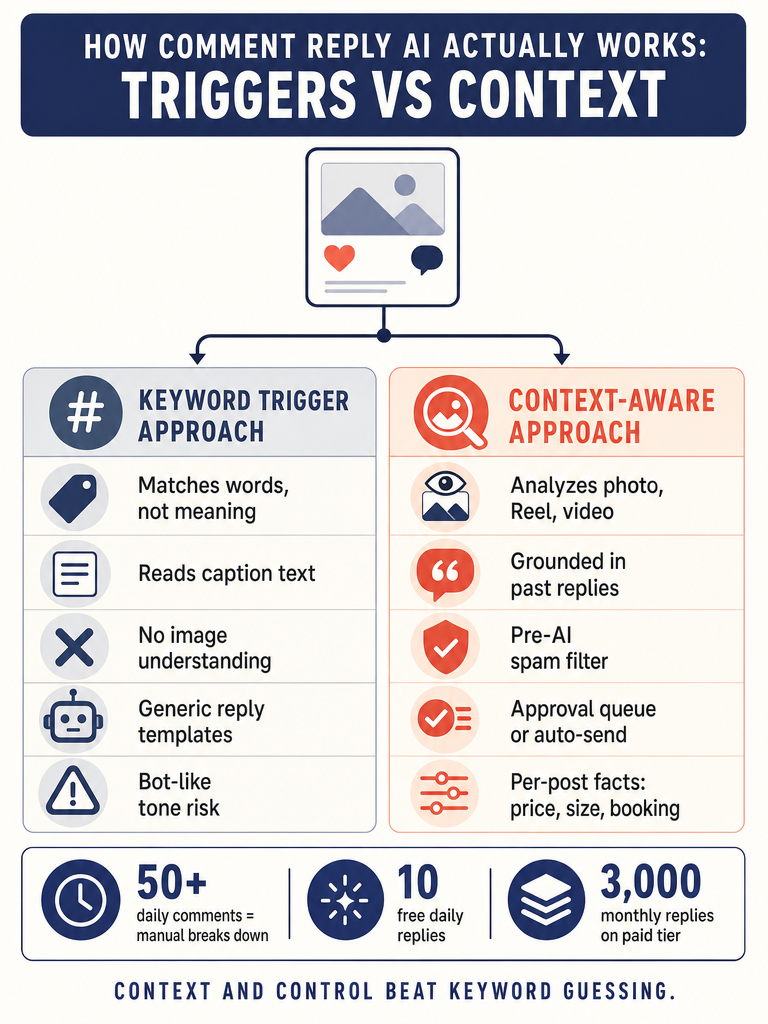
Stop using triggers. Start using context. The reason keyword-rule automation feels robotic is that it doesn't understand the post, the commenter, or what the brand actually sounds like: it just matches strings and fires.
A reply that doesn't feel bot-like needs five things working together:
- Per-post context. Save the product name, price, offer, and tone for each post once. ReplyMagic answers every comment under that post using those facts, in your voice.
- Comment intent. Distinguish a price question from a compliment from a complaint from spam. A Make.com community workflow describes the basic shape: a new Instagram comment comes in, the automation checks which post it belongs to, AI understands what the person is asking, and appreciation gets handled differently from a question.
- Visual post understanding. If the Reel shows a green dress and someone asks "does it come in blue?", the reply needs to know what's on screen: not just guess from the caption.
- Brand voice grounding. Past replies, emoji habits, sign-offs, and tone preferences from the connected account shape every draft. Not a "casual / friendly / professional" dropdown: actual examples from how the account already talks.
- Approval controls. Auto-send the obvious. Hold the ambiguous in a review queue. Use exclusion phrases to keep certain comments out of automation entirely.
The contrast that matters: context, not triggers. Actual facts, not keyword guesses. A launch post gets answers about the launch. A viral Reel about your dog gets answers about your dog. A cohort enrollment post gets prerequisite and deadline answers. A hotel guest asking about breakfast gets the actual breakfast hours.
For deeper detail on this, see how ReplyMagic reads each Instagram post before replying.
How Can AI Answer Instagram Comments On Brand?
Brand voice in AI replies isn't a vibe setting: it's grounded in the connected account's actual behavior. ReplyMagic conditions every draft on real past replies from the connected Instagram account, plus tone preferences, emoji habits, sign-offs, and per-account guardrails.
That mechanism matters because most tools say "on-brand" and mean a dropdown. The voice claim only holds up when there's a real source of truth. If your account ends replies with "xx" and one heart emoji, replies should end with "xx" and one heart emoji. If you never use exclamation points, the AI shouldn't either. If you call customers "loves" or "team", that shows up in drafts.
The recurring questions this voice has to handle are predictable across every Instagram-native business:
- Price: "How much?" "Is this on sale?" "Do you ship to Canada?"
- Sizes and fit: "Does this run small?" "Is the medium like a US 8?"
- Offers: "Is the bundle still available?" "Code expired?"
- Booking and availability: "Any spots left for Saturday?" "Open in December?"
- Enrollment: "When does the cohort start?" "Prerequisites?"
- Policies, cancellation, shipping: "Return window?" "Cancel before check-in?"
The voice isn't magic dust: it's grounded in what the connected account already says, every day, to real comments.
This is why per-account guardrails exist. A wellness brand needs softer language and a "DM me" redirect on health-adjacent questions. A coach needs hard-edged answers about prerequisites. A hotel needs warm, multilingual hospitality. The same engine, conditioned on different accounts, sounds different on purpose.
Can the Tool Read the Image, Reel, or Video Before Drafting?
Yes: ReplyMagic uses Google Gemini to analyze each Instagram post's photo, Reel, or video before drafting a reply, so responses can reference what's actually shown, not just what the caption says. This is the single biggest gap in most "Instagram auto-reply" tools.
Captions are thin. A caption might say "new drop 🔥" while the Reel shows a navy linen jacket, three styling shots, and a price tag in frame. Someone comments "what color is that?": a caption-only tool has no idea. A keyword-rule tool fires a generic "DM us!" A visual-context tool says "navy: and it's $128, link in bio."
That's the difference between a reply that converts and a reply that buries you.
Most tools in this space don't actually look at the media. Spur's visual flow builder triggers on keywords. Replient.ai analyzes past replies, website prices, and uploaded documents: useful, but not the post's actual visual content. Make.com workflows check which post a comment belongs to, but don't analyze frames. Native Instagram AI auto replies don't surface what they see in the image.
For launch posts, product drops, and viral Reels, visual context is the difference between automation that helps and automation that embarrasses the account in front of new followers.
ReplyMagic vs Native Instagram AI Auto Replies vs Flow Builders
For public Instagram comments specifically, ReplyMagic is the only option in this comparison that combines visual post analysis, brand-voice grounding from past replies, an approval queue, per-post settings, and pre-LLM spam gates in one tool. Native Instagram AI is free but blunt. Spur is a keyword-trigger flow builder. Make.com gives full control if you build the workflow yourself. Replient.ai suggests replies for manual approval. Here's how the capabilities line up side by side:
| Capability | Native Instagram AI | Spur-style flow builders | Make.com workflows | Replient.ai | ReplyMagic |
|---|---|---|---|---|---|
| Public comment replies | Yes | Yes | Yes | Yes (suggestions) | Yes |
| Meta/Instagram OAuth | Native | Yes | Yes | Yes (Business/Creator) | Yes (Business/Creator) |
| Visual post analysis | No | No | Custom build | No | Yes (Google Gemini) |
| Brand voice from past replies | Limited | No (keyword templates) | Custom build | Partial | Yes |
| Approval queue / review mode | Limited | N/A (rules) | Custom build | Yes (suggestions only) | Yes |
| Per-post settings | Limited | Per-trigger | Custom build | Partial | Yes |
| Exclusion phrases | No | Via rule logic | Custom build | Partial | Yes |
| Pre-LLM spam gates | Basic filters | No | Custom build | Post-gen moderation | Yes |
| Multilingual auto-reply | Limited | No | Custom build | Limited | Yes (matches commenter) |
Stop letting launch days flood one inbox: connect your Instagram account and try post-aware AI replies in your voice. Get started with ReplyMagic.
The trade-offs in plain language: native Instagram AI is free but blunt. Spur is great if you genuinely want keyword automation and accept its limits. Make.com gives you full control if you're willing to build, maintain, and debug your own workflow. Replient.ai is strong for teams that want suggestions, not auto-send. ReplyMagic is built for teams that want per-post context, visual understanding, brand-voice grounding, and granular auto-send vs review control in one tool.
How Do You Turn On AI Auto Replies for Instagram?
You have two paths: native Instagram or a dedicated tool. Both require an Instagram Business or Creator account.
The native path, per Instagram's Help Center: open your Profile, go to Professional dashboard, find Your AI, tap the gear icon, and configure auto reply settings from there. It's free and basic: fine for simple acknowledgments, limited for nuanced replies.
The dedicated-tool path with ReplyMagic:
- Sign up and connect Instagram. Authorize through Meta/Instagram OAuth using your Instagram Business or Creator account. ReplyMagic needs permissions to read comments and post replies on your behalf.
- Set tone and guardrails. ReplyMagic reads your past replies automatically, but you can layer in tone preferences, banned words, sensitive-topic redirects, and account-level rules.
- Add per-post facts. For each launch, drop, or campaign post, save product, price, offer, and any specific FAQs. This is the context layer that makes replies accurate.
- Choose your mode. Approval queue (review every reply) or auto-send (let obvious questions answer themselves). You can mix: auto-send for price and availability, queue for everything else.
- Test on a low-stakes post first. Run in approval mode for 24, 48 hours. Tune exclusion phrases. Then graduate to auto-send for the categories you trust.
Which Replies Should Auto-Send, and Which Should Stay in Review Mode?
Auto-send the obvious. Queue the ambiguous. Always. The split should be ruthless.
Safe to auto-send:
- Price questions ("How much?")
- Size and fit questions with clear sizing info saved per post
- Availability and stock questions
- Booking window and open-dates questions
- Shipping timelines and shipping-region questions
- Cohort enrollment deadlines and start dates
- Basic published policies (returns, exchanges)
- "Link in bio?" acknowledgments
Keep in review mode (or use exclusion phrases):
- Wellness and health-adjacent questions where a wrong answer matters
- Cancellations, refunds, and complaints
- Personal situations ("my grandmother just passed, can I...")
- Unusual pricing requests (custom quotes, bulk, B2B)
- Comments mentioning competitors, lawsuits, or press
- Anything ambiguous: if the AI's confidence is low, don't auto-send
- Comments tagging other accounts in ways that imply a dispute
ReplyMagic's per-post settings let you toggle auto-send per post: so a launch post might auto-send price and availability while a wellness post stays fully in the queue. Exclusion phrases (like "refund", "complaint", "lawyer", "press") force any matching comment into review mode regardless of the post-level setting.
How Can AI Automatically Hide Spam and Hate Comments on Instagram?
Filter spam before the AI is ever called. ReplyMagic includes pre-LLM spam gates that block scams, link bait, crypto schemes, and obvious abuse before any reply is generated. That matters for two reasons: cost (you don't burn AI credits on junk) and safety (no risk of the AI engaging with a scam).
This is a different model from post-generation moderation. Replient.ai describes using sentiment analysis and keyword patterns to automatically hide spam and hate after the fact. Both approaches have value: pre-LLM gates stop the obvious garbage cold, while post-generation moderation catches edge cases.
For launches, viral Reels, and product drops: when your public comment thread is the most exposed to bad actors: pre-LLM filtering is the protection layer. Crypto bait, fake follower DMs ("I can get you 10k followers"), and link spam never reach the draft stage.
The cleanest spam strategy is the one where the AI never sees the spam in the first place.
Does It Reply to Comments, DMs, or Both?
ReplyMagic responds to public Instagram comments. It is not a DM bot. It can suggest a "DM me" redirect when a question is sensitive: like a refund request, a personal health question, or a custom pricing inquiry: but the redirect goes from the public thread to your inbox, where a human takes over.
That distinction matters when evaluating tools. DM automation tools, native Instagram AI in DMs, and unified inboxes like Hootsuite Inbox handle private conversations. Spur, Replient.ai, and ReplyMagic handle public comments under posts. The two jobs have different risk profiles: a wrong DM is private; a wrong public comment is visible to every visitor of your profile for as long as the post lives.
Evaluate Instagram comment automation by public-thread risk and brand-voice fidelity, not by general inbox or all-channel support criteria. Buying an all-channel inbox tool to solve a public comment problem usually means you get neither well.
Can It Reply in the Commenter's Language?
Yes: ReplyMagic replies in whatever language the commenter wrote in. Automatic, not a setting. If someone comments in Spanish, the reply is in Spanish. French, French. Portuguese, Portuguese. No language dropdown, no manual configuration.
For hotels, B&Bs, tour operators, and travel creators, this is the difference between answering a Brazilian guest's question about breakfast at 2am local time and watching them book elsewhere. For coaches and educators with global cohorts, it means enrollment questions get answered in the prospect's language without a VA fluent in five. For creators with international audiences, every commenter feels seen, in their own words.
Buyer Checklist: What to Compare Before Picking an Instagram Comment AI Tool
Compare every tool against twelve specific criteria: Instagram Business support, Meta/Instagram OAuth, public comment handling, visual post analysis, past-reply voice grounding, approval queue, per-post settings, exclusion phrases, pre-LLM spam gates, multilingual replies, transparent plan limits, and no required custom workflow building. Score each tool against the grid below before picking.
Must-haves:
- Supports Instagram Business or Creator accounts
- Connects through Meta/Instagram OAuth (no password sharing, no scraping)
- Handles public comments (not just DMs)
- Analyzes the post's image, Reel, or video before drafting
- Grounds brand voice in past replies, not just a tone dropdown
- Approval queue and review mode available
- Per-post settings for facts, tone, and auto-send rules
- Exclusion phrases that force review mode
- Pre-LLM spam gates for scams, link bait, and abuse
- Multilingual replies that match the commenter's language automatically
- Clear plan limits and transparent extra-account costs
- Does not require building or maintaining custom workflows
Plan limits to ask about:
| Plan | Replies | Accounts | Cost |
|---|---|---|---|
| ReplyMagic Free | 10/day | 1 Instagram account | $0 |
| ReplyMagic Pro | 3,000/month | 1 Instagram account | Pro pricing |
| Extra account add-on | +3,000/month | +1 Instagram account | +$15/month |
Red flags:
- "On-brand" with no mechanism behind it
- Keyword triggers as the primary intelligence
- No visual post analysis
- All-or-nothing automation (no per-post or per-question control)
- Spam handled only after AI generation (you pay for the junk)
- Conflates public comments with DMs in the marketing copy
- Requires you to build the workflow yourself in a general automation tool
The cleanest decision criterion: pick the tool that handles the comments you're getting tomorrow, in your voice, with controls you can actually see. If a launch tomorrow would flood the account with 300 comments about price and availability, the right tool is the one that auto-sends those accurately, queues the rest, filters the spam, and reads each post before it speaks.
If that's the job, get started with ReplyMagic: connect your Instagram account, set your tone, and run your next launch with post-aware replies in your voice instead of a flooded inbox and a tired VA.
Frequently asked questions
Will AI auto-replies on Instagram get my account flagged or banned?
Tools that connect through Meta's official Instagram OAuth: not scraping or password sharing: operate within Meta's allowed API access, which significantly reduces ban risk. The bigger danger is keyword-rule tools that spam irrelevant replies at scale; post-aware, context-driven replies with spam gates and an approval queue are far less likely to trigger platform flags.
How many Instagram comments per day before I actually need automation?
Manual replies become genuinely time-consuming at around 50 comments per day and effectively impossible without extra staff at 200 or more: those are the thresholds where auto-sending obvious questions like price, availability, and sizing stops being optional and starts being the only way to keep up during a launch or viral Reel.
Can I use one tool to manage comments across multiple Instagram accounts?
ReplyMagic's Pro plan covers one Instagram account, with additional accounts available at $15 per month each: each extra account gets its own 3,000 replies per month and its own brand-voice grounding, so replies for a second brand don't bleed into the first.
What stops the AI from replying to spam or scam comments?
Pre-LLM spam gates screen out crypto bait, link spam, and obvious abuse before any AI draft is generated: meaning you don't pay AI credits for junk and there's zero risk of the tool accidentally engaging with a scam comment publicly under your post.
Does AI auto-reply work on Reels or only on static posts?
ReplyMagic analyzes photos, Reels, and videos using Google Gemini before drafting, so a comment on a Reel gets a reply that references what's actually on screen: the product, the color, the context: not just whatever the caption happened to say.
Sources
- Auto DM Instagram Comments WITHOUT ManyChat (Free Forever)www.youtube.com
- Instagram Auto Reply to Comments (2026 Guide) - Spurwww.spurnow.com
- AI‑Powered Instagram Comment & DM Automation with Make.comcommunity.make.com
- Turn on AI auto replies for Instagramhelp.instagram.com
- Answer Instagram comments with AIreplient.ai