
Approval Queue or Full Auto: How ReplyMagic Lets Creators Stay in Control of AI Instagram Replies
Instagram comment automation control means auto-sending price, sizes, and booking replies while queueing sensitive comments for review.

When should you use an approval queue instead of full auto for Instagram comments?
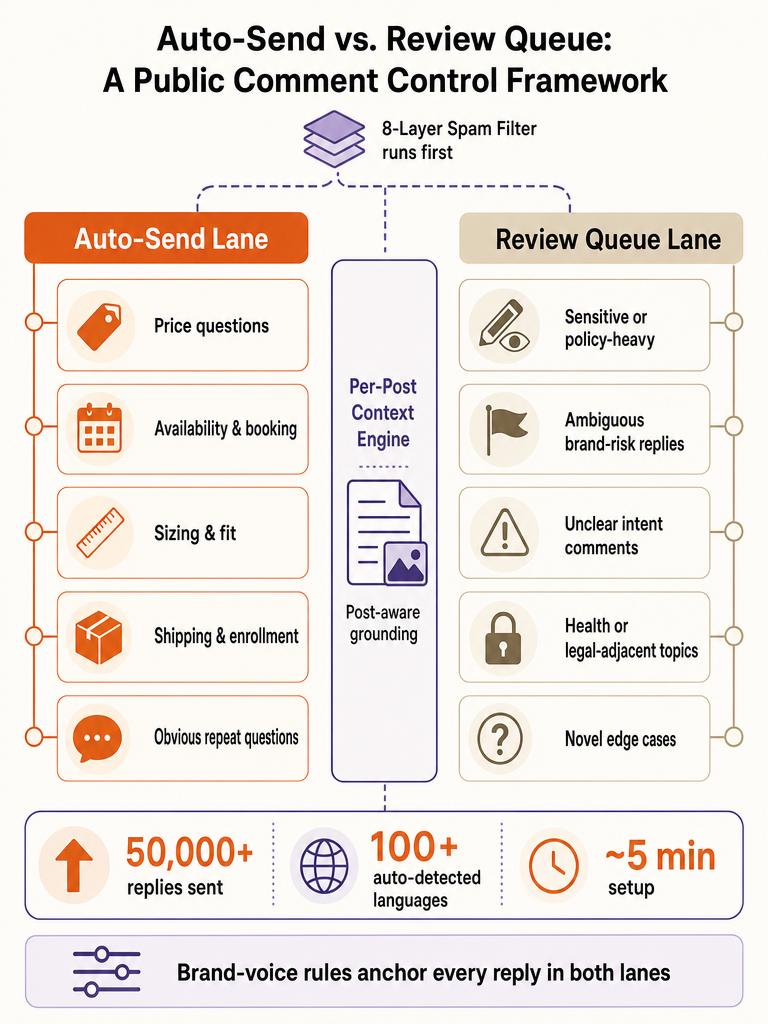
Use an approval queue when a wrong reply would embarrass the brand, and let full auto handle the questions you answer the same way every time. The split is about confidence, not laziness. High-confidence repeat questions: price, sizes, availability, booking: can fire on their own; anything ambiguous, sensitive, or policy-heavy should wait for a human.
ReplyMagic runs both modes: auto-send for obvious comments and a review queue for replies that need approval (Source: ReplyMagic). The mechanism that decides which is which is a confidence threshold you set yourself. ZipLyne's ReplyMagic case study describes merchants setting their own threshold, so high-confidence comments auto-send while edge cases route to a human approval queue (Source: ZipLyne).
That threshold is the whole game. Set it loose and more replies fire without you; set it tight and more land in review. There's a real-world pattern here too: a solo creator built an n8n workflow that generated AI replies but forced human approval through Telegram before sending anything via the Instagram API (Source: Anton Bryzgalov, Medium). Same instinct: automate the drafting, keep the publishing decision human where it counts.
The simple test: auto-send what you'd answer identically ten times, and queue anything you'd pause on if a stranger asked it in public.
Want to try both modes on your own account? Get started with ReplyMagic.
What is Instagram comment automation?
Instagram comment automation is software that replies to the public comments on your posts instead of you typing every response by hand. It handles the repetitive stuff: price, sizes, availability, booking, enrollment, shipping, policy questions: that piles up under launches, Reels, and product drops. It is not a DM bot; it works in the visible comment thread where followers actually ask.
The control-focused version isn't keyword triggers. It's post-aware replies plus human review when the reply needs a second look. ReplyMagic grounds each reply in context saved for that exact post: the product, price, sizes, offer, and CTA: so answers fit what people actually asked (Source: ReplyMagic). ReplyMagic's homepage says the product has sent more than 50,000 replies on creator accounts (Source: ReplyMagic).
The important distinction: automating comments means writing accurate public answers, not routing everyone into a private funnel.
How to auto-reply to Instagram comments without losing control
Auto-replying to Instagram comments safely comes down to five moves: connect through official Meta access, save real post context, set your voice, pick your control mode, then watch the public thread. Skip the context step and you get generic replies; skip the control mode and you get accidents.
- Connect through Meta/Instagram OAuth. ReplyMagic connects to an Instagram Business account through official Meta/Instagram access and watches incoming comments in real time (Source: ReplyMagic). No scraping, no borrowed credentials.
- Save context per post. Enter the facts for that specific Reel or drop: product, price, sizes, offer, CTA. ReplyMagic grounds replies in context saved for the exact post (Source: ReplyMagic).
- Set your voice. Feed it tone, emoji habits, sign-off, and 5, 10 examples of real replies so drafts sound like the account, not a bot (Source: ReplyMagic).
- Choose review mode or auto-send. High-confidence comments fire; edge cases queue for approval, per the threshold you set (Source: ZipLyne).
- Monitor the thread. Spot-check what went out and adjust the threshold as you learn.
ReplyMagic's homepage presents setup as about 5 minutes, with 20 minutes from signup to live (Source: ReplyMagic). For a fuller walkthrough, see how to auto-reply to Instagram comments safely.
What is an AI Instagram comment assistant with approval queue?
An AI Instagram comment assistant with an approval queue drafts the reply, then holds it for a human to review or edit before it publishes. The AI does the writing; you keep the publish button. That workflow exists precisely for comments that are ambiguous, sensitive, or easy to misread in a public thread.
ZipLyne's ReplyMagic case study describes the split cleanly: high-confidence comments fire immediately, while edge cases route to a human approval queue: with an 8-layer spam gate classifying comments before any LLM is even called (Source: ZipLyne). So spam and scam bait never reach a draft, and the drafts that do reach you are the ones worth a second of attention.
There's a working proof outside ReplyMagic too. Anton Bryzgalov built an n8n workflow that generated personalized replies while keeping him in control of what gets published: he approved or edited each reply through a Telegram bot before it went out via the Instagram API (Source: Anton Bryzgalov, Medium). His system pulled context from the full post content, enriched video content, and the entire comment thread before drafting (Source: Anton Bryzgalov, Medium).
Human-in-the-loop is the control layer that makes public automation safe to run at scale: it lets you automate the drafting while keeping the final publish decision with a person on the comments that carry real brand risk.
How does per-post context reduce wrong replies compared with keyword triggers?
Per-post context reduces wrong replies because the AI answers what the post is actually about, not whatever a trigger word matched. A keyword rule sees "price" and fires the same canned line everywhere: including under a post where the price is different, sold out, or irrelevant. Context, not triggers.
ReplyMagic saves context once for each Instagram post: product, price, sizes, offer, CTA: and grounds every reply in those facts (Source: ReplyMagic). So a comment on a product drop gets the drop's price and sizes; a comment on a course post gets the course details. Bryzgalov's workflow followed the same principle, assembling reply context from the full post content, enriched video content, and the entire comment thread before generating anything (Source: Anton Bryzgalov, Medium).
Here's the failure mode keyword tools can't escape: they read the word, not the thread. When someone asks "is this still available?" on the wrong post, a trigger fires blind. A context-aware reply checks what "this" is first.
| Approach | What it reads | Failure mode |
|---|---|---|
| Keyword triggers | The matched word | Fires on the wrong post, wrong price, sold-out item |
| Per-post context | Post facts + thread | Answers the actual question for that post |
More on the mechanics in what is context-aware Instagram comment automation.
Which comment types are safe to auto-send, and which should go to review?
Auto-send the questions you already answer identically every day; route anything with brand risk, sensitivity, or ambiguity to review. The line is simple: if a wrong answer costs you nothing, automate it. If a wrong answer costs you a customer or a complaint, queue it.
Repetitive, factual, post-anchored questions are the safe zone: the ones ReplyMagic is built to ground in saved post context like price, sizes, offer, and CTA (Source: ReplyMagic).
| Safe to auto-send | Route to review |
|---|---|
| Price ("how much?") | Refund, cancellation, or dispute claims |
| Availability / "still in stock?" | Medical, legal, or health-sensitive questions |
| Sizes and dimensions | Anything you can't interpret |
| Booking hours and general rates | Angry or public-complaint comments |
| Enrollment dates and prerequisites | Custom quotes or edge-case pricing |
| Standard shipping timelines | Anything that should move to a DM |
ZipLyne's case study describes exactly this routing: a merchant-set confidence threshold sends high-confidence comments automatically and pushes edge cases to a human queue (Source: ZipLyne). And before any of that, the 8-layer spam gate strips scams and link bait before they ever hit a draft or burn an AI credit (Source: ZipLyne).
For sensitive categories, pair auto-send with a "DM me" redirect: public reply for the general answer, private thread for the specifics.
Is Instagram comment automation safe?
Instagram comment automation is safe when it runs on official access, filters junk before spending on AI, and keeps a human in the loop for anything risky. The danger is automation with no gate and no review: not automation itself.
ReplyMagic connects through official Meta/Instagram OAuth on an Instagram Business account, not scraped logins (Source: ReplyMagic). Before an LLM is ever called, the 8-layer spam gate classifies comments to filter scams, link bait, and abuse (Source: ZipLyne). That matters twice over: bad comments don't reach the public thread, and they don't burn AI credits on garbage.
The rest of the safety story is control. A merchant-set confidence threshold decides what auto-sends versus what queues (Source: ZipLyne), and ReplyMagic's approval queue, per-post settings, and review mode keep humans on the edge cases (Source: ReplyMagic). Exclusion phrases let you keep specific comments out of automation entirely.
Independent benchmarks on error rates or approval rates for public comment automation aren't publicly available as of this writing: so treat any "X% accuracy" claim you see elsewhere with suspicion. The safe path is verifiable: official pathway, spam gate, threshold, review. More on that in are Instagram comment bots safe in 2026.
How is public comment automation different from comment-to-DM automation?
Public comment automation answers the visible comment under your post; comment-to-DM automation moves the conversation into a private inbox. Different jobs, different threads. ReplyMagic responds in the public comment thread: it can suggest a "DM me" redirect for sensitive questions, but it is not a DM bot (Source: ReplyMagic).
The distinction matters because most Instagram automation coverage assumes DMs. Meta's own creator AI feature, described by Lia Haberman, is built for common DM questions and Story replies, with on/off and audience controls in the Professional Dashboard: and she notes brands still need Meta's business tools (Source: Lia Haberman, Substack). That's a private-follow-up tool.
Public replies do work a DM funnel can't: they answer the question where the next hundred lurkers can read it. One good public "yes, $49, ships Monday" reply saves a hundred repeat comments.
Use public replies for repeatable, non-private questions. Redirect to a DM only when the answer involves personal details, payment, or anything sensitive. If your instinct is a full DM funnel, that's a different tool: see ManyChat vs. AI comment agents.
How do brand voice controls keep AI Instagram replies sounding like the account?
AI replies sound like the account because ReplyMagic conditions them on real inputs from that account: tone preferences, emoji habits, sign-off, and examples of past replies: not a generic model default (Source: ReplyMagic). The voice comes from evidence you supply, not a personality slider.
The homepage shows the mechanism concretely: accounts can provide 5, 10 examples of real replies to anchor the voice, plus a tone rule as specific as a 1 emoji max cap on a post's reply style (Source: ReplyMagic). Give it your actual replies and your actual habits, and drafts inherit them.
This solves the multi-teammate problem too. When three people answer comments, you get three voices and three different sign-offs. Voice controls conditioned on one saved set of examples keep every reply consistent, whoever's watching the queue that day.
The account's own past replies are the training data, so the reply sounds like you because it learned from you rather than from a template.
For setup specifics, see how to set up Instagram comment auto-replies that actually sound like you.
Where review mode matters most: launches, wellness, hotels, and price questions
Review mode earns its keep in exactly four situations: comment floods you can't read fast enough, sensitive topics that need human judgment, booking details that vary, and pricing edge cases. In each, the confidence threshold decides what fires and what waits (Source: ZipLyne).
- Launch and viral-post floods. When a drop blows up, the repeats can auto-send while unusual comments queue. See how to survive a viral post and course launch FAQ handling.
- Wellness and health-adjacent brands. Sensitive questions belong in review, with public replies stopping short of advice. See Instagram comment automation for wellness brands.
- Hotels and travel. General rates and availability can auto-send; reservation specifics move to a DM. See how hotels handle Instagram booking questions after hours.
- Service pricing. Standard rates auto-send; custom quotes queue. See how service businesses answer Instagram price questions fast.
The pattern holds across all four: automate the obvious, queue the rest, and let per-post context keep both accurate.
Ready to set your threshold before your next launch? Get started with ReplyMagic.
Frequently asked questions
AI Instagram comment assistant with approval queue: how does it work?
ReplyMagic drafts a reply, then holds it in a queue for you to review, edit, or approve before it publishes. An 8-layer spam gate filters scams and link bait before any AI is called, so the drafts that reach your queue are the ones worth a second of attention. High-confidence comments: price, sizes, availability: can auto-send; ambiguous or sensitive ones wait for a human. You keep the publish button on anything that carries real brand risk.
Context-aware Instagram comment automation tool: what makes it different from keyword triggers?
Per-post context means the AI answers what that specific post is actually about, not whatever trigger word it matched. ReplyMagic saves facts once per post: product, price, sizes, offer, CTA: and grounds every reply in those details. A keyword rule fires the same canned line everywhere, including under a post where the price changed or the item sold out. Context, not triggers: the reply checks what "this" is before answering.
How do I implement Instagram comment automation before my launch?
ReplyMagic's homepage puts setup at about 5 minutes, with 20 minutes from signup to live. Connect your Instagram Business account via official Meta OAuth, save context for each launch post: product, price, offer, CTA: set your voice with 5, 10 real past replies, then choose a confidence threshold. High-confidence comments auto-send during the flood; edge cases queue for approval. Set the threshold tight at first, then loosen it as you see which auto-sends you'd have approved anyway.
Which Instagram comments are safe to auto-send, and which should go to an approval queue?
Auto-send the questions you'd answer identically every day: price, availability, sizes, booking hours, enrollment dates, and standard shipping timelines. Route to review anything with brand risk: refund or dispute claims, health-sensitive questions, angry public complaints, custom quotes, or anything that should move to a DM. The rule is simple: if a wrong answer costs you nothing, automate it; if it costs you a customer or a complaint, queue it.
How much does high-volume Instagram comment automation cost?
ReplyMagic's Free plan covers 10 AI replies per day on 1 Instagram account. Pro is 3,000 replies per month on 1 account. Each additional Instagram account adds $15/month and includes 3,000 more replies. There are no per-follower or per-engagement scaling fees: volume stays predictable regardless of how fast the account grows.
Is Instagram comment automation safe to run on a public thread?
It's safe when it runs on official access with gates and review in place. ReplyMagic connects through official Meta/Instagram OAuth: no scraping, no borrowed credentials. Before any LLM is called, an 8-layer spam gate classifies comments to filter scams, crypto bait, and link abuse. A merchant-set confidence threshold controls what auto-sends versus what queues, and exclusion phrases let you keep specific comments out of automation entirely.
Sources
- Instagram has supported automated DM replies for YEARS. But ...www.instagram.com
- About AI auto replies for Instagram | Instagram Help Centerhelp.instagram.com
- Instagram Auto Reply Tool for Creators and Brands - GoSky AIwww.goskyai.com
- I added live reply suggestions to Instagram (and more) using AIliahaberman.substack.com
- AI Instagram Comment Assistant | ReplyMagicziplyne.agency
- ReplyMagic, ZipLyne Agencywww.reddit.com