ManyChat vs. AI Comment Agents: The Best Way to Handle Instagram Comments in 2026
Compare manychat vs ai comment tools for Instagram comment overload. See why context beats keywords, and when ReplyMagic is the better fit.

What's the Real Difference Between ManyChat and an AI Comment Agent?
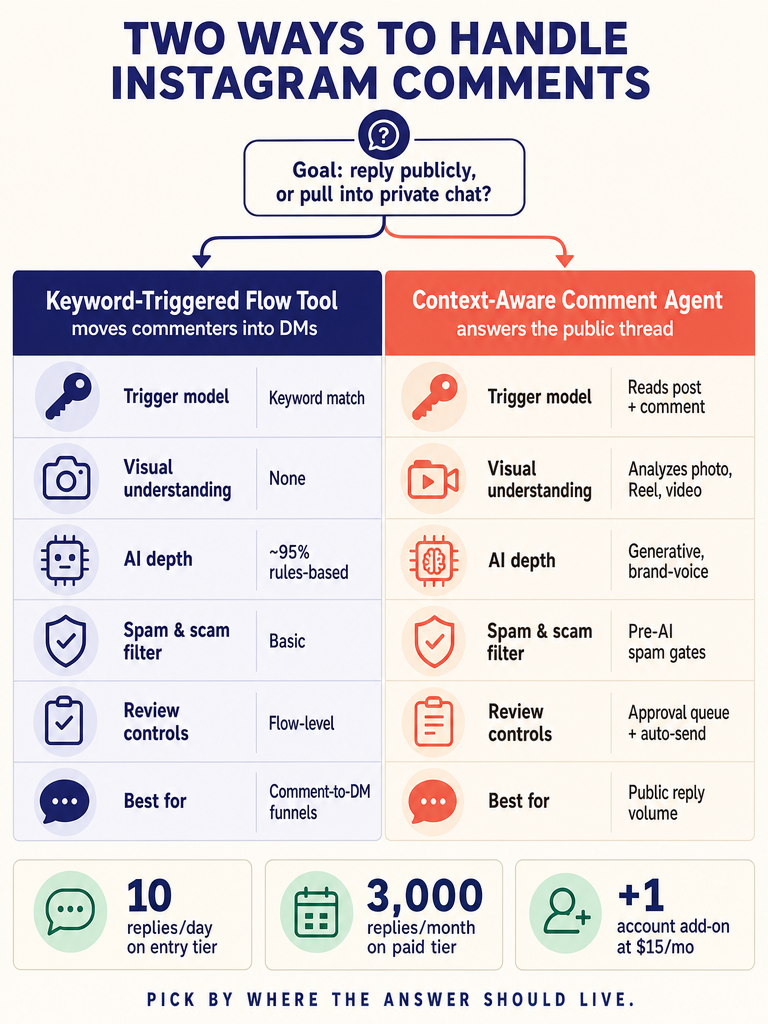
ManyChat automation is a no-code, flow-based system for sending triggered replies across Instagram DMs, Facebook Messenger, WhatsApp, SMS, and email: most often used to turn a public Instagram comment into a private DM through a keyword trigger. ReplyMagic does a different job: it connects to an Instagram Business account through Meta/Instagram OAuth, watches public post comments in real time, and drafts brand-voice replies in the comment thread itself.
That distinction is the entire buying fork. Before you compare features, decide which job you're hiring the tool for:
| Job to be done | What you actually want | Better fit |
|---|---|---|
| Move commenters into a private DM funnel | Keyword trigger → DM with link, lead magnet, or sales flow | ManyChat |
| Answer the public thread cleanly at volume | Context-aware replies in your voice on every comment, not just the ones using a keyword | AI comment agent like ReplyMagic |
| Capture an email or run a broadcast | List growth, drip sequences, opt-ins | ManyChat |
| Handle launch-day, viral Reel, or product-drop comment floods | Spam filtering, brand voice, per-post context, approval controls | AI comment agent like ReplyMagic |
If your goal is the public comment section itself, a comment-to-DM funnel tool is solving an adjacent problem, not yours. DMtracker frames the comment-to-DM model precisely: the comment is the social proof, and the DM is where the selling happens. That's a lead funnel. It's not a strategy for the other 95% of comments: the ones asking about price, sizes, booking, availability, and "is this still in stock?"
Is ManyChat AI or Rules-Based?
It's overwhelmingly rules-based. According to SetSmart's analysis, ManyChat automation is approximately 95% rules-based, with a single ManyChat AI Step that can answer free-text questions from a small knowledge base: and deeper generative AI typically requires wiring a webhook out to OpenAI. That's not a knock; it's a design choice that fits its core use case of triggered flows.
The label "AI" gets stretched pretty thin in this category, so it helps to be specific. An AI comment agent, in the sense that matters for Instagram, should read each post, draft an open-ended reply, hold a brand voice, filter spam before generation, and give you review controls: not just match a keyword to a canned message.
| Capability | ManyChat | Generic AI (e.g., ChatGPT) | ReplyMagic |
|---|---|---|---|
| Connects to Instagram via Meta API | Yes | No direct connection | Yes (Meta/Instagram OAuth) |
| Reads the post's image, Reel, or video | No | No | Yes, via Google Gemini |
| Open-ended reply drafting | Limited (AI Step) | Yes, but offline | Yes |
| Brand voice from past replies and sign-offs | No | No | Yes |
| Pre-LLM spam filtering | Hide/block rules | No | Yes |
| Approval queue and per-post controls | Trigger settings | No | Yes |
As Hyperleap notes, ChatGPT doesn't connect to Instagram directly: so anyone hoping to drop a prompt and have it reply to comments is going to be disappointed. The real choice is between a rules engine and a comment agent that actually reads the post.
How Do You Set Up Comment Automation in ManyChat: and What Does That Miss?
In ManyChat, comment automation is built on the trigger-flow-action model SetSmart documents in its review: a trigger fires, a pre-built sequence runs, and an action completes (tag the contact, push to a spreadsheet, hand off to Zapier). For Instagram comments specifically, setup looks roughly like this:
- Connect the Instagram Business account through Meta.
- Choose the Facebook/Instagram Comments trigger and pick "any post" or a specific post.
- Set keyword conditions: require certain words, exclude others, or fire on any comment.
- Optionally restrict to first-level comments only.
- Define the public reply and/or the auto-DM that goes to the commenter.
- Tag the contact and route them into a flow (lead magnet, FAQ, booking link).
The blind spot is structural. Setup is built around triggers, not around understanding the post. Nothing in the flow looks at what the Reel actually shows, whether the carousel is a price list or a behind-the-scenes, or whether "is this available?" refers to the dress in slide three or the workshop in the caption. Reply200 puts it bluntly: a comment-to-DM tool is a DM funnel tool, not a comment-management tool: it doesn't handle the hundreds of comments that aren't trigger-word conversions.
Which Comparison Actually Helps: ManyChat vs. AI Comment Agents vs. Chatfuel?
The honest answer: most comparisons online are answering the wrong question. Rules-engine vs. Chatfuel, rules-engine vs. FlowGent, rules-engine vs. anything-else-in-DMs: those are useful if you're picking a DM automation platform. They don't tell you what to do about the public comment thread under your launch post.
Here's a cleaner way to slice it:
| Tool category | Best at | Weakest at |
|---|---|---|
| ManyChat | Comment-to-DM lead capture, broadcasts, simple FAQ paths, appointment links | Reading the post, open-ended replies, public-thread voice consistency |
| Chatfuel | Messenger-first flows with built-in generative AI | Instagram-native comment volume; SetSmart prices it at $169/month at 2,500 contacts vs. $29/month for ManyChat |
| FlowGent and similar AI DM tools | AI-driven DM responses | Still focused on DMs, not the public comment thread |
| ReplyMagic | High-volume public Instagram comments: launches, Reels, product drops, cohort enrollment, guest questions, service inquiries | Not a DM bot; won't run a multi-step sales funnel inside Instagram DM |
If your customer acquisition lives inside Instagram DMs, a rules-engine funnel tool is purpose-built. If your customer experience lives in the public comment thread, you need a tool that reads each post and replies in your voice: not a keyword router.
LoopReply makes the same observation from another angle: rules-engine tools dominate Instagram DM automation and comment-to-DM flows when acquisition lives there. But that's a specific job. SetSmart, even while rating ManyChat 7/10 and praising the price, calls it "fundamentally limited by its flow-based approach for users who need real conversations." The public comment thread is real conversation.
What Happens to Comments That Don't Use the Trigger Keyword?
In a keyword-rule system, nothing happens: or worse, the wrong thing happens.
This is the failure mode keyword automation papers over. Imagine a launch Reel hits 50k views and the comments roll in: "price?", "how much?", "still available?", "do you ship to Canada?", "what size is she wearing?", "is this the one from your story?", "drop the link 🙏". A keyword rule built for "PRICE" catches maybe a third of those. The rest sit there. Worse, the same keyword on a different post can trigger the wrong DM: picture "LINK" set up for a freebie firing on a post that's actually about a paid cohort.
This is what context-aware replies fix. ReplyMagic looks at the specific post and the specific comment before drafting, so:
- "how much?" on a product carousel gets the product price.
- "how much?" on a coaching launch gets the program price.
- "is this still available?" gets answered based on whether the post is a current drop or a throwback.
- "what size?" gets the size shown in the Reel, not a generic size chart.
The same comment means different things on different posts. Keyword rules can't tell the difference. A reader of the post can.
Repetitive questions about price, sizes, offers, booking, availability, enrollment, shipping, cancellation, and policies are exactly the kind of recurring volume an AI comment agent should be handling: without keyword roulette and without paying a VA to type the same five answers all day. (For a deeper walkthrough of how this works on launch posts, see how ReplyMagic reads each Instagram post before replying.)
Can the Tool Read the Reel, Image, or Video Before Replying?
This is the layer almost every comparison skips. Captions and keywords aren't enough when the answer depends on what's shown in the post.
ReplyMagic uses Google Gemini to analyze each post's photo, Reel, or video before a reply is drafted, so replies reference the actual visual content: not just the caption. That's the difference between a reply that says "thanks for asking!" and a reply that says "that's the linen midi in sand: runs true to size, link in bio."
A few Instagram-native scenarios where post-reading changes the answer:
- A hotel Reel showing a specific suite. Commenters ask "is this the one with the balcony?": the agent should know what the Reel actually shows.
- A product drop carousel. "Available in black?" depends on which slide they're looking at.
- A workout clip. "What's the move at 0:14?" needs the video to answer.
- A menu photo. "Is this gluten-free?" depends on the specific item shown.
- A travel itinerary post. "Which day was this?" needs the image, not the caption.
- A coaching launch. "Is this still open?" depends on whether the post is the open-cart announcement or last cohort's recap.
Keyword rules can't do any of this. Generic AI tools without Instagram access can't do any of this. The competitor pages reviewed for this article: even the ones marketing themselves as "real AI" alternatives: discuss DM flows and keywords, not visual post understanding.
How Should Repetitive Price, Size, Booking, Enrollment, and Policy Questions Be Handled?
Not every question deserves the same treatment. The working rule: auto-send the obvious, queue the gray area, redirect the sensitive.
| Question type | Recommended handling | Why |
|---|---|---|
| Price, sizes, availability, shipping, hours | Auto-send | Facts, low risk, high repeat volume |
| Booking, enrollment for open cohorts | Auto-send with link | Clear answer, clear next step |
| Custom orders, partnerships, bulk | Approval queue | Needs a human judgment call |
| Medical, financial, or legal questions | "DM me" redirect | Public thread is the wrong place |
| Complaints or refund requests | "DM me" redirect | Move to private channel before it escalates |
| Spam, scam links, crypto bait | Block before AI | Don't waste a reply on it |
Brand voice is what makes auto-send safe. ReplyMagic conditions replies on the connected account's actual past replies, tone preferences, emoji habits, and sign-offs: so the auto-sent answer to "price?" sounds like the brand wrote it, not like a chatbot template. That's the mechanism behind voice consistency: not a "tone slider," but real historical replies as the reference signal.
For the recurring "is this still available?" problem specifically, ReplyMagic's context-aware answer flow walks through how the post's actual status drives the response.
What Controls Keep AI Comment Automation From Going Rogue?
Control-first buyers: and you should be one: care more about what the tool won't do than what it will. The right comparison isn't "keyword exclusions vs. no exclusions." It's the full layered stack.
Here's what to look for:
- Pre-LLM spam gates. Scam links, crypto bait, follower-for-follower spam, and abusive comments should be filtered before AI is ever called. No reply, no wasted generation, no embarrassing thread.
- Approval queue / review mode. Every draft sits in a queue for human approval before going live. Start here when you launch.
- Auto-send mode with guardrails. Once you trust the voice, let obvious questions auto-send while uncertain ones stay queued.
- Per-post settings. Turn automation off on sensitive posts (memorials, apologies, hard launches you want to handle by hand).
- Exclusion phrases. Specific words or phrases that always route to human review.
- Sensitive-topic routing. Medical, mental health, financial, or legal questions get a "DM me" redirect, not a public answer.
- Multilingual handling. ReplyMagic replies in whatever language the commenter wrote in: automatic, not a setting you have to configure per market.
This is also where the public-comments vs. DM distinction matters again. ReplyMagic is for public Instagram comments and will suggest "DM me" redirects when a question belongs in private: but it doesn't pretend to be a DM bot running a multi-step sales conversation. Different jobs, different tools.
Who Should Not Use ManyChat in 2026: and How Should You Choose Instead?
ManyChat is the right answer if your job is a simple comment-to-DM funnel, a lead magnet delivery, broadcast flows, or a basic FAQ path inside DM. According to SetSmart, over a million businesses use it for exactly that, and SetSmart prices its paid plans at $14, $69/month: a reasonable price for that job.
It's the wrong answer if any of these describe you:
- Public comments are piling up faster than you can answer, especially during launches, Reels, or product drops.
- The post's image, Reel, or video changes the right answer: keywords and captions aren't enough.
- Brand voice consistency matters because multiple teammates reply, or because every reply is in front of your whole audience.
- You serve international commenters and want answers in whatever language they wrote in.
- Spam, scam links, and crypto bait keep slipping through.
- You're paying a VA or community manager mostly to type the same five answers all day.
For those jobs, an AI comment agent that reads the post first is the better fit. ReplyMagic's plan limits, if you want the numbers straight:
| Plan | Replies | Instagram accounts | Price |
|---|---|---|---|
| Free | 10 AI replies/day | 1 | $0 |
| Pro | 3,000 replies/month | 1 | See pricing page |
| Extra account add-on | +3,000 replies/month | +1 | $15/month |
External pricing for other tools shifts often: we've kept the ManyChat ($14, $69/month per SetSmart) and Chatfuel ($169/month at 2,500 contacts per SetSmart) numbers attributed to their published source rather than restating them as gospel.
The cleanest decision rule: if your customer acquisition lives in DM, use a DM funnel tool. If your customer experience lives in the public comment thread, use an agent that reads each post and replies in your voice. Most brands need both: just don't ask one tool to do the other one's job.
Ready to stop typing the same five answers under every Reel? Get started with ReplyMagic and connect your Instagram account in a couple of minutes.
Frequently asked questions
Can I use both a DM funnel tool and an AI comment agent at the same time?
Yes, and most active brands probably should. A DM funnel tool handles comment-to-DM lead capture and broadcast sequences; an AI comment agent handles the public thread: price questions, size questions, availability, booking: that never get a keyword trigger. They solve adjacent jobs, not the same one.
What happens to spam and scam comments before the AI replies?
ReplyMagic runs pre-LLM spam gates that catch scam links, crypto bait, and follower-for-follower spam before the AI is ever called: so no reply is generated, no generation credit is wasted, and the junk never gets a public response that embarrasses the brand.
Do I have to set up separate rules for every language my followers comment in?
No configuration needed. ReplyMagic replies in whatever language the commenter wrote in: it's automatic, not a per-market setting you have to build out.
How do I keep AI replies from going live before I've reviewed them?
Start in approval queue mode: every drafted reply sits in a review queue until you approve it. Once you trust the voice match, you can flip high-confidence question types: price, sizing, availability: to auto-send while keeping edge cases and sensitive topics queued for a human.
What's the free plan limit, and when do I need to upgrade?
The Free plan covers 10 AI replies per day on one Instagram account at no cost: enough to test voice match and approval flow before a launch. Pro unlocks 3,000 replies per month; if you manage more than one account, each additional account adds 3,000 replies for $15/month.
Sources
- Best ManyChat Alternative for Instagram DM Automation (2026)www.flowgent.ai
- Auto-reply to comments • Trigger DMs from keywords • Automate ...www.instagram.com