Instagram Comment Automation for Course Launch FAQs
Instagram comment automation before a launch should answer price, dates, and availability publicly, then route sensitive questions to DM.

For a course launch, should you automate public Instagram comment replies, send people to DMs, or use both?
Use both, split by question type: automate the obvious public answers, route the sensitive ones to DM. During a launch, the same five questions repeat under every post: price, start date, whether spots are still open. Those belong in public comments where the next reader sees them too. Personal enrollment status, payment issues, or "is this right for me?" belong in a DM. Creatorflow says automating an Instagram course launch funnel can save 10-15 hours of manual DM work per launch and reports a 5-10% comment-to-enrollment conversion across that funnel (Source: Creatorflow).
The trap is treating everything as a DM trigger. Most launch guides push a single move: comment a keyword, get a DM. That works for lead capture, but it leaves your public thread full of unanswered "how much?" comments while you funnel people elsewhere.
Public replies do real work. A clear price answer under a viral Reel saves the next 40 people from asking. ReplyMagic responds to public Instagram comments and can suggest a "DM me" redirect for sensitive questions: it is not a DM bot.
When in doubt, ask whether the answer helps the whole audience or just one commenter.
What is Instagram comment automation?
Instagram comment automation is software that detects new comments on your posts and either replies to them publicly or triggers a follow-up action, like sending a direct message. It runs through Meta's official API on a connected Instagram Business account. Creatorflow describes the common version as DM automation that "sends direct messages automatically when followers comment on posts, reply to stories, or send specific keywords" (Source: Creatorflow).
For course launches, two jobs hide under that one term. One is the public comment reply: the answer that appears under your post for everyone to see. The other is the comment-to-DM trigger: a private message fired after a comment, usually keyed to a word like "ENROLL."
They solve different problems. DM triggers capture leads. Public replies handle the repetitive FAQ flood your launch generates. Most ranking guides cover only the DM side, which is why launch threads still fill with unanswered questions.
How do you auto-reply to Instagram comments and send automatic DMs?
There are two automation paths, and a launch usually needs both. The first replies under the post; the second messages the commenter privately. ReplyRush says comment-to-DM automation can send an instant personalized DM within 2 to 5 seconds of a comment (Source: ReplyRush): fast, but it only fires when someone uses the exact trigger word.
The public-reply path works differently:
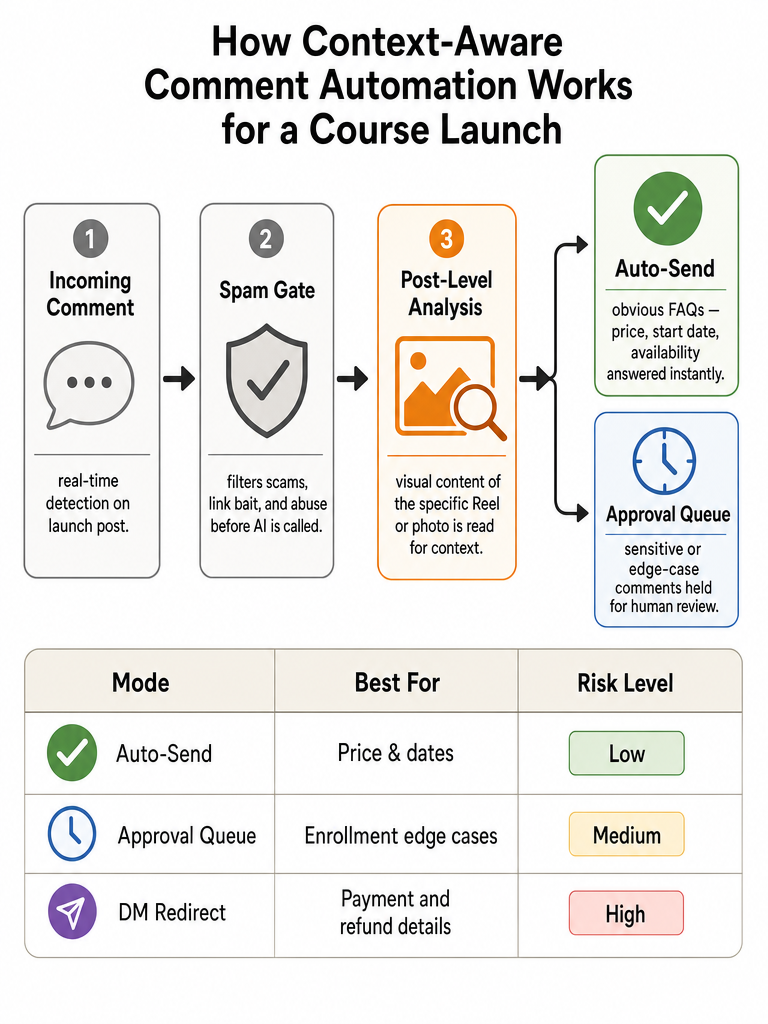
- Connect an Instagram Business account through Meta/Instagram OAuth.
- The tool watches incoming comments on your posts in real time.
- A spam gate filters scams, link bait, and abuse before anything else runs.
- The system drafts a reply that answers the actual question.
- You either approve it in a queue or let obvious questions auto-send.
The DM path adds a keyword trigger and a pre-written message sequence. One beginner tutorial claims you can set a basic DM automation up "in less than 10 minutes" (Source: "How to Automatically Reply to Instagram DMs," YouTube).
The split that matters: DM automation captures the lead, public-reply automation handles the FAQ flood: most tools only do the first.
Context-aware Instagram comment automation vs keyword triggers for launch posts
Keyword triggers fire on a word; context-aware automation reads the post first. That difference decides whether your launch replies make sense. A keyword rule set to "price" will answer the same way whether the comment lands on your $97 cohort or a free workshop Reel: and it misfires the moment someone types "price" on the wrong post. Launch questions depend on the specific Reel, offer, cohort, and deadline. A trigger doesn't know which.
Here's how the two approaches handle a launch thread:
| Situation | Keyword trigger | Context-aware automation |
|---|---|---|
| "How much?" on two different offers | Same canned answer on both | Reads each post, answers the right price |
| Comment with no trigger word | Ignored | Still understood and answered |
| Question about what the Reel shows | Can't reference the video | References real visual context |
| Wrong post fires the rule | Embarrassing misfire | Tied to that post's facts |
ReplyMagic reads the post's photo, Reel, or video with Google Gemini before drafting, so the reply references what's actually in the post: not just the caption (Source: ReplyMagic). That's the difference between context and triggers. For a deeper breakdown, see why keyword bots keep failing on launch posts.
What is a context-aware Instagram comment automation tool?
A context-aware Instagram comment automation tool analyzes each individual post before drafting a reply, then matches the answer to that post's actual content and your brand voice. It doesn't wait for a trigger word. It reads the comment, checks what the post shows, and writes a public reply that fits.
Three things define the category. First, post-level analysis: the tool examines the specific photo, Reel, or video instead of relying on the caption alone: ReplyMagic uses Google Gemini for this step (Source: ReplyMagic). Second, brand-voice conditioning: replies are anchored on the connected account's past replies, tone settings, emoji habits, and sign-offs. Third, public-comment drafting: the output lands under the post for everyone, not just in a private DM.
Context, not triggers: the reply knows which launch post it's answering.
This is the gap most launch guides skip. They cover keyword-to-DM funnels and leave the public thread on autopilot or, worse, on a misfiring rule.
How can I implement Instagram comment automation before my launch?
Set it up in the quiet week before launch day, not during the flood. Creatorflow says funnel setup takes 15-30 minutes total (Source: Creatorflow), but the prep that prevents misfires is worth more than speed. Here's the order that keeps you in control:
- Connect through Meta/Instagram OAuth. Use an Instagram Business account and the official connection: not scraping. See the safe API path.
- Configure per-post settings on each launch post. Tie the automation to the specific Reel or carousel so answers match that offer.
- Cover the obvious FAQs. List the repeat questions: price, start date, prerequisites, availability, enrollment status. Make sure the tool can answer each from real facts.
- Turn on review mode first. Run every draft through an approval queue for the first hours of launch. Watch what it writes.
- Set exclusion phrases. Block auto-replies on anything sensitive: refunds, medical claims, personal situations.
- Confirm the spam gate is on. ReplyMagic runs pre-LLM spam gates that filter scams, link bait, and abuse before the AI is ever called (Source: ReplyMagic).
- Graduate the easy stuff to auto-send. Once the queue proves itself, let price and availability answer automatically.
For a full walkthrough, see how to set up replies that sound like you.
Which course launch FAQs should be auto-answered, reviewed, or sent to DM?
Sort launch questions by risk: factual repeats auto-send, judgment calls get reviewed, and anything personal goes to DM. The rule is simple: if the answer is the same for everyone and carries no liability, automate it publicly. If it depends on one person's situation or touches money and policy, slow down.
| Question type | Handling | Why |
|---|---|---|
| Price, start date, availability | Auto-answer publicly | Same answer for all; helps the whole thread |
| Prerequisites, format, what's included | Auto-answer publicly | Factual, repeats constantly |
| "Are spots still open?" | Auto-answer, update at close | Time-sensitive but factual |
| Certification details | Review first | Easy to overstate; needs accuracy |
| Refund / cancellation policy | Review or DM | Policy language matters |
| "Is this right for me?" | DM redirect | Personal, needs a real conversation |
| Payment problems, enrollment status | DM redirect | Account-specific, often private |
Auto-answer the questions whose answers are identical for every commenter; route everything tied to one person's money or fit into a DM.
Set exclusion phrases on refund and medical-adjacent terms so they never auto-send. ReplyMagic can suggest a "DM me" redirect for sensitive questions rather than answering them publicly.
How ReplyMagic handles course launch FAQs without sounding robotic
ReplyMagic reads each launch post before it writes, then drafts in your voice: so the reply matches the actual Reel and doesn't sound canned. Google Gemini examines the post's photo, Reel, or video first, which means a reply under your cohort announcement references what's actually shown, not a generic template (Source: ReplyMagic). That's the fix for the two launch problems guides ignore: misfiring on the wrong post, and replies that read like a bot.
Voice comes from mechanism, not a tone slider. Replies are conditioned on the connected account's past replies, tone preferences, emoji habits, and sign-offs. Across teammates and posts, the voice holds steady because it's anchored to your real reply history.
Control stays with you. Run the approval queue to review every draft during the launch peak, or switch obvious questions: price, sizes, availability, booking, enrollment: to auto-send. Per-post settings, exclusion phrases, and pre-LLM spam gates keep scams and link bait out of the workflow before the AI is ever called (Source: ReplyMagic).
The plans fit launch volume. Free covers 10 AI replies per day on one account. Pro covers 3,000 replies per month. Each extra Instagram account is $15/month for one more account and 3,000 more replies (Source: ReplyMagic).
See how ReplyMagic survives launch comment floods without hiring a VA.
How to choose Instagram comment automation for course or waitlist signups
Pick the tool that handles public replies and DM routing: not just one. A waitlist needs both: a public answer for "when does it open?" and a private route for personal enrollment questions. Score every option against the launch jobs you actually have.
Use this checklist:
- Public comment replies, not just keyword DMs. Many tools only fire DMs after a trigger word. Confirm it answers under the post.
- Per-post context. Does it read the specific Reel or carousel, or fire the same answer everywhere?
- Brand voice from real history. Replies should match your past replies, tone, and sign-offs: across teammates.
- Control settings. Look for an approval queue, review mode, per-post settings, and exclusion phrases by name.
- Spam filtering. Scams and link bait should be filtered before the AI runs.
- Official Meta OAuth. Connection through Meta/Instagram OAuth, not scraping.
- Volume headroom. Match plan limits to launch peaks: ReplyMagic's Pro covers 3,000 replies per month, with $15/month per extra account.
- Multilingual coverage. ReplyMagic replies in whatever language the commenter wrote in: automatic, not a setting.
For a head-to-head on the two jobs, read DM funnels vs. better public replies.
What to read next if launch comments start flooding in
When a launch post takes off, the next move depends on what's breaking. These guides go deeper on each piece:
- How to survive a viral post and reply to a comment flood after a launch: triage when the queue explodes.
- What context-aware automation is and why keyword bots keep failing: the case for reading the post, not the trigger.
- How to set up auto-replies that actually sound like you: the setup walkthrough.
- Are Instagram comment bots safe in 2026?: official API vs. scraping.
- How ReplyMagic reads each post before replying: the mechanism behind context-aware drafts.
Ready to answer your launch FAQs without typing the same reply all day? Get started with ReplyMagic.
Frequently asked questions
How do I implement Instagram comment automation before my course launch?
Set it up the quiet week before launch day: not during the flood. Connect your Instagram Business account through Meta/Instagram OAuth, configure per-post settings on each launch post, then run every draft through an approval queue first. Creatorflow puts total funnel setup at 15-30 minutes. Once the queue proves the voice and accuracy, graduate price, availability, and start-date questions to auto-send. Don't flip to auto-send on day one.
What is a context-aware Instagram comment automation tool?
It's a tool that reads each post before drafting a reply: not after a trigger word fires. ReplyMagic uses Google Gemini to analyze the actual photo, Reel, or video, so a reply under your cohort announcement references what's shown in that post, not a generic template. Brand voice is anchored to the connected account's past replies, tone preferences, and emoji habits. The output lands publicly under the post, visible to every future commenter.
Which course launch FAQs should be auto-answered publicly versus sent to DM?
Auto-answer publicly when the answer is identical for every commenter: price, start date, availability, prerequisites, and what's included. Route to DM when the question is tied to one person's situation: payment problems, enrollment status, or "is this right for me?" Set exclusion phrases on refund and medical-adjacent terms so they never auto-send. A clear price answer under a viral Reel saves the next 40 people from asking the same thing.
How does context-aware Instagram comment automation differ from keyword triggers on launch posts?
Keyword triggers fire on a word; context-aware automation reads the post first. A keyword rule set to "price" returns the same canned answer whether the comment lands on your $97 cohort or a free workshop Reel: and it misfires the moment someone types that word on the wrong post. Context-aware tools match the reply to the specific offer, deadline, and visual content of that exact post. Comments with no trigger word still get answered.
What are the pricing plans for high-volume Instagram comment automation?
ReplyMagic's Free plan covers 10 AI replies per day on one Instagram account. Pro covers 3,000 replies per month on one account. Each additional Instagram account costs $15/month and adds 3,000 more replies. For launch peaks that spike past 3,000 comments in a month, adding an account slot is the scaling lever: not a separate enterprise tier.
How do I install Instagram comment automation for booking inquiries on my service business posts?
Connect your Instagram Business account through Meta/Instagram OAuth: the official path, not scraping. Configure per-post settings so booking-related Reels answer price, availability, and scheduling questions automatically. Turn on the approval queue first to confirm replies match your actual offer. For anything account-specific: deposit amounts, personal availability: set those terms as exclusion phrases or add a "DM me" redirect so the public reply doesn't overpromise.
Sources
- How to Automatically Reply to Instagram DMs (Beginner Guide)www.youtube.com
- Comment & DM Automation: Instagram Auto-Reply Guidescreatorflow.so
- How to stop instagram comments automation? - Facebookwww.facebook.com
- How to Automate Your Instagram Course Launch Funnelcreatorflow.so