How to Set Up Instagram Comment Auto-Replies That Actually Sound Like You
Set up Instagram comment auto-replies with context, not triggers. ReplyMagic reads each post, matches your voice, and handles repeat questions fast.
What are Instagram comment auto-replies, and why do they matter during launches?
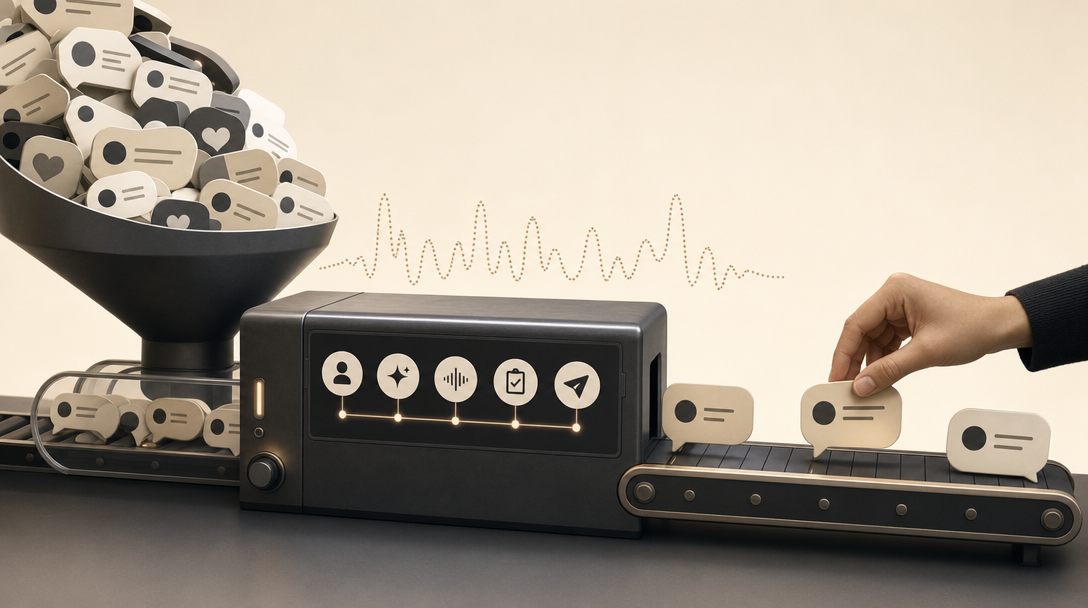
Instagram comment auto-replies are automated responses to public post comments: the visible thread under a Reel, photo, or carousel: not private DMs. They matter most during launches, viral Reels, product drops, cohort enrollment windows, and seasonal booking surges, when one post can attract hundreds of repeat questions about price, sizes, availability, shipping, and policies in a few hours.
Public comments are brand-visible; every unanswered "how much?" is a missed sale and a quiet credibility leak.
The trap most teams fall into: they conflate three different things: DM instant replies, comment-to-DM funnels, and actual public comment replies. Native Meta Business Suite Instant Replies and Away Messages cover DMs, not comments. Comment-to-DM flows ask people to type a keyword to trigger a private message. Neither answers the question publicly, in your voice, referencing the actual post.
ReplyMagic is built for the third category. It connects to an Instagram Business account through Meta/Instagram OAuth, watches new post comments in real time, and drafts replies that reference what each specific post actually shows. Repeat questions get handled. Edge cases stay in your queue. Your brand voice stays consistent even when the comment volume goes vertical.
Instagram auto reply: native vs advanced, what's the difference?
Instagram natively supports auto-replies for direct messages, not for public post comments. Inside Meta Business Suite, you can open Inbox, click Automations, hit Create Automation, and set up an Instant Reply or Away Message: but those messages live in the DM inbox. They send the same canned text to everyone and have no awareness of which post a person commented on.
That's where "advanced" starts. Advanced comment workflows fall into two buckets:
| Approach | What it does | Where it breaks |
|---|---|---|
| Native Instant Replies (Meta Business Suite) | Sends a fixed DM when someone messages you | Same reply to everyone; no public comment coverage |
| Comment-to-DM keyword funnels | Reply pings a DM when a comment contains a keyword | Reddit-documented "comment WORD" pattern; ignores post context |
| Custom Instagram Webhooks builds | Developer pipes new comments to an AI and posts a reply | Engineering lift, no built-in voice, no spam gates |
| Context-aware comment assistants (ReplyMagic) | Reads the post's image/Reel/video, drafts a public reply in your voice | Requires Instagram Business and OAuth setup |
According to Jotform's Instagram Agent documentation, a proper comment workflow lets you pick whether replies apply to all your posts or only certain ones, plus the comment type to handle. Native automations don't offer that. DM-first content on YouTube, Reddit threads about "comment a word" flows, and broad 2026 round-ups from Spur all sit on the DM or keyword side of the line. If the tool replies in the DM inbox, it isn't answering your public comments.
How to set up an auto-reply on Instagram step by step?
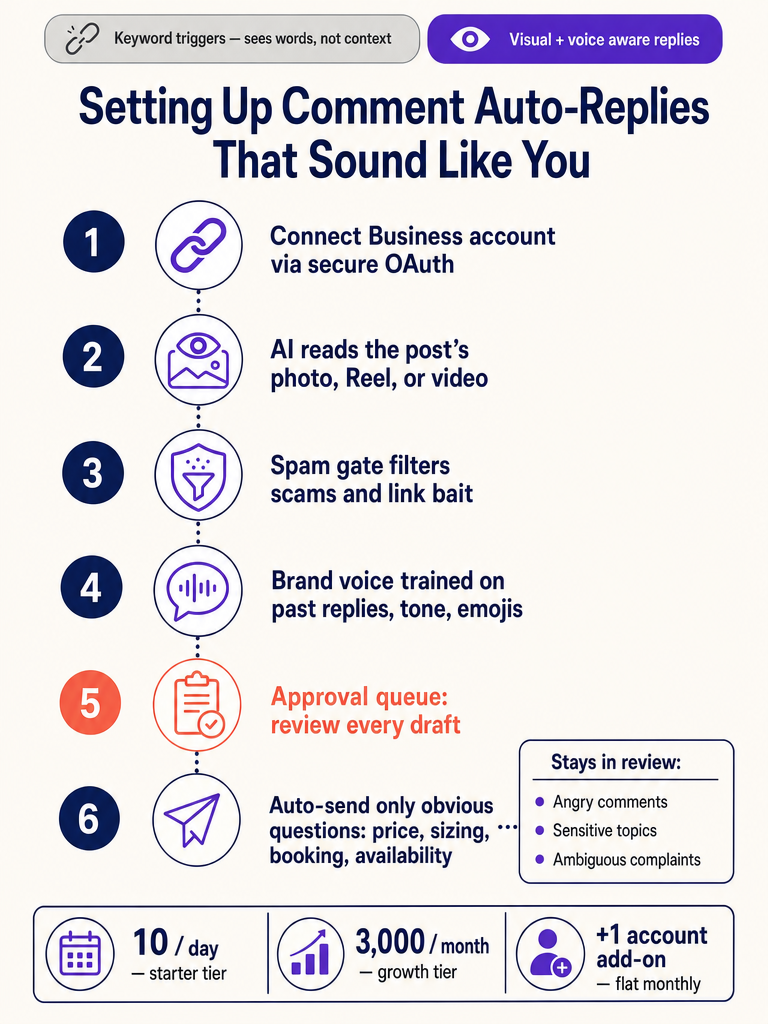
Here's the practical sequence for setting up a context-aware Instagram comment assistant this week:
- Switch to an Instagram Business account. Personal accounts can't connect through the official Meta Graph API. If you're on Creator or Personal, convert in Instagram settings first.
- Connect through Meta/Instagram OAuth. In ReplyMagic, authorize the Instagram Business account you want to monitor. This is the same official OAuth flow Meta requires: no scraping, no password sharing.
- Let ReplyMagic watch new post comments in real time. Once connected, incoming comments start appearing in your ReplyMagic dashboard within seconds of being posted.
- Start in approval-queue mode. Every draft reply lands in a queue for you to approve, edit, or reject. This is the test phase: don't skip it.
- Set your tone and brand voice inputs. ReplyMagic conditions drafts on your real past replies, emoji habits, sign-offs, and any tone preferences you provide. The more historical replies it sees, the closer the drafts land.
- Add per-account guardrails and exclusion phrases. Block topics you never want auto-answered: refunds, medical claims, pricing for custom services, anything legal-adjacent.
- Test on a live post. Pick a recent Reel or product post with active comments. Review 20, 30 drafted replies. Edit anything that sounds off; ReplyMagic learns from your corrections.
- Enable auto-send only for obvious questions. Once voice and accuracy feel right, flip auto-send on for the easy questions: price, sizes, availability, booking, shipping, enrollment, cancellation, policies. Keep everything else in review.
Skip the keyword-rule maze and let ReplyMagic read each post before drafting a reply in your voice: Get started with ReplyMagic.
Compare that to the custom route. A Medium write-up on Instagram Webhooks shows you can pipe each new comment to an AI and post the response: but you'd own the spam gates, the voice training, the per-post controls, the OAuth refresh logic, and the failure modes. For most creators, coaches, hotels, and service businesses, that engineering bill never pays itself back.
How do you choose all posts, selected posts, or per-post settings?
The post-scope decision is the single biggest source of "this auto-reply embarrassed us" stories. Get it right by matching scope to risk.
- All-post coverage makes sense for evergreen accounts where the same FAQ-style questions repeat across most posts: boutique e-commerce, hotels, established service businesses with stable pricing.
- Selected-post coverage is safer when you have a mix of launch posts, paid offers, and content that shouldn't generate replies (apologies, statements, sensitive announcements).
- Per-post settings are the highest-control option. Each post can have its own answer set, exclusion phrases, and auto-send toggle. This is what you want during a cohort enrollment, a product drop with limited inventory, or a Reel promoting a specific room rate or service package.
Exclusion phrases are the safety net that keeps automation from firing on the wrong launch. Add the names of competitor products, last season's pricing, sunset offers, and any topic ("refund", "complaint", "broken") that should always stay human. ReplyMagic also routes those flagged comments to your review queue instead of auto-sending.
Why do keyword auto-replies feel spammy, and how does post context fix it?
Keyword auto-replies feel spammy because they react to words, not posts. A trigger that fires on the word "price" can't tell whether the post is a $20 ebook, a $4,000 retreat, or a behind-the-scenes Reel where pricing isn't even relevant. The reply lands, the commenter clocks the mismatch, and the brand looks lazy.
Triggers see strings; context-aware AI sees the actual post.
ReplyMagic uses Google Gemini to analyze the post's photo, Reel, or video before drafting a reply. If your Reel shows three color variants of a bag, the draft can reference those colors. If your carousel is a hotel suite with an ocean view, the draft can mention the view. If the Reel is a yoga flow, the draft knows it's a movement post, not a product post. For a deeper look at the mechanism, see how ReplyMagic reads each Instagram post before replying.
The Inrō keyword-automation guide makes the same observation from the other side: keyword replies sound robotic when they "ignore what the person asked, send a long paragraph, or drop a link immediately." Fixing that with longer keyword lists doesn't scale. Reading the post does.
| Failure mode (keyword rules) | Context-aware fix (ReplyMagic) |
|---|---|
| "price" fires on a free Reel | Gemini sees the post isn't a product, drafts a friendly non-pricing reply |
| Wrong product details quoted | Reply references the actual item visible in the post |
| Identical canned answer to 50 commenters | Each draft varies in phrasing while keeping your voice |
| Link dropped regardless of question | Link only included when the question warrants it |
How do you make auto-replies sound like your brand voice?
Brand voice isn't a tone slider. It's a function of the words, emojis, and sign-offs you actually use. ReplyMagic conditions drafts on your real past replies, emoji habits, sign-offs, and account-level tone settings: not a generic "friendly" or "professional" preset.
Practically, that means:
- Replies pull from how your account has historically answered "is this still available?": not a template library.
- If you sign off with "xx" or ", J" or no sign-off at all, drafts mirror that.
- If you use one emoji per reply max, drafts respect that ceiling.
- If your coaching brand never uses exclamation points, drafts won't either.
The test phase matters here. Run drafts through the approval queue for at least a few days before trusting auto-send, especially if multiple teammates have been replying in different styles. That's when you'll catch drift: and your corrections feed back into how future drafts are written.
For creators, the win is consistency under volume. For coaches and cohort-based programs, it's prerequisite and enrollment questions sounding like the lead instructor, not a help desk. For hotels and travel brands, it's a tone that matches the property: relaxed beach club versus polished urban hotel: instead of one beige hospitality voice. E-commerce shops and wellness teams get the same benefit: replies that read like the brand, not like an FAQ bot.
Where can I find an AI Instagram comment assistant with safe auto-send?
Safe auto-send means automating only the obvious, factual, repeat questions: and leaving everything else for human review. That's the line.
Auto-send these:
- Price and pricing tiers
- Sizes and fit
- Booking availability and dates
- Course or cohort enrollment status
- Shipping timelines
- Cancellation and refund policy basics
- Product specs that are documented and stable
Keep these in review:
- Angry or complaint-shaped comments
- Sensitive wellness, medical, or mental-health questions
- Ambiguous or sarcastic comments
- Legal-adjacent topics (allergens, claims, guarantees)
- Anything that should redirect to a DM
ReplyMagic's control stack is built around that split. The mechanisms by name:
| Control | What it does |
|---|---|
| Approval queue | Every draft goes to a queue; nothing posts until you approve |
| Review mode | Auto-send paused account-wide while you audit drafts |
| Per-post settings | Different rules and auto-send toggles per post |
| Exclusion phrases | Topics or words that always route to human review |
| Spam gates | Pre-LLM filter for scams, crypto bait, link spam, and abuse |
| DM redirects | Public reply suggests "DM me" for sensitive questions |
That last point matters: ReplyMagic replies to public Instagram comments and can suggest a DM redirect when a question shouldn't be answered publicly, but it is not a DM bot. The split keeps the workflow honest. For more on staying inside Meta's guardrails, see are Instagram comment bots safe in 2026 and how to avoid getting your account flagged.
How do I get started with multilingual Instagram comment replies?
ReplyMagic replies in whatever language the commenter wrote in: automatically, no language setting to toggle. If a Reel goes viral and you get comments in Spanish, Portuguese, French, German, Japanese, and Hebrew in the same hour, each draft comes back in the commenter's language.
That matters for:
- Hotels and B&Bs answering booking questions from international guests across time zones.
- Travel creators and tour operators whose Reels routinely cross borders.
- Cohort-based courses and online programs with global enrollment.
- Service businesses and creators whose audience is more multilingual than their reply team.
You're not setting up "Spanish mode" for a campaign. You're just connecting the account and letting ReplyMagic match each commenter where they are. The voice conditioning still applies: your emoji habits and sign-offs translate alongside the substance.
How do Free, Pro, and multiple-account limits change your setup?
Pick a plan based on comment volume and how many Instagram accounts you actually manage, not feature charts.
| Plan | Replies | Accounts | Best for |
|---|---|---|---|
| Free | 10 AI replies per day | 1 | Solo creators testing the workflow on one live post |
| Pro | 3,000 replies per month | 1 | Launches, viral Reels, active e-commerce, single-property hotels |
| Pro + extra account add-on | +3,000 replies/month per add-on | +1 per $15/month add-on | Agencies, multi-brand teams, hotel groups, creators with a personal + brand account |
A practical read:
- Light testing or low-volume accounts: Free is enough to see drafts and refine voice before committing.
- Single-brand launches and cohort enrollments: Pro absorbs a launch week without rationing replies.
- Hotels with multiple properties, agencies, or creators running a personal + brand account side by side: stack the $15/month add-on per extra Instagram account. Each one comes with its own 3,000-reply pool.
- Surviving a viral moment: see how ReplyMagic handles launch comment floods without a VA.
If you're staring at a launch week, a Reel that just popped off, or an enrollment window where the same five questions are eating your team's day, the setup above takes an afternoon. Connect your Instagram Business account, run a day in the approval queue, and only auto-send the obvious answers once the voice sounds like yours: Get started with ReplyMagic.
Frequently asked questions
Does an Instagram comment auto-reply tool actually sound like me, or does it sound like a bot?
ReplyMagic conditions every draft on your real past replies, emoji habits, and sign-offs: not a generic tone preset. Run the approval queue for a couple of days, correct anything that sounds off, and those corrections sharpen future drafts so they land closer to how you actually write.
What's the difference between Instagram comment auto-replies and DM automation?
DM automation sends messages to a private inbox: native Meta Instant Replies and most keyword-trigger flows live there. Comment auto-replies answer the public thread under your Reel or post, where every unanswered question is visible to everyone scrolling past. ReplyMagic handles public comments and can suggest a 'DM me' redirect for anything that shouldn't be answered publicly, but it is not a DM bot.
How do I keep auto-replies from firing on the wrong post and embarrassing my brand?
Use per-post settings instead of blanket all-post rules, add exclusion phrases for topics like refunds, complaints, or sunset offers, and keep anything sensitive in the approval queue rather than on auto-send. Spam gates also filter scams and crypto bait before the AI is ever called, so your reply allowance isn't burned on junk.
Can the tool reply to comments in other languages automatically?
ReplyMagic replies in whatever language the commenter wrote in: no language setting to configure. If a Reel goes viral and pulls comments in Spanish, French, Japanese, and German in the same hour, each draft comes back in the commenter's language with your voice conditioning still applied.
How much does it cost to add a second Instagram account?
Each extra Instagram account is a $15/month add-on, and it includes its own pool of 3,000 replies per month. That makes it practical for agencies, multi-brand teams, hotel groups, or creators running a personal account alongside a brand account.
Sources
- How To Set Up DM Automation on Instagram to make morewww.youtube.com
- How to Set Up an Auto-Reply on Instagram (Step- ...www.instagram.com
- Instagram Auto Reply to Comments (2026 Guide) - Spurwww.spurnow.com
- How to Auto-Reply to Instagram Comments with Instagram ...www.jotform.com
- Instagram Keyword Automation: Auto-Reply That Sounds Humanwww.inro.social