
How to Respond to Instagram Comments Fast Without Sounding Canned
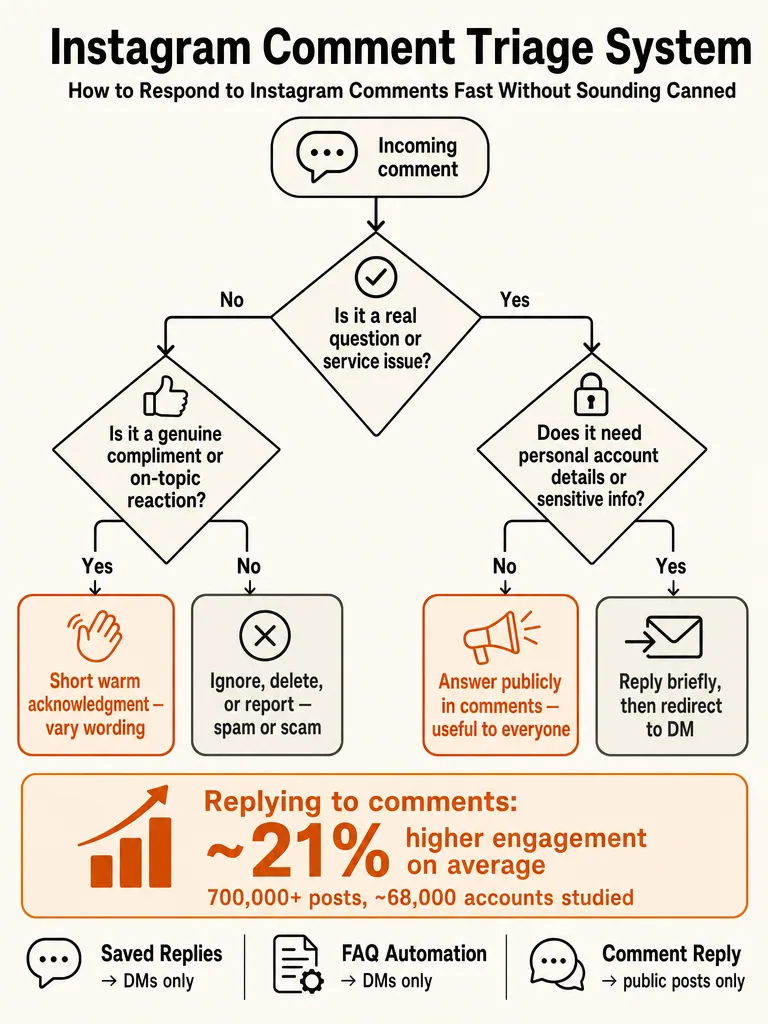
How to respond to questions on Instagram: use a 4-way triage, keep shared answers public, and move sensitive or account-specific comments to DMs.

How to respond to questions on Instagram without turning comments into a support ticket
The fastest way to handle Instagram questions is a four-way triage: answer public when the reply helps everyone, redirect to DMs when it's account-specific or sensitive, reply manually when the question is unusual, and ignore or report when it's spam. Jenn's Trends puts it plainly: answer questions and customer service issues accurately and promptly, then move the personal stuff to private messages.
Most of your comment volume is the same handful of questions on repeat. Price, sizes, offers, booking, availability, enrollment, policies, cancellation, shipping. Those belong in public replies, because the next fifty commenters have the same question and reading your answer once saves them from asking.
Here's the triage in practice:
| Comment type | Best move |
|---|---|
| Price, sizes, availability, shipping | Public reply, useful to everyone |
| Order status, refunds, account-specific | DM redirect |
| Sensitive or complex (health, disputes) | DM redirect, keep it human |
| Odd one-off question | Manual public reply |
| Spam, scam links, crypto bait | Delete or report |
The goal isn't to reply to everything the same way. It's to match the response to the job so your thread stays useful instead of becoming a queue.
Should you reply to every comment on Instagram?
No. Not every comment earns the same reply, and some earn none. Jenn's Trends breaks comments into types that each need a different play: genuine compliments, real questions, @mentions, and spam. Treating them identically is how brands end up thanking a scam bot.
For a real compliment, a quick "Thanks" or "Glad you liked this one" is fine, per Jenn's Trends, and matching the commenter's specifics makes you sound less like an autoresponder. Real questions get a real answer. When someone @mentions a friend to pull them in, address that intentionally, and remember you have to @mention people back so they actually see your reply.
Spam is the category to stop feeding. Jenn's Trends describes the "great pic! follow me back" pattern and the "you look great!" comment on a photo with no person in it. Those get deleted or reported, not answered.
Reply to what deserves a reply, and let spam sit unanswered or gone.
Replying still pays off where it counts: NapoleonCat cites that 75% of consumers say positive personal experiences make them loyal to a brand. That's an argument for quality over blanket coverage.
When should I reply to comments on Instagram?
Aim to answer Instagram questions within 24 hours, per TryPostbase's guidance on responding to questions. For actual questions and customer service issues, Jenn's Trends says respond as accurately and promptly as you can, because a slow answer to "is this still available?" is often the same as no answer.
Speed matters most in the first few hours after posting. NapoleonCat notes that Instagram treats an active comment section as a signal to push your content further, so early replies do double duty: they help the commenter and they help reach.
Launches, viral Reels, and product drops change the math. When one post floods a single inbox with the same five questions, 24 hours isn't fast enough to feel attentive. That's when you triage: high-intent questions first, obvious repeats batched, edge cases held for review.
Does replying to comments on Instagram boost engagement?
Yes, by about 21% on average. Buffer found that Instagram posts where creators replied to comments saw roughly a 21% engagement lift, based on data scientist Julian Winternheimer's analysis of more than 700,000 Instagram posts from nearly 68,000 accounts.
The method is what makes the number trustworthy. Rather than comparing big accounts to small ones, Buffer compared each account against its own baseline over time. So the lift reflects what happens when the same creator starts replying, not a size effect dressed up as a habit.
The Instagram result sits inside a larger cross-platform study. Buffer reports lifts ranging from 5% to 42% across six platforms, with Threads at 42% and LinkedIn at 30%. Instagram's 21% was one of the stronger effects.
| Platform | Engagement lift |
|---|---|
| Threads | 42% |
| 30% | |
| 21% |
Replying to your Instagram comments boosts engagement by around 21%, measured against each account's own baseline.
The practical read: being genuinely social on social media works, and now there's a number attached.
Which Instagram questions should stay public, and which should move to DMs?
Keep it public when the answer helps everyone; move it to DMs when it only helps one person or gets sensitive. Jenn's Trends recommends answering questions in the comments, then shifting to private messages when the issue needs a more personalized approach. Richpanel says the same for complex problems: take it private.
Public replies are for shared answers. Price, availability, sizing, shipping timelines, general policies, enrollment dates. One clear reply serves the whole thread and cuts the number of people asking the same thing.
DMs are for anything tied to one person or one order:
- Order status, refunds, account lookups
- Complaints that need back-and-forth
- Sensitive topics, especially health-adjacent questions
- Anything requiring personal details
The line to hold: don't let the public thread turn into a support ticket. A visible complaint handled in ten public replies reads worse than a fast "let's sort this in DMs" and a real resolution behind the scenes.
For sensitive questions, a public "DM me and I'll help" is often the right first move. It acknowledges the commenter, keeps the thread clean, and routes the detail somewhere private. This is where the comments-vs-DMs distinction actually earns its keep.
How do you answer repetitive questions without sounding copy-pasted?
Answer the actual question, reference the post when it helps, and skip the filler. The fix, drawn from Kerry Milne's guidance, is blunt: don't comment "Great post," don't summarize the post like a bot, don't force a joke. A Facebook group thread in the corpus adds the obvious step people skip: read the entire post, then answer what they actually asked.
Repetition is fine. Robotic repetition is the problem. The same price question can get slight variations that still carry the specific answer. These are illustrative templates, not real numbers:
- Price: "It's $48, and there's a bundle option in the link if you want two."
- Availability: "Still in stock as of today, grab it from the link in bio."
- Booking: "We've got Thursday and Friday open this week, DM me to lock a slot."
- Cancellation: "Free cancellation up to 48 hours before, no charge."
- Shipping: "Ships in 2 to 3 business days, tracking included."
The differentiator is post context. A generic tool answers "price?" the same on every post. A reply that references the exact item shown in the Reel reads like a person who knows what they posted.
This is what ReplyMagic is built for: it conditions replies on your past replies, tone, emoji habits, and sign-offs, so the answers vary the way yours would.
Ready to make your repeat replies sound like you? Get started with ReplyMagic.
Comment replies vs DMs vs Saved Replies: what works where on Instagram?
Saved Replies and FAQ automation live in DMs, not in public comment threads. Per the TryPostbase snippets, Instagram's built-in FAQ feature lets business and creator accounts set up to four preset questions with automated answers for new messengers, and Saved Replies are a DM tool. Public comment replies are a separate job with separate tools.
This distinction is where a lot of advice gets muddy. People hear "automate Instagram replies" and picture one system. In practice there are three lanes:
| Feature | Where it lives | What it does |
|---|---|---|
| Saved Replies | DMs | Reusable canned messages for direct messages |
| Built-in FAQ | DMs | Up to four preset Q&As for new messengers |
| Comment replies | Public thread | Answers visible to everyone on the post |
The takeaway: if you set up FAQ automation expecting it to answer "price?" in your comments, it won't. That's DM territory. Public comment questions need a tool aimed at the thread itself, which is a different problem than a DM autoresponder solves. ReplyMagic works on public comments, not DMs, and can suggest a "DM me" redirect when a comment should move private.
How to automate Instagram comments (and do you want to?)
Automating replies to comments on your own posts is safe; auto-commenting on other people's posts is spam. Vista Social draws the line clearly: outbound automation that scatters "Love this!" across dozens of accounts violates Instagram's terms and is the fastest way to get flagged, restricted, or banned. Inbound automation, replying to comments left on your own posts through Meta's official API, is fully supported.
The risk isn't hypothetical. Vista Social cites that 56.5% of marketers list fake or bot followers as their biggest influencer risk concern, and an account that only engages with spammy, bot-like responses gets treated the same way.
| Automation type | What it does | Status |
|---|---|---|
| Outbound | Comments on other people's posts | Violates Instagram TOS |
| Inbound | Replies to comments on your own posts | Supported via official API |
With inbound automation reaching an audience Vista Social puts at over 1.74 billion people worldwide, the question isn't whether to automate, it's how to do it without sounding like a bot.
That means answering with real facts, not blasting generic lines. For the full boundaries Meta enforces, our guide on what Meta allows for comment automation breaks down public replies, comment-triggered DMs, and follow-ups separately.
How can post-aware replies beat keyword-triggered replies?
Post-aware replies read the actual post before drafting; keyword replies fire on a matched word regardless of what the post shows. That difference is the whole game. A keyword rule that triggers on "price" answers the same way on a product Reel and a behind-the-scenes clip, which is how brands end up posting a reply that makes no sense.
ReplyMagic uses Google Gemini to analyze each post's photo, Reel, or video before generating a reply, so the answer references what's actually in the post, not just the caption and not a trigger. Context, not keywords.
The control layer is what keeps automation from going rogue:
- Approval queue: review every draft before it sends
- Review mode: hold edge cases for a human while obvious repeats flow
- Auto-send: let price, availability, sizing, and booking answers go out on their own
- Per-post settings: decide behavior post by post, so a sensitive post can stay manual
- Exclusion phrases: block replies to comments containing terms you flag
- Spam gates: pre-LLM filters catch scams, link bait, and abuse before AI is ever called
That last point matters for cost and safety: spam never reaches the model, so it never gets a polished reply. The scam bait just gets stopped.
A reply grounded in what the post shows beats a reply fired from a keyword, every time.
Our deeper explainer on context-aware automation versus keyword bots covers why triggers keep failing on real accounts.
How do you handle negative comments, spam, and scams?
Stay calm, address the real concern, move complexity to DMs, and delete or report the junk. Richpanel lays out the sequence for negativity: take a breath before responding, show you're listening and willing to help, then take complex issues private. Deleting is an option in certain situations, but not as your default, or you lose authenticity.
Spam and scams are a different category. Jenn's Trends notes that spam comments can be deleted and reported as spam or scam, and Instagram factors that feedback into its analysis of whether accounts follow its terms. So reporting isn't just cleanup, it feeds the platform's enforcement.
Two rules keep you out of trouble:
- Don't feed trolls. Engagement is what they want, and a public argument makes the thread worse.
- Don't manufacture bot-like engagement to bury criticism. That's the behavior Instagram flags.
A spam gate that filters scam links and crypto bait before they reach your reply flow keeps the whole thread cleaner from the start.
How do I reply to all the comments on Instagram when a Reel or launch takes off?
Prioritize high-intent questions, batch the obvious repeats, and hold edge cases for review. When a launch or viral Reel floods one inbox, blanket-answering in order wastes the first few hours that NapoleonCat says matter most. Sort by intent, not by timestamp.
The scale workflow:
- Answer high-intent questions first. "Is this still available?" and "how do I enroll?" are buyers. Handle them before compliments.
- Batch the repeats. Price, sizes, shipping, booking, and availability get the same core answer, varied so it doesn't read copy-pasted, and posted publicly so the whole thread benefits.
- Keep edge cases in review. Anything sensitive, account-specific, or unusual stays in the approval queue for a human.
- Use public replies for shared questions. One good public answer to "when does the cohort start?" saves you fifty individual replies.
- Route the private stuff to DMs. Order lookups and personal issues get a "DM me" redirect.
This is exactly the moment automation pays off, if it's post-aware and controlled. If you want the full playbook for a spike, see surviving a viral post comment flood, the approval queue versus full auto tradeoff, and safe auto-reply setup.
ReplyMagic's Free plan covers 10 replies a day; Pro handles 3,000 a month, with extra Instagram accounts at $15/month for another account and 3,000 more replies.
Frequently asked questions
Does replying to Instagram comments actually boost engagement?
Yes: by about 21% on average. Buffer data scientist Julian Winternheimer analyzed over 700,000 Instagram posts from nearly 68,000 accounts and found that creators who replied to comments saw that lift relative to their own baseline, not compared to bigger accounts. That controls for size effects. Threads came in at 42% and LinkedIn at 30%, making Instagram one of the stronger results in the six-platform study.
When should I reply to comments on Instagram?
Within 24 hours for most questions: but that window shrinks fast on launch days or viral Reels. NapoleonCat notes Instagram treats an active comment section as a signal to push content further, so early replies help reach too. A slow answer to 'is this still available?' is functionally the same as no answer. During a spike, sort by intent: buyers first, repeat questions batched, edge cases held for review.
Which Instagram questions should stay public and which should move to DMs?
Keep it public when the answer helps everyone scrolling: price, sizing, availability, shipping timelines, enrollment dates, general policies. Move to DMs when it's tied to one person: order status, refunds, complaints needing back-and-forth, or anything requiring personal details. A visible complaint handled across ten public replies reads worse than a fast 'let's sort this in DMs' followed by a real resolution behind the scenes.
Best alternatives to keyword-rule builders for Instagram comments
Post-aware AI replies beat keyword rules because they read the actual post before drafting: not just a matched word. A keyword trigger fires the same reply on a product Reel and a behind-the-scenes clip, which is how brands post replies that make no sense. ReplyMagic uses Google Gemini to analyze each post's photo, Reel, or video first, so the answer references what's actually shown. An approval queue, per-post settings, and spam gates keep the automation controlled.
How do I reply to all the comments on Instagram when a Reel or launch takes off?
Prioritize high-intent questions first: 'is this still available?' and 'how do I enroll?' are buyers. Batch obvious repeats like price, sizes, and shipping into public replies so the whole thread benefits. Hold anything sensitive or account-specific in a review queue for a human. One good public answer to a common question saves fifty individual replies. ReplyMagic's Pro plan handles 3,000 replies a month; the Free plan covers 10 a day.
How do you answer repetitive Instagram questions without sounding copy-pasted?
Answer the specific question, vary the phrasing slightly, and reference the post when it helps. The fix is blunt: don't summarize the post like a bot, don't force filler, read what they actually asked. The same price question can get slight variations: 'It's $48, and there's a bundle in the link' versus 'Grab it from the link in bio': that carry the real answer without sounding canned. Post context is the differentiator a generic tool skips entirely.
Sources
- What Should You Say? How to Respond to Comments on ...jennstrends.com
- Does replying to every comment actually do anything?www.richpanel.com
- How to reply to a post without sharing opinionsvistasocial.com
- 6 ways to comment like you mean it | Kerry Milnenapoleoncat.com
- Replying to Your Instagram Comments Can Boost ...www.reddit.com
- How To Respond To Instagram Comments: A 2026 Guidewww.linkedin.com