Can AI Reply to Instagram Comments Without Getting Your Account Flagged?
Learn how AI reply to Instagram comments safely with Meta OAuth, post context, spam gates, and controls that avoid bot-like behavior.

Can AI Reply to Instagram Comments Without Getting Your Account Flagged?
Yes: AI can draft and send Instagram comment replies without flagging your account, as long as the tool connects through Meta/Instagram OAuth, uses authorized Instagram API access, and only responds to user-initiated public comments. The risk isn't that AI wrote the sentence. The risk is bot-like behavior: identical replies on repeat, password-sharing tools, scrapers that mimic human clicks, and missing controls.
That distinction matters more during the moments AI is actually useful: a product drop, a viral Reel, a cohort launch: when one post can attract hundreds of repetitive questions about price, sizes, availability, booking, enrollment, shipping, or cancellation. A single overworked inbox plus a copy-pasted reply is exactly what Instagram's spam systems are tuned to catch.
The safer pattern: official API access, per-post context so every reply references what's actually shown, spam gates that filter scams before AI is ever called, and an approval queue for anything sensitive. Context, not triggers.
This guide walks through what actually gets flagged, where AI comment assistants differ from Instagram bots, how the 24-hour messaging window fits in (it doesn't apply the way most people think), and the controls a comment AI tool should give you before it sends anything.
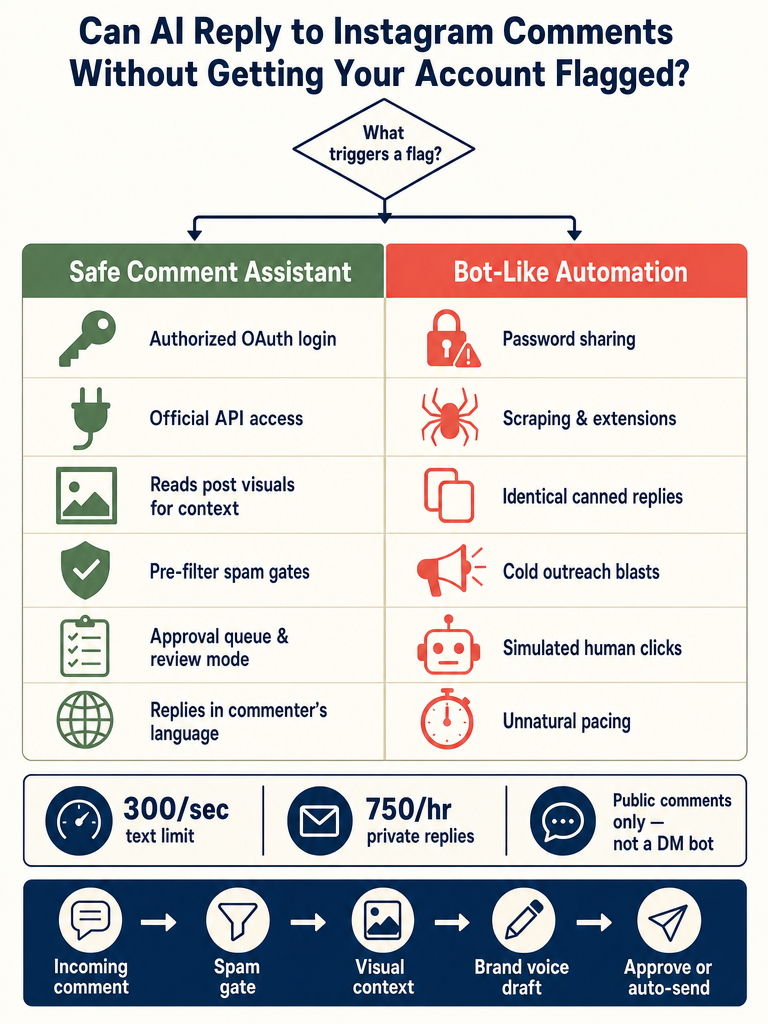
What Actually Gets an Instagram Account Flagged?
Instagram flags accounts based on behavior patterns, not on whether a human or an AI typed the words. The fastest path to a flag is posting the same comment over and over with automation: that single behavior is "the quickest way to look like a bot and to get flagged," according to a creator-education Instagram Reel on the topic.
The other major triggers are about how the tool reaches Instagram in the first place:
- Password-sharing tools, browser extensions, and scrapers that simulate human clicks. According to CreatorFlow, these can trigger spam detection and cannot be whitelisted by Meta.
- Unauthorized API access or cold outreach to people who never engaged with you.
- Spammy pacing: bursts of activity that exceed Meta's described text rate limit of 300/sec and post-comment private reply limit of 750/hour (CreatorFlow).
- Generic, robotic replies that look templated. Quora users cite "comments that seem a bit too generic or robotic" as one of the easiest tells for bot-like activity.
You'll also find anecdotal panic: a Reddit thread where a user reports "nearly any comment I make anywhere on IG gets immediately removed," and Facebook discussions claiming Instagram uses "a new AI system to flag posts." Treat those as anecdotes about false positives, not as published policy. The actionable rules come from Meta's API limits and from how your tool actually authenticates.
Flagging risk comes from access method, repetition, and missing controls: not from AI drafting the words. That's the lens for everything below.
What Is the Difference Between AI Comment Replies and Instagram Bots?
An AI comment assistant and an Instagram bot are not the same product, even when both involve automation. The difference is how they touch Instagram and what behaviors they perform.
| Dimension | AI Comment Assistant (e.g., ReplyMagic) | Instagram Bot |
|---|---|---|
| Authentication | Meta/Instagram OAuth on an Instagram Business account | Password sharing or browser session hijack |
| API access | Authorized Instagram Graph API / Meta Messenger API | Scrapers, unofficial endpoints, click simulation |
| Trigger | User-initiated public comment on your own post | Likes, follows/unfollows, cold DMs, scraped lists |
| What it does | Drafts a reply based on post context | Simulates human behavior at scale |
| Whitelistable by Meta | Yes | No |
According to Replient, AI-powered comment tools "operate through the official Meta Messenger API and Instagram Graph API, reading comments through authorized interfaces, analyzing content, and generating responses." A bot, by their definition, "simulates human behavior such as liking, following, unfollowing, and commenting instead of using the official Instagram API."
CreatorFlow makes the same distinction from the policy side: Meta allows automated replies to user-initiated actions: comments, story replies, and DMs: but bans cold outreach and unauthorized API access.
ReplyMagic sits firmly on the assistant side. It connects through Meta/Instagram OAuth, watches incoming public comments on your own posts, and drafts replies through authorized API access. It does not like, follow, unfollow, scrape, or send cold DMs. It's not a growth bot wearing an AI hat.
Does the 24-Hour Messaging Window Apply to Public Instagram Comments?
No: the 24-hour messaging window applies to direct messages and private replies, not to ordinary public comment replies on your own posts. This is one of the most-confused points in Instagram automation guidance.
According to CreatorFlow, "auto-DM automation should only message people who engaged within the last 24 hours." That rule exists because DMs are a private channel, and Meta treats unsolicited DMs more strictly than replies on a post the user already commented on.
Public comment replies work differently. When someone comments on your post, they've initiated the interaction: replying to them publicly is a continuation of that conversation, not an outbound message. There's no 24-hour countdown on saying "$49, link in bio" under a comment that asked about price.
ReplyMagic responds to public Instagram comments. When a question is sensitive, personal, or better handled privately: refund details, medical questions, account-specific info: it can suggest a short "DM me" redirect inside the public reply. But it is not a DM bot, and it doesn't try to be one.
How Do You Automatically Reply to Instagram Comments Safely?
Safe automated comment replies follow the same pattern every time: official access, per-post context, spam filtered before AI runs, and human-controllable output. Here's the workflow ReplyMagic uses, in order:
- Connect via Meta/Instagram OAuth. No password sharing. The Instagram Business account authorizes ReplyMagic through Meta's official login flow, which means access is revocable and whitelistable.
- Watch incoming post comments in real time. Comments are read through authorized API access: not by scraping the Instagram website or simulating a logged-in browser.
- Run spam gates before the LLM is called. Crypto bait, scam links, abuse, and obvious garbage get filtered out before any AI cost is spent. The model never sees them, so it never accidentally engages with them.
- Read the actual post with Google Gemini. Before drafting, ReplyMagic uses Gemini to analyze the post's photo, Reel, or video. Google describes Gemini as a multimodal model that "handles text, audio, images, and more": that's what lets replies reference what's actually in the post, not just the caption.
- Draft from real context. The reply is conditioned on the visual content, the caption, and your past replies: including tone preferences, emoji habits, and sign-offs from the connected account. Not keywords. Not triggers.
- Route through your chosen control mode. Approval queue (review every reply), review mode (spot-check), or auto-send mode for obvious recurring questions. Per-post settings and exclusion phrases let you turn things off where they don't fit.
Ready to put this into practice? Connect your Instagram Business account in under two minutes and start drafting replies that actually reference your posts: Get started with ReplyMagic.
Compare this with keyword-rule tools, which fire the same canned response whenever a word matches: regardless of whether the post is a sales drop, an apology, or a behind-the-scenes Reel. That's how brands end up replying "$49, link in bio!" under a grief post because someone typed "price" in passing.
The safest comment AI is the one that reads each post first, then drafts: context, not triggers. For a deeper walkthrough, see how ReplyMagic reads each Instagram post before replying.
How Do You Avoid Samey, Bot-Looking Replies During a Launch or Viral Reel?
The single biggest flagging risk during a launch is repetition: the same reply pasted under fifty comments in a row. The fix isn't to slow down; it's to make each reply specific to the post and the question. That's where per-post visual context beats keyword-rule automation every time.
Keyword-rule tools fire a fixed response when a word matches. So a launch Reel and a Q&A Reel both get "$49, link in bio!" the moment someone types "price": even when the second Reel was about a free workshop. The reply is technically grammatical and totally wrong for the post. Multiply that across a viral moment and you have hundreds of identical, off-topic replies under your own content. That's the bot-like pattern Instagram's spam systems are built to catch.
ReplyMagic uses Google Gemini to read what's actually shown in the photo, Reel, or video before drafting. A pricing question under a Reel showing the small-batch version gets a different answer than the same question under the bundle post: because the model knows what's on screen. A sizing question on a behind-the-scenes post can pivot to "we go into sizing in the product post pinned to the grid" instead of pasting a sizing chart that doesn't fit.
What stops replies from looking templated:
- Visual grounding so the answer references the actual content (the blue version, the Tuesday workshop, the second drop).
- Brand-voice conditioning on past replies, emoji habits, and sign-offs from the connected account.
- Natural variation in phrasing: not three variants in a rotation, but genuinely different replies because the inputs are different.
- Spam gates and exclusion phrases so the AI doesn't engage with bait that would force it into a canned defensive reply.
The defense against bot-like repetition isn't slower replies: it's per-post context that makes every reply genuinely different. For launch-day specifics, the survive-an-Instagram-launch playbook and the context-aware availability replies guide cover the comment-flood playbook in more detail.
Which Comments Should Auto-Send, Go to Approval, or Get a DM Redirect?
Not every comment deserves the same treatment. The right routing depends on how clear the answer is and how sensitive the topic is.
| Comment Type | Recommended Routing | Why |
|---|---|---|
| Price, sizes, availability, shipping, booking link, enrollment date | Auto-send | Answer is fixed, public, and the same for every customer |
| Cancellation policy, refund window, general terms | Auto-send with link to policy | Public info, low risk |
| Angry customer, complaint about a specific order | Approval queue | Needs human judgment and tone |
| Health, wellness, or medical-adjacent question | Approval queue + DM redirect | Sensitive, account-specific |
| Pricing for custom/enterprise work | Approval queue | Not one-size-fits-all |
| Spam, crypto bait, scam links, abuse | Spam gate (no reply) | Filtered before AI is called |
| Comments matching exclusion phrases you set | No reply | Brand-specific edge cases |
ReplyMagic also handles multilingual audiences automatically: ReplyMagic replies in whatever language the commenter wrote in. A Spanish comment on an English post gets a Spanish reply. There's no language setting to toggle: it just matches.
For sensitive questions where a public reply would expose too much (a refund dispute, a private booking change, a health detail), the right move is a short public acknowledgment plus a DM redirect: "Sent you a DM with the details." That keeps the public thread clean while routing the actual conversation to a private channel a human can handle.
What Should You Check Before Choosing an Instagram Comment AI Tool?
Use this checklist to evaluate any AI comment tool before you connect your Instagram account:
- Authentication via Meta/Instagram OAuth: never a tool that asks for your Instagram password.
- Official Instagram Graph API or Meta Messenger API access: confirmed, not vague.
- Per-post context: the tool reads the actual photo, Reel, or video, not just the caption or a keyword.
- Spam gates that run before the LLM: scam links and abuse never reach the model.
- Approval queue and review mode: you can hold every reply, or spot-check, before anything goes live.
- Auto-send controls: granular, by question type or post, not all-or-nothing.
- Per-post settings and exclusion phrases: turn the AI off on grief posts, apologies, or sensitive launches.
- Brand-voice conditioning on real past replies, tone, emojis, and sign-offs: not a generic "friendly tone" toggle.
- Multilingual replies in the commenter's language, automatically.
- Clear, published volume limits so you know what you're paying for.
On that last point: ReplyMagic's Free plan includes 10 AI replies per day on one Instagram account. Pro includes 3,000 replies per month on one account. Each additional Instagram account is $15/month and includes another 3,000 replies. No password sharing, no hidden scraper layer, no growth-bot side features.
The tools to avoid are the ones that lead with keyword-rule builders, generic Instagram automation, or "human-like AI" claims without explaining the mechanism. If a tool can't tell you how it authenticates, what API it uses, and how it reads the post: it's not a comment AI, it's a liability.
Ready to put a real safety framework around your Instagram comments? Get started with ReplyMagic and connect your Instagram Business account through official Meta OAuth: drafts in your voice, every reply grounded in what's actually in the post, full control over what goes out.
Frequently asked questions
Will using AI to reply to Instagram comments get my account banned?
Not if the tool connects through official Meta/Instagram OAuth and authorized API access: Meta's rules ban bots that simulate human behavior, not AI drafting words through legitimate channels. The real risk is repetitive, identical replies that look templated, not the fact that AI wrote the sentence. Spam gates, per-post context, and an approval queue are what keep behavior looking human.
Does the Instagram 24-hour messaging window affect public comment replies?
No: the 24-hour window applies to DMs and private replies, not to public replies on your own posts. When someone comments on your post, they've initiated the interaction, so replying publicly has no countdown attached. The restriction matters for DM automation, which is a different product category entirely.
How do I stop my automated replies from sounding generic and repetitive?
Generic replies happen when a tool fires the same canned response every time a keyword matches, regardless of what the post actually shows. The fix is per-post visual context: reading the photo, Reel, or video before drafting: combined with brand-voice conditioning on real past replies, so each answer references what's actually on screen rather than pasting the same line fifty times.
Can AI reply to Instagram comments in languages other than English?
ReplyMagic replies in whatever language the commenter wrote in: automatically, with no language setting to configure. A Spanish comment on an English post gets a Spanish reply, which matters for travel brands, global product drops, and any account with an international audience.
Which types of Instagram comments should a human review before a reply goes out?
Auto-send works well for fixed, public-information questions: price, sizing, availability, booking links, enrollment dates, and shipping windows. Complaints about specific orders, health-adjacent questions, and custom pricing requests should go through an approval queue: those need human judgment, not a fast answer. Spam, scam links, and abuse should be filtered before the AI ever sees them.
Sources
- Ever worried Instagram might flag your comments as spam?www.instagram.com
- Comments being flagged constantly : r/Instagram - Redditwww.reddit.com
- How to Automatically Reply to Instagram Comments - YouTubewww.youtube.com