
Check the exact offer before answering Instagram price questions: share a verified price or approved range, or ask what changes the price.

How do you handle a price question when the Instagram post has no price?
To handle a price question when the Instagram post has no price, check for a verified price on that exact offer. If you have one, lead with the number. If you have only an approved range, give it with its assumptions. If you have neither, ask for the detail that changes the price, or hand the thread to a person.
Launches, product drops, and viral Reels pile up "how much?" comments, and a caption with no price sends every one of them to your team. The sequence above is this article's proposed workflow, built from two documented recommendations. HubSpot's guide on responding to pricing questions says to answer directly: price first, then relevant context or a question. Its article (updated 09/25/2023) draws on a Qualtrics panel study with Santa Clara University of 530 verified B2B buyers. That is B2B evidence, not Instagram evidence. Meetlead covers the case where you can't quote yet. It offers three honest options: a range with stated assumptions, clarifying questions, or a link to a price list, each ending in a concrete next step.
Two hypothetical posts below show the same question landing on different evidence and getting different decisions.
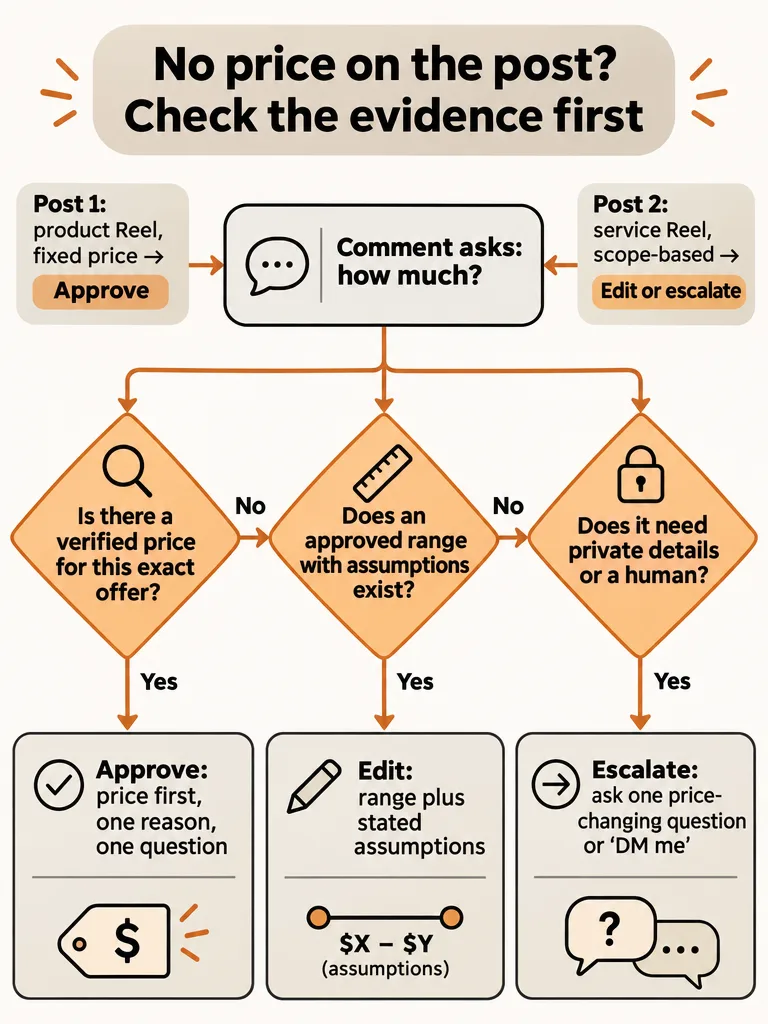
What counts as a verified price you can approve for a public reply?
A verified price is a figure your team has confirmed for the exact offer in the post, as of today. Recognizing an item in a photo or Reel is not proof of its price. The research behind this article contains no verified price for any real offer, so every example here is hypothetical.
Match the reply to what your team can actually verify:
- A confirmed fixed price for this exact offer. Say the number.
- An approved range with stated assumptions. Meetlead recommends this when scope changes the figure. Say what the range assumes.
- A published price list that is current and covers this exact offer. Link it and add a next step. A stale list, or one for a different version of the offer, counts as nothing verified.
- Nothing verified. Ask for the detail that changes the price, or escalate. Don't guess.
For the reply shape, Systems Bureau suggests Price + Reason + Relevant Question. Answer the question first, add one line on what the price covers, then ask something useful. Making people hunt for the price creates friction.
Running this check in the queue is its own skill, covered in what a brand manager should check before approving a reply.
Hypothetical post 1: a product Reel with no price in the caption
A price question under a product Reel is an approve when the team holds a confirmed fixed price for that exact product. Lead with the number, add one verified detail, and ask one relevant question. The post tells you which offer the commenter means. The confirmed price is what justifies approval.
Hypothetical scenario, not a real brand. A candle brand posts a Reel of a new autumn scent. The caption says "Drop is live." There's no price. A commenter writes: "how much?"
Within this hypothetical, the team has confirmed two facts. The autumn candle's fixed price is $48 (an invented, illustrative figure), and the drop is live in the shop.
Draft reply: "It's $48 for the autumn candle, and the drop is live in the shop now. Want the shop link?"
Decision: approve. The price comes first, the one extra detail is a verified fact, and the question is useful. The Reel shows the autumn candle, so "how much?" means that product and not the brand's other scents. A reviewer's job is to confirm the verified price belongs to that product. Anything beyond the price and live status, such as materials or restock plans, would need the same team verification before it goes in a reply.
Drops are where this volume piles up. The same price and availability questions arrive repeatedly, which is the pattern behind answering "is this still available?" on Instagram.
How do you answer price questions before you have the details?
When the price depends on scope, never approve a bare number. Edit the draft into an approved range with stated assumptions, or into a question about the detail that changes the figure, and escalate if neither exists. Meetlead names both as honest options. A "DM me" redirect can carry the private details.
Hypothetical post 2. A cleaning studio posts a before-and-after Reel of a heavily stained living room rug. A commenter writes: "price?" No single price exists. It depends on rug size and starting condition.
Option A, approved range with assumptions (only if the team has one on file). The reply states the team's approved range, says what it assumes, such as a standard size in normal condition, and notes that heavy staining like this can move the figure. It then invites the commenter to share the size. Use the team's real numbers. Never invent them.
Option B, ask for the missing detail. Suppose the studio's team says size moves the figure most. The reply asks: "Happy to price this. What size is the rug?" Meetlead advises asking only questions whose answers change the price, such as size, material, number of people, or starting condition. Ask for the minimum needed, and add a second question only if the first answer isn't enough.
Decision: edit or escalate, never approve a bare number. If the team needs photos, an address, or a budget, add a "DM me" redirect for those details. The DM itself is a human conversation. For more on this pattern, see how service businesses answer Instagram price questions fast.
Which evidence changes the decision from approve to escalate?
Approve a price reply only when you can verify the price for the exact offer. Edit when the evidence is partial, and escalate when teammates disagree or the comment involves a complaint. Use this worksheet in the queue.
| What you can verify | Reply type | Decision |
|---|---|---|
| Confirmed fixed price for this exact offer | Price first, one reason, one relevant question | Approve |
| Approved range with stated assumptions | Range, assumptions, next step | Approve, or edit if the assumptions don't match the post |
| Price list link only | Link plus a short next step | Edit: confirm the list is current and covers this offer |
| Stale price, or teammates disagree | Hold the draft | Escalate: Meetlead says to document ranges in one shared place so customers don't get conflicting answers |
| Complaint or sensitive context | Human response | Escalate: Vista Social says complaints, service issues, and sensitive moments need a human |
How do you get a useful price-question draft into the approval queue?
ReplyMagic gets a useful price draft into the approval queue by reading the post first. It uses Google Gemini to analyze each post's image, Reel, or video before drafting, then writes from the connected account's past replies, tone preferences, emoji habits, and sign-offs. Context, not triggers.
Keyword rules can be scoped to a post, but someone still has to write and maintain each rule and its response for each offer. ReplyMagic's drafts start from what the post shows. That helps with identifying the offer, but recognizing the candle in a Reel is not knowing its price. This article's sources don't show that ReplyMagic withholds a number automatically or detects stale prices. The approval queue (review mode) is where you check the evidence yourself before anything goes live.
ReplyMagic works on public Instagram comments, not DMs, and can suggest "DM me" redirects for private details. The Auto-Respond to Instagram Comments page covers how the reply workflow works.
Should you answer a price question publicly or move it to DMs?
Answer a price question publicly when the answer is a known price or a non-sensitive scope question. Move only the private details, such as photos, an address, or a budget, to a human-led DM. Acknowledge complaints publicly through a person, then take any private specifics out of view.
A public price helps everyone reading the thread. Exerta advises keeping public replies short and moving private details, such as order numbers, into DMs, and routing complaints and refund requests to a person. Vista Social agrees that complaints, service issues, and sensitive moments need a human response.
For post 1, the number goes in public. For post 2, a custom scope question can stay public too: the reply asks for the rug size and offers "DM me" only for photos and the address.
If you're sorting which comments get a public reply, a DM redirect, or a manual answer, responding to Instagram comments fast without sounding canned lays out a triage.
Can price replies go on auto-send, or should every one wait for approval?
Keep price replies in approval mode until the price for that offer is confirmed and one test post has produced clean drafts. Only then consider auto-send, and only for fixed-price offers. Scope-dependent services, complaints, and refund questions stay with a person.
- Confirm the price evidence first. Only a verified fixed price or an approved range with assumptions qualifies.
- Run one test post. Exerta advises testing on one post before going wider.
- Check the test replies. Do they name the right offer, state the right number, and sound like you?
- Move one reply type at a time. Fixed-price offers can be candidates. Scope-dependent services stay in review.
- Set a team policy for sensitive replies. Complaint language, refunds, and sensitive topics go to a person. Treat this as your team's rule, and confirm what your tool's controls actually do before relying on any automatic routing.
- Re-verify when prices change. A repriced or sold-out offer makes an old draft stale.
No source here tests whether any price-reply format changes bookings or sales, so that effect is unproven. A missing test doesn't show there's no benefit. Before relying on any setup, verify Meta's current permissions and policies, and check live plan limits.
Frequently asked questions
What should an Instagram reply to "how much?" include?
Lead with the price, then add one line on what it covers and one relevant question. Systems Bureau calls this Price + Reason + Relevant Question: if the item is $59, say it is $59, because making people hunt for the price creates friction. Only state a number your team has confirmed for that exact offer, as of today.
Is giving a price range better than saying "it depends"?
Yes, when scope changes the figure. "It depends" is true but is not an answer. Meetlead recommends a range with stated assumptions, one to three clarifying questions, or a link to a price list, each ending in a concrete next step. Publish only a range your team has approved, and keep ranges in one shared place so customers don't get conflicting answers.
Should every Instagram comment get a reply?
No. Exerta advises replying to buyer questions and genuine praise, hiding spam and abuse, and leaving off-topic chatter alone. Vista Social says complaints, service issues, and sensitive moments need a human response. A price question is a buyer question, so it earns a reply, even if that reply is a clarifying question.
Can I reply to Instagram comments without sending a DM?
Yes. A public reply and a DM are separate actions. Socioverse notes that plenty of accounts run public replies alone on general posts and add a DM only where there is something specific to deliver. For price questions, answer in the thread when the answer is a known price, and save the DM for private details like photos or an address.
How do I hand a price comment to a human?
Set escalation rules so complaints, refund requests, and sensitive comments go to a person, as Exerta advises. Hold any price draft when the figure is stale or teammates disagree. Meta's Instagram Messaging guidance also says apps need an escalation path to a human agent, so confirm your setup has one before you turn on automation.
Can AI read the price from an Instagram post's image or Reel?
No. Recognizing a product in a photo or Reel doesn't tell you its current price. ReplyMagic uses Google Gemini to analyze each post's image, Reel, or video before drafting, which helps identify the offer a commenter means. The price itself must come from your team, so check it in the approval queue before the reply goes live.
Sources
- exerta.aiexerta.ai
- www.socioverse.iowww.socioverse.io
- vistasocial.comvistasocial.com