
For sold-out products in Instagram comments, check the exact variant and live inventory, then approve only wording the stock source supports.

What should I check before replying to sold-out products in Instagram comments?
When a product drop or viral Reel fills the thread with the same availability question, replying to sold-out products in Instagram comments takes three checks: confirm the exact product and variant, check current inventory in a live source, and approve only wording that source supports. Sauzy's guide calls for a real-time check against current inventory.
Recognizing the post is not verifying stock. A photo can help identify the product, but it does not establish current stock. Last week's inventory is not evidence either.
Chronometrica's review guidance on public Instagram buying questions describes the workflow: review the question alongside its post, check the product facts, assign a responsible owner, and approve the reply before it posts. Treat the four checks below as an editorial checklist built on that workflow:
- Which product and variant is the commenter asking about?
- What does your live stock source say right now?
- Who owns that answer?
- Does the draft say only what the source supports?
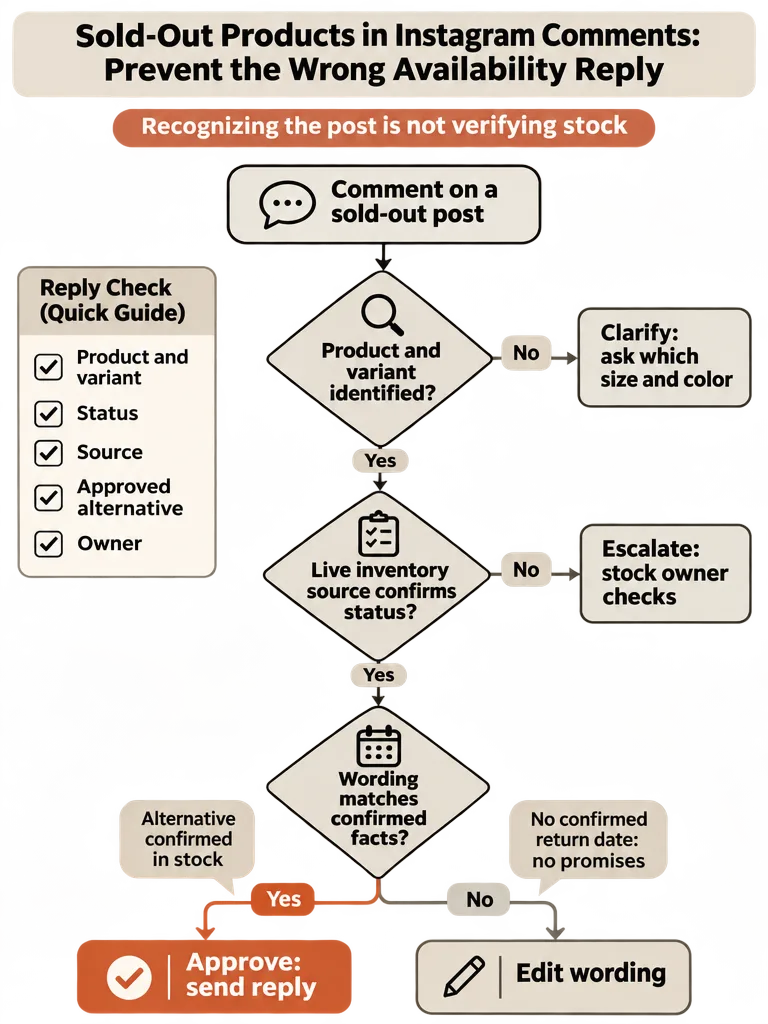
Can I tell the exact product, size, and color from the post and the comment?
Identify the product when the post and comment together point to one item. Ask a clarifying question when the comment names only a size or the post shows several items or variants. Sauzy's guide notes that "medium" means something only once you know which product is being asked about, and that isn't always stated.
Two separate questions are in play, and they have different evidence:
| Question | Evidence that answers it | What that evidence can't tell you |
|---|---|---|
| What does the post show? | The image, Reel, or video, plus the caption | Whether the pictured variant can be bought today |
| Which product and variant does the comment mean? | The comment read alongside its post | Anything, if the comment says only "medium" and the post shows several items |
| Is that variant purchasable now? | A live inventory source, or the person who owns it | Nothing about the post; it must be checked every time |
ReplyMagic reads each post's image, Reel, or video with Google Gemini before drafting and can hold drafts in an approval queue. Nothing in the available materials verifies inventory integration, stock synchronization, or automatic sold-out detection, so confirm current availability separately.
Hypothetically, a comment of "How much?" under a post showing a single item and a bundle could mean either one. So could "medium" under a post showing a shirt and a jacket. Ask: "Which piece do you mean, the overshirt or the tee?" That costs one extra comment. A wrong guess costs a wrong promise in public.
How do I answer "Do you have this in medium?" when that variant is sold out?
Approve a reply to "Do you have this in medium?" only when every stock claim in it is confirmed. Say the pictured variant is sold out once the stock owner confirms it. Offer another variant only after confirming it's available and naming the differences. If neither claim can be confirmed, escalate.
Everything below is hypothetical. A Reel shows a sage green linen overshirt. The caption says "Spring drop is live." A commenter writes: "Do you have this in medium?"
Suppose your inventory shows sage in medium is sold out. Navy in medium might still be in stock, but nobody has checked. Assume the draft identified the sage overshirt correctly. Visual analysis doesn't guarantee that, and it can't tell the draft whether navy is available.
Three outcomes:
- Approve if the stock owner confirmed sage medium is sold out and the draft says only that.
- Edit if navy medium is confirmed in stock. TQTY's guidance says a suggested alternative must be confirmed as available, and differences that affect the purchase decision should be explained rather than treating it as identical. Here that means naming the color difference and anything else that changes the purchase, such as fabric or fit.
- Escalate if nobody can confirm either variant. Don't send "should still have navy!" on a hunch.
What can I say when someone asks "Is it coming back?" and no restock date is confirmed?
When a commenter asks "Is it coming back?" and no restock date is confirmed, the reply may say the item is sold out and that no return date is confirmed. It must not state an informal date or imply a reservation or priority access. TQTY's guidance says an informal restock estimate shouldn't be published as a confirmed return date.
Again, everything below is hypothetical. A product-drop post shows a ceramic pour-over set. Stock is confirmed at zero. A teammate mentioned in passing that it "might be back in spring." A commenter asks: "Is it coming back?"
TQTY's guidance adds that notification wording shouldn't imply reservations or priority access unless those benefits actually exist.
The reply may say:
- The set is sold out.
- No return date is confirmed.
- There's a notification process, but only if you run one, described exactly as it works.
The reply must not say:
- "Back in spring" (an informal date).
- "We'll hold one for you" or "you'll get first dibs" (a reservation or priority access that doesn't exist).
Decision: Approve when the sold-out status is verified and the draft uses only the approved "no confirmed return date" wording. Escalate to the stock owner when the sold-out status is unverified, or when the draft says anything about timing that nobody has approved.
Use whatever hold controls your reply tool offers, such as an approval queue or exclusion phrases, so restock questions wait for a person. Keep order-specific problems out of the public thread with a "DM me" redirect. The reply itself stays in the public comments.
What information should I hand to the person approving the reply?
Hand the approver a short brief with six fields: product and variant, confirmed status, source of that status, approved alternatives, permitted restock wording, and a responsible owner. TQTY's guidance names the first five as the core of an availability handover. Chronometrica's workflow adds the responsible owner and the approval step.
Use this as a worksheet:
| Field | What to write | Example (hypothetical) |
|---|---|---|
| Product and variant | Exact item, size, color | Sage linen overshirt, M |
| Confirmed status | Sold out / in stock / unknown | Sold out |
| Source of status | Where you checked, and when | Inventory dashboard, checked today |
| Approved alternatives | Confirmed-available options and differences | Navy M, different color only |
| Permitted restock wording | What the reply may say about return | "No confirmed return date" |
| Responsible owner | Who answers for this claim | Stock manager |
Then pick one outcome:
- Approve: the product and variant are clear, every affirmative stock claim has current evidence in the source field, any uncertainty wording (such as "no confirmed return date") has been approved, and the draft says nothing beyond the sheet. Filled-in fields aren't enough. A claim with no current evidence behind it doesn't pass.
- Clarify: the product or variant is unclear, so ask the commenter.
- Escalate: the status is "unknown," the source is missing or stale, or the alternative or restock wording is unconfirmed. The owner decides.
The approval-mode workflow covers how drafts wait for review before going live.
Which older posts, replies, and links still say "available" after a sellout?
Recent posts, pinned content, profile links, campaigns, earlier replies, and scheduled content can all keep signaling that a sold-out product is available. TQTY's guidance says changing the listing may not be enough. List every entry point, note which you can edit, and clarify availability wherever someone might act on outdated information.
- Map the entry points. List recent posts, pinned content, profile links, campaigns, and earlier replies that point to the offer.
- Record what's editable. Note which items you can change directly and which need another intervention.
- Clarify availability where decisions happen. Preserve the product story, but make current availability clear wherever someone might act on old information.
- After a confirmed restock, check variants and destinations. TQTY's guidance puts this before reactivating any paused messages.
- Remove obsolete notices where possible. Don't leave "sold out" on something that's back.
- Review scheduled content. Look for outdated shortage messaging queued to go out.
If the same availability question keeps landing on every launch post, this guide on "Is this still available?" comments covers the repeat-question problem.
What if availability cannot be checked?
If availability cannot be checked, don't approve a reply that makes a stock claim, even when the post clearly shows the product. Hold the draft, escalate to the stock owner, and publish only wording the confirmed facts support. A hotel-focused guide from AI Hotel Agency says an assistant shouldn't state availability unless it comes from the booking system.
The same guide says "I don't know" is a valid answer, and that an assistant should offer a handover to a person when it can't find the answer. Retail stock works the same way as hotel rooms here.
In practice:
- Unverified status: escalate. Identifying the product from the post doesn't change this.
- Unverified alternative: leave it out. An unconfirmed "we have it in navy" is a promise.
- Unverified restock timing: use only the approved "no confirmed return date" wording, or nothing.
- Reply needed anyway: post one that makes no claim about stock, price, or timing, and have the owner confirm before anything more specific goes out.
Frequently asked questions
Can AI tell from an Instagram post whether a product is sold out?
No. A post's photo, Reel, or caption can help identify which product a commenter means, but it cannot show current stock. ReplyMagic reads each post's image or video with Google Gemini before drafting, and that is not a stock check. Confirm availability in your live inventory source or with the person who owns it, and approve only wording that source supports.
Can I suggest another color or size when the one requested is sold out?
Yes, but only after confirming the alternative is actually in stock. TQTY's guidance says a suggested alternative must be confirmed as available, and differences that affect the purchase decision should be explained rather than treating it as identical. For a sold-out sage overshirt, for example, that means naming the color difference and any change in fabric or fit.
Can I tell commenters a sold-out item will be back soon?
Not unless a return date is confirmed. TQTY's guidance says an informal restock estimate shouldn't be published as a confirmed return date. The reply can say the item is sold out and no return date is confirmed. Avoid wording like "we'll hold one for you" or "first dibs" unless that reservation or priority access really exists.
Why can't I answer a stock question from last week's inventory?
Stock changes, and an accurate reply needs a real-time check against current inventory, not a memory of what was in stock last week. Sauzy's guide pairs that check with resolving the question to the right product and variant. Note where and when you checked, so whoever approves the reply can see the evidence behind it.
Should I handle order problems on a sold-out post in the comments or by DM?
Keep the availability answer public and move order-specific problems to DMs with a "DM me" redirect. The public reply covers what everyone reading the thread needs: sold out, no confirmed return date, or a confirmed alternative. ReplyMagic replies to public Instagram comments and can suggest a "DM me" redirect, but it is not a DM bot.
Do old posts and links keep saying a sold-out product is available?
They can. Changing the product listing may not be enough, because recent posts, pinned content, profile links, campaigns, and earlier replies can still point to the offer. TQTY's guidance says to find each entry point, record which ones you can edit directly, and clarify current availability wherever someone might act on outdated information.
Sources
- www.aihotelagency.comwww.aihotelagency.com