
In your course launch comment queue, check verified facts before approving replies. Send personal advice requests to a human for review.

How do you separate enrollment questions from personal advice in a course launch comment queue?
When enrollment questions pile up in a course launch comment queue, sort each comment with one test: can a verified course fact on the launch post or saved details answer it? Price, dates, prerequisites, certificate and cancellation questions get a public reply. Requests for judgment about the commenter's own situation go to a human.
The rule covers public Instagram comments only, not a DM campaign. ReplyMagic drafts public comment replies from each post's caption, saved details and available media analysis, and it is not a DM bot. The approve-or-escalate decision stays with your team.
The test needs a fact to point at. Open edX's course launch checklist tells course teams to verify the start date and time, the grading policy and the certificate setup before launch. If a fact isn't verified, it isn't ready for a public reply. A reply is supported when you can name the line of verified course information it came from. A human still reads the tone and framing before it goes out.
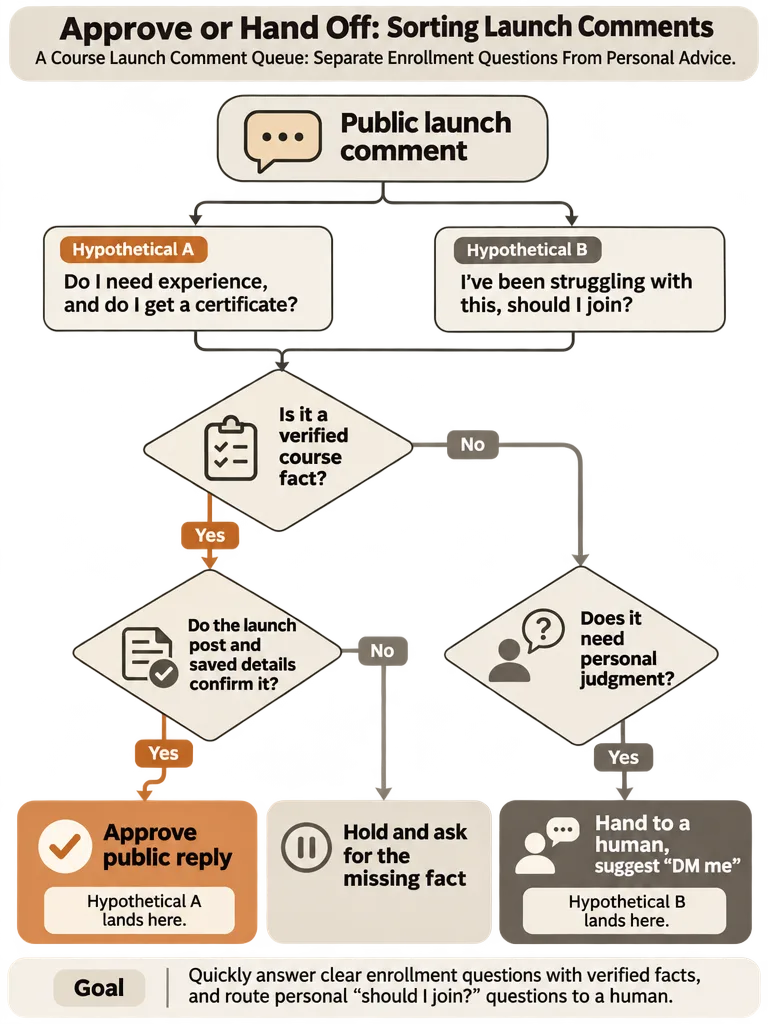
Two worked examples follow, both hypothetical. The first is an approval. The second is an escalation.
What counts as an enrollment question and what counts as personal advice?
An enrollment question is a comment whose answer is a published course fact, the same for every commenter: price, start date, prerequisites, certificate, refund terms. Personal advice is a comment whose answer depends on who is asking. The table is an editorial recommendation, not a documented product feature. It sorts by context, not keywords.
| Answerable from verified course facts | Needs personal judgment |
|---|---|
| Price and what it includes (only when it's on the post or in saved details) | "Is it worth it for someone in my situation?" |
| Start date and enrollment window | "Am I ready, or should I wait for the next cohort?" |
| Prerequisites as written ("no experience needed") | "I've been struggling with this. Will the course fix it?" |
| Whether a certificate is issued and what earns it | "Will the certificate help me get hired?" |
| Refund and cancellation terms as published | "Can you make an exception for me?" |
Some comments mix both. "Is it beginner-friendly, and should I wait until my job calms down?" has a fact half and a judgment half. Answer the fact half publicly and hand the rest to a human.
When a price question arrives and no price exists in your materials, do not state an unverified fact. A brief acknowledgment or a request for clarification is still fine.
Hypothetical comment 1: "Do I need experience, and do I get a certificate?" Should you approve the reply?
Approve the reply when both answers appear in the launch post or the saved course details. In this invented beginner photography cohort, the caption and saved details state the prerequisite and the certificate rule, so the public reply only repeats them. No real course, price or policy is described.
The launch post (hypothetical): a Reel for a fictional "Beginner Brand Photography Cohort." The caption says: "Enrollment is open. No experience needed."
Saved details (hypothetical): "Prerequisites: none. Week 1 covers camera basics. A certificate of completion is issued after the final project is submitted."
The comment: "Do I need experience, and do I get a certificate?"
Proposed public reply: "No experience needed! Week 1 starts with camera basics. And yes, you get a certificate of completion after you submit the final project. Maya"
Decision: approve in the approval queue. Every line of the reply matches a line in the caption or saved details.
Voice comes from mechanism: drafts are conditioned on real past replies, tone preferences, emoji habits and sign-offs from the connected account. The sign-off "Maya" here is invented for illustration, not a recorded output.
Context, not keywords, decides the answer. The reply rests on this post's caption and saved details, not on the word "certificate" appearing in a comment. A rule configured to answer any "certificate" comment on every post could post this line under a launch with different certificate terms. For the broader pattern, see how coaches answer prerequisite questions on Instagram.
What would flip the decision: saved details that are missing, or that conflict with the caption. If the post says "no experience needed" but the saved details say "intermediate level," don't approve. Fix the source first.
Hypothetical comment 2: "I've been struggling with this, should I join?" How do you hand it off to a human?
Hand a personal-advice request to a human, because no course fact can settle it. "I've been struggling with this, should I join?" asks for judgment about the commenter's own situation. The recommended move is a short public acknowledgment with a "DM me" suggestion, then an individualized answer written by a person. This example is hypothetical.
The comment (hypothetical): "I've been struggling with this, should I join?"
Nothing on the launch post or in the saved details says what "this" is, how long the person has struggled, or whether the course fits. Any definitive answer would be a guess about a stranger's situation.
Decision: escalate. In Ask me mode the draft waits in the queue. A human edits it down to a short public acknowledgment, or skips it. For example: "Thanks for sharing that. It deserves a real answer, not a quick one. DM me and we'll talk it through. Maya"
The public reply only points to a private channel. The individualized answer is written by a person, in private, outside the comment queue.
Consider a rule configured to post the enrollment pitch on any comment containing "join." Under this comment, that setup would put a sales line beside a vulnerable remark. A pitch of any kind, posted publicly there, would embarrass the brand.
What should you check before approving a public reply about dates, prerequisites, or certificates?
Before approving a public reply about course dates, prerequisites or certificates, confirm three things: the fact is written down, it is current, and it matches the launch post the comment sits under. The worksheet below is an editorial recommendation, not a documented product feature. Its checks draw on the Open edX checklist: start date and time, grading policy, certificate activation and working links.
| Verified course fact | Relevant launch post | Proposed public answer | Reviewer | Unresolved question |
|---|---|---|---|---|
| Start date and time, with time zone | Launch Reel caption | State the date as written | Course lead | Does the time zone appear anywhere? |
| Prerequisites as published | Launch Reel caption | Quote the saved line | Course lead | Do the caption and saved details agree? |
| Passing score or grading rule | Carousel slide 4 | Quote the saved policy | Course lead | Is there a grace period? |
| Certificate: when it's issued | Launch Reel caption | Say what earns it | Ops owner | Is the certificate activated yet? |
| Resource or syllabus link | Pinned comment | Paste the working link | Ops owner | Did anyone click it today? |
Fill it in before launch, then keep it open beside the queue.
Two controls matter here. The approval queue holds each draft until someone edits, sends or skips it. Per-post settings and saved details let a draft use the relevant post's caption and saved details, so check each draft against the post it answers, especially when you run more than one cohort. For how the queue and Auto mode fit together, read how the approval queue compares with full auto.
How do you hand off to a human when the launch post and saved details don't answer the question?
When the launch post and saved details do not answer a comment, hold the draft and give the question to a named person instead of guessing. Do not state an unverified fact, especially a deadline or a count of remaining places. A brief acknowledgment or a request for clarification is still fine. This is a team process, not an automatic product feature.
- Hold the draft. Leave it in the queue, or skip it. Never approve a deadline or "spots left" number you can't point to.
- Ask for the missing fact. Message the person who owns that fact: the course lead for dates, the ops owner for certificates.
- Escalate. Name one owner for each escalated comment. Open edX advises defining communication methods for contributors and making sure they know how to record work and report issues.
- Record the outcome. Log the comment, the answer and the fact source. Then add the fact to the saved details so the next identical question is answerable.
If the flood is already on, surviving a viral post covers triage order.
Can you answer publicly without a DM, and what happens when a comment turns negative?
Yes, you can answer a launch comment publicly without sending a DM. The public reply and the private message are separate steps, and a "DM me" suggestion belongs only where the question is sensitive. Complaints and negative comments go to a person. This is an editorial recommendation, and nothing here guarantees account safety.
For a negative or sensitive comment, have a human read it in the queue before anything is posted. Refund demands, complaints and anything touching someone's personal circumstances should get a person's reply, or a short public acknowledgment with a move to DM. Public information on automated sensitive-topic detection or exclusion controls is limited, so this article doesn't assume them. Human screening through the approval queue is the supported route.
Not every comment needs a reply. Answer questions that verified facts settle. Spam and off-topic chatter don't need one. Anything that asks for judgment goes to a human.
More launch-specific answers are in Instagram comment automation for course launch FAQs.
How do you test the queue before launch day?
Test your launch-comment review workflow on one post before announcing anything: connect a professional account, start in Ask me mode, add the post's details and approve one real reply. The goal is a first approved public reply you would stand behind. No uplift is promised.
- Connect an Instagram Business or Creator account. The product works with those two account types.
- Start in Ask me mode. New accounts begin there, so every draft waits for you to edit, send or skip it.
- Trial one launch post with per-post details. Add the dates, prerequisites and certificate rules from your worksheet.
- Approve the first useful public reply. Check it against the saved fact, not against how good it sounds.
- Decide as a team which repeat answers, if any, you'd trust to Auto mode. That is a manual decision. Don't assume any automatic separation of topics, and keep personal-advice comments in human review.
- Test learner-access claims from a real non-admin account. Cademy's documentation notes that admin previews bypass access rules, including schedules and earlier-lesson requirements. If your replies promise what learners can see, test as a learner.
Before launch day, verify current Meta permissions and your plan's posted-reply allowance on the pricing page.
Frequently asked questions
Should every comment under a course launch post get a reply?
No. Reply to comments that verified course facts settle, such as price, start date, prerequisites, certificate and refund terms. Spam and off-topic chatter don't need a reply. Any comment that asks for judgment about the commenter's own situation goes to a human. A public reply is supported only when you can name the line of course information it came from.
What do I do when one comment mixes a fact question with a personal one?
Split it. Answer the fact half publicly and hand the judgment half to a human. A comment like "Is it beginner-friendly, and should I wait until my job calms down?" has a published answer to the first part, the prerequisites. No course fact settles the second part, so a person should write that answer or suggest a DM.
What if the launch caption and the saved course details disagree?
Don't approve the draft. Fix the source first. If the caption says "no experience needed" but the saved details say "intermediate level," no reply can be checked against one verified fact. Correct whichever is wrong, then approve against the updated line. Check each draft against the post it answers, especially when you run more than one cohort.
Why do keyword auto-replies go wrong under course launch posts?
Keyword rules match words, not posts. A rule set to answer any "certificate" comment could post one cohort's certificate terms under a launch with different terms. A rule set to pitch on "join" could put a sales line beside a vulnerable comment. ReplyMagic drafts from each post's caption, saved details and available media analysis instead: context, not keywords.
Does ReplyMagic answer Instagram DMs, or only public comments?
Only public comments. ReplyMagic is not a DM bot. For a sensitive or personal question, a reply can suggest "DM me," but the individualized answer is written by a person, in private, outside the comment queue. It works with Instagram Business and Creator accounts.
How should I start automating course launch replies safely?
Connect an Instagram Business or Creator account and start in Ask me mode, where new accounts begin and every draft waits for you to edit, send or skip it. Add the dates, prerequisites and certificate rules to one launch post, then approve one real reply checked against the saved fact. Moving repeat answers to Auto mode is a separate, manual decision.
Sources
- Course Launch Checklist: Latest documentationdocs.openedx.org