
How Do Coaches Answer Prerequisite Questions on Instagram?
Context-aware Instagram comment automation answers repetitive questions from the post itself, with approval queue or auto-send for obvious fit questions.
How do coaches answer prerequisite questions on Instagram?
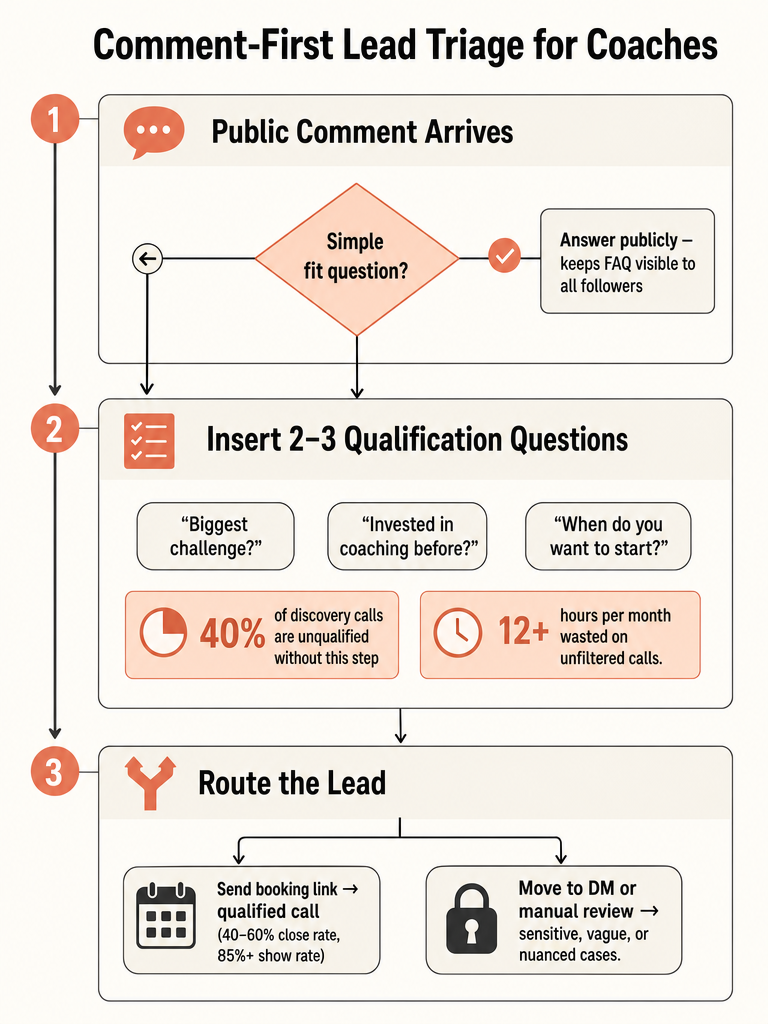
Coaches answer prerequisite questions on Instagram by qualifying before they book. The workflow the sources support: answer the obvious fit questions in the public comment, ask 2-3 questions about the person's challenge and timeline, then route them to the right next step. CreatorFlow says qualified calls close at 40-60% versus 15-20% for unfiltered ones.
Think of it as comment-first triage, not a DM funnel that dumps a calendar link on everyone.
When someone comments "Is this for beginners?" on a Reel, the answer is public and short. It clears the doubt for that person and every other lurker reading the thread. But when someone asks "Am I ready for this?" or "Will this work for my situation?", that's a private conversation, not a public one.
Here's the three-step shape most of the sources converge on:
- Answer the simple fit question publicly. Prior experience needed, certification level, time commitment, who the program is for.
- Qualify before the link. CreatorFlow recommends inserting 2-3 questions between an inquiry and the booking link.
- Route by sensitivity. Nuanced or personal cases move to DM or a discovery call.
The rest of this guide breaks down which questions belong in each bucket, and how to handle a launch week when the comments won't stop.
What counts as a prerequisite question before coaching enrollment?
A prerequisite question is anything a prospect asks to check whether they're eligible or ready for your program, separate from price or booking logistics. Think fit, prior experience, certification level, readiness, and time commitment. These questions decide whether someone enrolls, not how they pay or when they book.
Coaching brands see this all the time. One Rizzo Health and Fitness Instagram post explicitly told followers to ask questions before hiring a coach, because "you deserve more than a cookie cutter plan" (Source: rizzohealthandfitness on Instagram).
Here's how prerequisite questions differ from the other comment types flooding your posts:
| Question type | Example comment | What the commenter wants |
|---|---|---|
| Prerequisite / fit | "Is this for total beginners?" | To know if they qualify |
| Prior experience | "Do I need a certification first?" | To check eligibility |
| Readiness / timeline | "Am I ready for a program like this?" | Reassurance before committing |
| Time commitment | "How many hours a week is this?" | To gauge feasibility |
| Price | "How much is the cohort?" | Cost, not fit |
| Booking | "How do I sign up?" | The next action |
The distinction matters because prerequisite questions depend on what the specific post is about. A cohort enrollment carousel and a certification announcement Reel need different answers. That's exactly where keyword-rule automation breaks: a trigger that fires on "beginner" can't tell which post it's under.
What prerequisite questions should a coach answer publicly vs move to DM?
Answer prerequisite questions publicly when the answer is the same for everyone and reveals nothing personal. Move to DM when the answer depends on the individual's situation, involves health or money details, or needs back-and-forth. Public replies clear the same doubt for every lurker; private ones protect sensitive context.
The split is about generality, not difficulty.
Answer in the comment: - "Is this for beginners?" (fixed answer) - "Do I need a certification before enrolling?" (program rule) - "How long is the cohort?" (published detail) - "Is there a prerequisite course?" (yes/no)
Move to DM or a call: - "Will this work for my specific injury/situation?" - "Am I ready given where I'm at?" - "Can you look at my current setup and tell me?" - Anything health-adjacent or emotionally loaded
CoachVox describes Instagram DMs as where coaches respond to Story replies or post comments and start more natural conversations with prospects. Use that for the nuanced cases, not the FAQ ones.
The redirect line is a courtesy, not a dodge. It tells the whole thread you're responsive while keeping one person's private details off a public post. Save the personal diagnosis for the DM, where it belongs.
How do you qualify Instagram leads before discovery calls?
Qualifying Instagram leads means inserting 2-3 questions between someone's inquiry and your booking link, so unqualified prospects filter themselves out first. CreatorFlow calls the framework Trigger → Qualify → Route: a comment triggers the flow, a few questions qualify the person, then you route them to a call, DM, or resource. CreatorFlow says this filters out 80% of time-wasters before they reach your calendar.
The math behind it is blunt. CreatorFlow reports that 40% of discovery calls are unqualified, and each wasted call runs 30 minutes of call time plus 15 minutes of prep. For a coach scheduling 10 calls a week with 4 unqualified, that's roughly 3 hours lost every week, and 12+ hours per month.
Qualification pays off twice: fewer junk calls and better closes.
| Metric | Qualified calls | Unfiltered calls |
|---|---|---|
| Close rate | 40-60% | 15-20% |
| Show rate | 85%+ | lower |
| Time-wasters filtered | 80% | 0% |
Source: CreatorFlow for all three rows.
CreatorFlow ties the 85%+ show rate for pre-qualified leads directly to the effort they invested before booking. That effort is the point. Answering two or three questions is a small commitment, and people who won't answer them were never going to close.
The trigger step is where post context matters. A generic keyword bot fires on the word, not the post. Context-aware replies read what the Reel or carousel actually shows before deciding whether to qualify or redirect.
What questions should coaches ask before sending a Calendly link on Instagram?
Ask three qualifying questions before any booking link: what's their biggest challenge, whether they've invested in coaching before, and when they want to start. CreatorFlow lists these exact prompts, and they work because they surface fit, budget signal, and urgency in one short exchange. The same logic applies whether you send a Calendly, Cal.com, or Acuity link.
The three-question set, straight from CreatorFlow:
- What's your biggest challenge right now? Reveals whether your program fits.
- Have you invested in coaching before? Signals budget and expectations.
- When are you looking to get started? Sorts real timelines from "just curious."
IGMsg offers a sharper single-question version: ask what someone would want to work on if they had 30 minutes together. It surfaces intent fast without a survey feel.
Higher-ticket programs need more filtering. IGMsg notes that coaching at $1K+ per package usually needs more than one qualifying question before the calendar link goes out. The stakes justify the extra step.
Keep it in the comment or a first DM, then send the link once answers come back. The tone should stay consistent no matter which teammate replies, so match the voice your account already uses.
Should coaches send the booking link right away on Instagram?
No. Dropping the calendar link the instant someone shows interest is the mistake that fills your schedule with no-shows. IGMsg says coaches who send the link immediately often wonder why their no-show rate hits 60%, and it recommends asking one qualifying question first. A single question turns a cold click into a small commitment.
The contrast is stark when you line it up:
| Approach | No-show rate | Close rate |
|---|---|---|
| Send link immediately | ~60% (IGMsg) | 15-20% unfiltered (CreatorFlow) |
| Ask 1+ qualifying question first | lower | 40-60% qualified (CreatorFlow) |
The reason is friction, the good kind. Someone who answers "what's your biggest challenge?" before booking has already invested effort, and CreatorFlow ties that effort directly to its 85%+ show rate for pre-qualified leads. One question before the link does most of that filtering work.
There's a nuance for post context. If a viral Reel drives a comment flood, blasting the same booking link into every reply looks robotic and fires on people who never asked to book. Reading the post first, then qualifying, keeps the response tied to what the person actually commented on. That's context, not triggers.
How do coaches use Instagram question stickers for Q&A?
Coaches use Instagram question stickers to answer repeated prerequisite questions once, then save those answers to Story Highlights so future prospects self-serve before asking again. Storrito says the question sticker launched in 2018 and supports everything from Q&A sessions to product launches. More than 90% of Instagram's one billion users follow at least one business account, so the audience is already primed to engage.
The self-serve loop looks like this:
- Run a Q&A session with a question sticker in Stories, inviting prerequisite questions like "Do I need experience?" or "Is this beginner-friendly?"
- Answer on video or text, tying each answer to your actual program.
- Save the best answers to a Highlight titled something like "Enrollment FAQ" so it sits at the top of your profile permanently.
- Use quiz stickers on Reels and Stories to test readiness in a fun way. The Simple Marketing Academy tutorial shows how to add a quiz sticker to both Reels and Stories.
Storrito's warning matters here. Q&A sessions "should always align with your brand and your business strategy" rather than run randomly, or they waste everyone's time. Pick prerequisite questions your prospects actually ask, then answer them with your program in mind.
Upcoach adds that Stories, broadcasts, and live sessions all work for real-time question-handling. A pinned Highlight does the same job on autopilot.
How should coaches handle a launch-week flood of prerequisite comments?
During a launch flood, keep the obvious prerequisite answers public and fast, route edge cases to review, and never rely on keyword triggers that fire on the wrong post. Launches, viral Reels, and cohort openings dump a week's worth of "Is this for me?" comments into one inbox. The winning move is to answer the repeatable ones instantly and hold the nuanced ones for a human.
A launch-week playbook:
- Pin the enrollment FAQ Highlight so lurkers self-serve before commenting.
- Auto-answer the repeat prerequisite questions (beginner-friendly? certification needed? time commitment?) that you answer the same way every time.
- Route personal, health-adjacent, or money-specific comments to review mode so you approve them before they post.
- Suggest DM redirects for anything that needs back-and-forth.
This is where per-post context beats keyword rules. A trigger set for "beginner" can't tell your enrollment carousel from an unrelated Reel, so it misfires and embarrasses the brand. ReplyMagic uses Google Gemini to read each post's image, Reel, or video before drafting, so the reply references what the post actually shows, not just the caption. Run an approval queue when you want to check every reply, or auto-send for the obvious fit questions while keeping edge cases in review. On plan limits, the Free plan covers 10 AI replies per day, and Pro handles 3,000 replies per month, with an extra Instagram account at $15/month.
Frequently asked questions
What counts as a prerequisite question before coaching enrollment on Instagram?
Prerequisite questions check whether someone qualifies or is ready: think prior experience, certification level, time commitment, and program fit. They're distinct from price or booking logistics because they decide whether someone enrolls, not how. A cohort carousel and a certification Reel need different answers to the same "Am I ready?" comment, which is exactly why a keyword trigger set on "beginner" misfires across unrelated posts.
Should coaches answer prerequisite questions publicly or move them to DM?
Answer publicly when the reply is the same for every commenter: "Do I need a certification?" or "How long is the cohort?" Those answers clear the doubt for every lurker reading the thread. Move to DM when the question involves someone's specific injury, financial situation, or personal readiness. A public "Great question: DM me and I'll walk you through it" keeps the thread clean without leaving the commenter hanging.
How do coaches qualify Instagram leads before sending a Calendly link?
Insert 2, 3 questions between an inquiry and your booking link. CreatorFlow's framework: Trigger → Qualify → Route: filters out 80% of time-wasters before they reach your calendar. The three qualifying questions: what's their biggest challenge, whether they've invested in coaching before, and when they want to start. Coaches who skip this step and send the link immediately report no-show rates around 60%, per IGMsg.
How do coaches handle a launch-week flood of prerequisite comments on Instagram?
Pin your enrollment FAQ Highlight so lurkers self-serve first. Auto-answer the repeatable fit questions: beginner-friendly, certification needed, time commitment: and route personal or health-adjacent comments to review before they post. Keyword triggers misfire here: a rule set on "beginner" can't tell your enrollment carousel from an unrelated Reel. Context-aware tools read the actual post image or Reel before drafting, so replies reference what's really shown, not just the caption.
How can coaches use Instagram question stickers to handle enrollment FAQ questions?
Run a Q&A session with a question sticker in Stories, answer the common prerequisite questions on video or text, then save the best answers to a Highlight titled something like "Enrollment FAQ." The sticker was introduced in 2018 and supports everything from Q&A sessions to launches, per Storrito. Storrito notes sessions should align with your business strategy: random Q&As waste everyone's time. A pinned Highlight handles the same job on autopilot after the session ends.
How do I implement Instagram comment automation before my coaching launch?
Connect your Instagram Business account, configure per-post settings for your enrollment content, and decide whether to run approval-queue mode (you review every reply) or auto-send for obvious fit questions. ReplyMagic uses Google Gemini to read each post's image or Reel before drafting, so replies reference actual post context: not a keyword trigger that fires on the wrong content. The Free plan covers 10 AI replies per day; Pro handles 3,000 replies per month. Extra accounts are $15/month each.
Sources
- How To Use The Instagram QUIZ Feature On Reels & Storieswww.youtube.com
- How to Use Instagram Story Questions Stickerswww.youtube.com
- How to Qualify Instagram Leads Before Discovery Callscreatorflow.so