

Instagram Comment Bots in 2026: What Changed?
Instagram comment bots 2026 split into safe public replies, risky outbound commenting, and comment-to-DM. Meta allows only the first via API.

What is an Instagram comment bot in 2026?
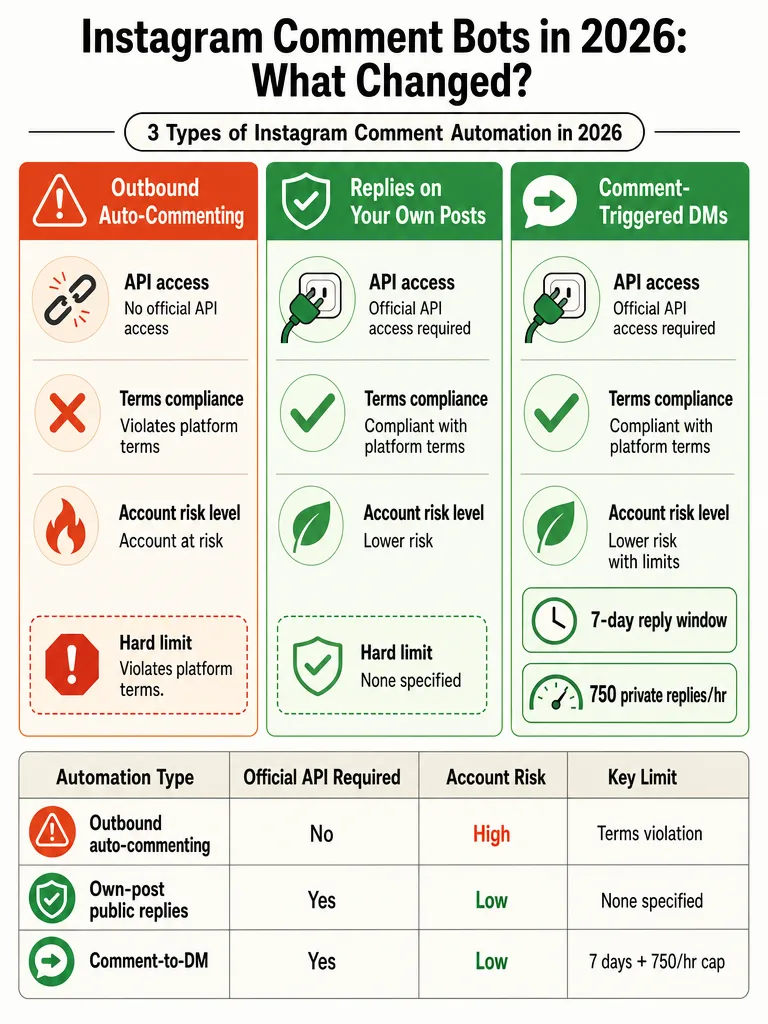
An Instagram comment bot is any tool that reads or writes comments automatically, but the word hides three very different jobs. The safe one automates replies on your own posts. The risky one posts comments on other people's posts. The third triggers a DM when someone comments a keyword. These do not carry the same rules or the same account risk.
Bucket one is outbound auto-commenting. Tools that drop comments on strangers' posts operate outside Instagram's official API and violate Instagram's Terms of Use, according to InstaGrow. That's the growth-hack category people got banned for.
Bucket two is public replies on your own posts, run through the Instagram Graph API. This is the compliant lane: answering "how much?" or "still available?" in the thread where people are already asking.
Bucket three is comment-to-DM. Someone comments a trigger, an automated DM opens a private thread. ChitChatBot.ai puts this at 60-75% of total inbound conversation volume for most consumer brands.
Two of these three are legitimate 2026 workflows. Only one gets accounts terminated. Know which bucket you're buying.
Are Instagram comment bots safe in 2026?
Own-post automation through the official Instagram Graph API is the safe path. Scraping comments, controlling a logged-in account through a headless browser, and outbound auto-commenting are not. The difference is the API, not the marketing. Bots that post on other people's posts run outside Instagram's official API and violate its Terms of Use, per InstaGrow.
The penalty pattern is steep. InstaGrow says Instagram's AI-powered detection catches over 95% of unauthorized bot activity within 24, 72 hours, then applies a three-stage sequence: action blocks lasting 24 to 72 hours, then shadowban, then permanent termination. Shadowbanned accounts see organic reach collapse to 10, 20% of normal.
InstantDM draws the same line: tools that last are built on Instagram's official API and Meta's terms; unofficial follow/unfollow and mass-engagement tools still get accounts restricted or banned.
The practical test: does the tool connect through official OAuth, or does it ask for your password? Anything that logs in like a person is the risky kind.
What changed after Instagram's May 6, 2026 bot purge?
Instagram ran a major automated purge on May 6, 2026, removing bots and inactive accounts in an overnight wave. According to Instagram's own post, the cleanup caused follower drops across creators, brands, and public figures, and was framed as an authenticity measure to improve engagement accuracy.
The scale was public. Membership.io reported Kylie Jenner lost roughly 14 million followers overnight, while most small and mid-sized creators saw 2 to 5 percent drops. Heavy bot-buyers lost 30 to 60 percent of their follower base. Meta's spokesperson called it "part of our routine process to remove inactive accounts."
No source in this corpus shows Meta tying the purge directly to comment automation tools. The purge targeted fake, spam, and inactive accounts broadly, not reply assistants. So the honest read is about environment, not a specific crackdown on comment tools.
The purge is a signal, not a policy: 2026 is a stricter enforcement climate, and inauthentic behavior is cheaper to detect than ever. If your automation looks like a person mass-acting on the platform, that's the profile getting swept.
What Meta actually allows in 2026
Compliant comment automation requires a specific setup before a single reply fires. According to Creator Lane, you need an Instagram Business or Creator account, a linked Facebook Page, and two permissions granted through Meta OAuth: instagram_manage_messages and instagram_manage_comments.
Miss any one and the API won't run. A personal account can't do it. An account with no linked Facebook Page can't do it. And the permissions have to be granted through the official consent screen, not worked around.
Here's the required stack:
| Requirement | What it does | Why it matters |
|---|---|---|
| Instagram Business or Creator account | Unlocks Graph API access | Personal accounts have no API path |
| Linked Facebook Page | Ties the account to Meta's business layer | Required for OAuth to work |
instagram_manage_comments | Read and reply to post comments | Powers public replies |
instagram_manage_messages | Send private replies (DMs) | Powers comment-to-DM |
| Meta OAuth grant | Authorizes the tool | Replaces password sharing |
Creator Lane notes many automation guides are outdated because they still cite 2023 Graph API steps instead of 2026 requirements. ReplyMagic connects through this exact OAuth flow, so access is authorized by Meta rather than borrowed from a login. For the full breakdown, see what Meta allows for Instagram comment automation.
Ready to handle the comment flood without losing control? Get started with ReplyMagic.
Public replies vs comment-triggered DMs: which workflow fits the comment?
Public replies fit questions everyone in the thread wants answered; comment-triggered DMs fit questions that need a private, one-to-one path; human review fits sensitive edge cases. The mistake is forcing one workflow onto every comment. Price, sizes, and availability are public. Enrollment specifics, health questions, and refunds often are not.
Public replies win for repeat questions on the post itself. When ten people ask "how much?" under a product drop, answering in the thread clears all ten at once and shows future scrollers the answer. Comment-to-DM makes sense when the next step is private: a booking link, a personal detail, an offer you don't want pinned publicly.
| Question type | Best workflow | Why |
|---|---|---|
| Price, sizes, availability | Public reply | Everyone benefits; clears the thread |
| Booking, enrollment steps | DM redirect | Personal, multi-step |
| Cancellation, refunds, policies | Human review | Edge cases, tone-sensitive |
| Health or sensitive topics | DM redirect or human | Needs guardrails |
ReplyMagic answers public comments and can suggest a "DM me" redirect for sensitive questions, but it is not a DM bot. That distinction matters. Coaches sorting fit questions can start with public replies for prerequisite questions, then route the nuanced cases. Wellness teams should read review vs auto for sensitive comments before turning anything on.
What changed in comment-to-DM in 2026?
Comment-to-DM got more rule-bound in 2026, and the limits will break a launch workflow if you don't plan around them. Creator Lane lists the operational ceilings in one place: a 7-day private-reply window, an hourly cap, per-user limits, and pacing that forces queueing at viral volume.
The window is the big one. You can only send a private reply to a comment posted within the last 7 days. After that, the API rejects the DM call with error code 551. Evergreen posts that keep drawing comments months later can't trigger a DM, so those need a public reply instead.
Creator Lane lists the pacing limits that stack up:
- 300 messages per second is the platform-level ceiling for text and stickers.
- 750 private replies per hour applies specifically to post comment replies.
- ~200 automated DMs per hour per account is the de-facto pace reputable tools use to avoid tripping Meta's spam classifier.
- One automated DM per user per 24-hour window now applies to comment triggers, ending the old pattern of DMing the same person every time they comment.
This is where "instant reply" promises fall apart. Creator Lane's example: a viral Reel pulling 5,000 keyword comments in twelve hours would take roughly 25 hours to clear at 200 DMs per hour. That's a queue, not instant delivery. Creator Lane also recommends rotating 3 to 5 message variants so identical DMs don't pattern-match as spam.
At viral volume, comment-to-DM is a queue with a 24-hour clearance, not a real-time channel. Public replies don't hit that DM ceiling.
How does Instagram detect bot activity in 2026?
Instagram detects bots through behavioral signals, not just content. According to InstaGrow, the detection stack includes action velocity, repetitive comment patterns, session fingerprinting, unofficial API calls, behavioral graph analysis, and IP reputation scoring. The system catches over 95% of unauthorized bot activity within 24, 72 hours.
Action velocity is the fastest tell. InstaGrow says Instagram limits follows to about 60 per hour, and bots that ignore that rate get flagged quickly. Repetitive comment patterns are another: identical or near-identical text posted at machine speed reads as coordinated behavior. Session fingerprinting and IP reputation catch the browser workarounds that outbound comment tools rely on.
When detection fires, InstaGrow describes the sequence: an action block lasting 24, 72 hours, then shadowban with reach collapsing to 10, 20% of normal, then permanent termination for repeat offenders.
The pattern that trips detection is a human-like account performing machine-like actions at machine-like speed. Official API tools avoid this because they identify as apps, respect published rate limits, and never simulate a logged-in browser session. That's the whole point of the OAuth path in the earlier section: the tool announces itself as software instead of impersonating a person.
How to auto-reply to Instagram comments safely before a launch
Safe pre-launch automation comes down to five moves: use official API access, set per-post rules, keep a human checkpoint, block the spam, and reply with context instead of keyword triggers. Do those and you handle a comment flood without looking like a bot to Meta's detection stack.
- Connect through the official API. Instagram Business or Creator account, linked Facebook Page, message and comment permissions via OAuth. No password sharing, no browser control.
- Set per-post rules before the post goes live. Decide which posts auto-reply and which stay manual, so a promo Reel and a sensitive announcement don't get the same treatment.
- Run an approval queue or review mode. Auto-send the obvious repeats: price, sizes, availability, booking. Hold edge cases for a human. Approval queue or full auto walks through the tradeoff.
- Turn on spam gates and exclusion phrases. Pre-LLM spam filters catch scam links and crypto bait before AI is ever called, so garbage never gets a polished reply.
- Reply with post context, not keyword triggers. Keyword rules fire on the wrong post and embarrass the brand. ReplyMagic uses Google Gemini to read each post's image, Reel, or video before drafting, so the reply references what's actually shown, not just a matched word.
That last point is the difference between context and triggers. A keyword bot sees "price" and dumps a canned line. A context-aware reply knows which product the post shows. For the full safe setup, see how to auto-reply to Instagram comments safely, and for launch-day chaos, how to survive a viral post.
Ready to automate the obvious answers without losing control of the edge cases? Get started with ReplyMagic.
Frequently asked questions
Generic Instagram automation bots vs context-aware comment assistants: what's the real difference?
Keyword-rule bots match a word and fire a canned reply regardless of which post triggered it. A context-aware assistant reads the actual image, Reel, or video before drafting: so the reply references what's in the post, not just a matched word. That distinction matters when you have a product drop and a sensitive announcement live at the same time. One tool embarrasses you on the wrong post; the other doesn't.
How do I implement Instagram comment automation safely before a launch?
Five moves before the post goes live: connect through official Meta OAuth (Instagram Business account plus linked Facebook Page), set per-post rules so your promo Reel and any sensitive content get different treatment, run an approval queue for edge cases while auto-sending price and availability answers, turn on spam gates to block scam links before AI is called, and use a tool that reads each post's visual context rather than keyword triggers. That stack handles a comment flood without triggering Meta's detection.
What happened during Instagram's May 6, 2026 bot purge?
Instagram ran an overnight AI-driven sweep on May 6, 7, 2026, removing millions of bot, spam, and inactive accounts. Kylie Jenner lost roughly 14 million followers; most small creators saw 2, 5% drops; heavy bot-buyers lost 30, 60% of their follower base. Meta called it routine inactive-account removal. No source ties the purge specifically to comment reply tools: it targeted fake and inauthentic accounts broadly.
Find an AI Instagram comment assistant with safe auto-send: what should I look for?
Look for three things: official Meta OAuth connection (not a password login), a spam gate that filters scam links and crypto bait before the AI runs, and per-post controls so you choose which posts auto-send and which go to an approval queue. ReplyMagic checks all three: Free plan handles 10 replies per day; Pro handles 3,000 per month. Auto-send clears price, sizing, and availability questions; the approval queue holds everything else for a human.
What are the comment-to-DM rate limits on Instagram in 2026?
The ceiling that breaks most launch plans is the 7-day private-reply window: the API rejects DM calls on comments older than 7 days with error code 551. Inside that window, the practical cap is roughly 200 automated DMs per hour per account, plus a one-automated-DM-per-user-per-24-hour limit. At viral volume: say, 5,000 keyword comments in 12 hours: that's a 25-hour queue, not instant delivery. Public replies don't hit that ceiling.
How does Instagram detect bot activity in 2026?
Detection runs on behavioral signals: action velocity, repetitive comment patterns, session fingerprinting, unofficial API calls, behavioral graph analysis, and IP reputation scoring. InstaGrow reports the system catches over 95% of unauthorized bot activity within 24, 72 hours. The trigger pattern is a human-looking account performing machine-like actions at machine-like speed. Official API tools avoid this because they identify as apps, respect published rate limits, and never simulate a browser login.
Sources
- Instagram BOT clean up - “the great purge of 2026”membership.io
- Instagram DM Automation: The Complete 2026 Guide for ...creatorflow.so
- Instagram Algorithm 2026: What Changed (+ How to Adapt)www.instagram.com
- Instagram rolled out a major automated purge on May 6 ...creatorlanehq.com