

InstaReply Alternatives for Creators With Comment Floods
Reply to Instagram comments with post-aware AI, not keywords. ReplyMagic reads each post, then drafts voice-matched answers for high comment volume.

What are the best InstaReply alternatives for creators with high comment volume?
The best InstaReply alternative depends on one question: are you answering repeat questions in the public thread, or handing leads off to DMs? For creators drowning in comments during launches, viral Reels, and product drops, the job is usually the first one. You want accurate public replies that reference the actual post, not a keyword that starts a DM funnel.
Most tools in this space, including InstaReply's own Google Play listing, sell keyword-triggered comment-to-DM automation. That's a different workflow. It fires a template DM when someone types a trigger word. Useful for lead handoff, wrong for answering "what's the price?" or "is this still available?" out in the open where everyone can see it.
Pick a context-aware public comment tool when your problem is repetition in the thread. Pick a comment-to-DM tool only when the workflow is genuinely a private handoff.
ReplyMagic fits the first job. It reads each post with Google Gemini before drafting, so a reply about sizes references the sizes actually shown, and a reply about a course references the launch that post is promoting. Not keywords. Actual facts.
The rest of this guide compares the two jobs, breaks down what InstaReply actually publishes, and gives you a control checklist before anything posts under your name.
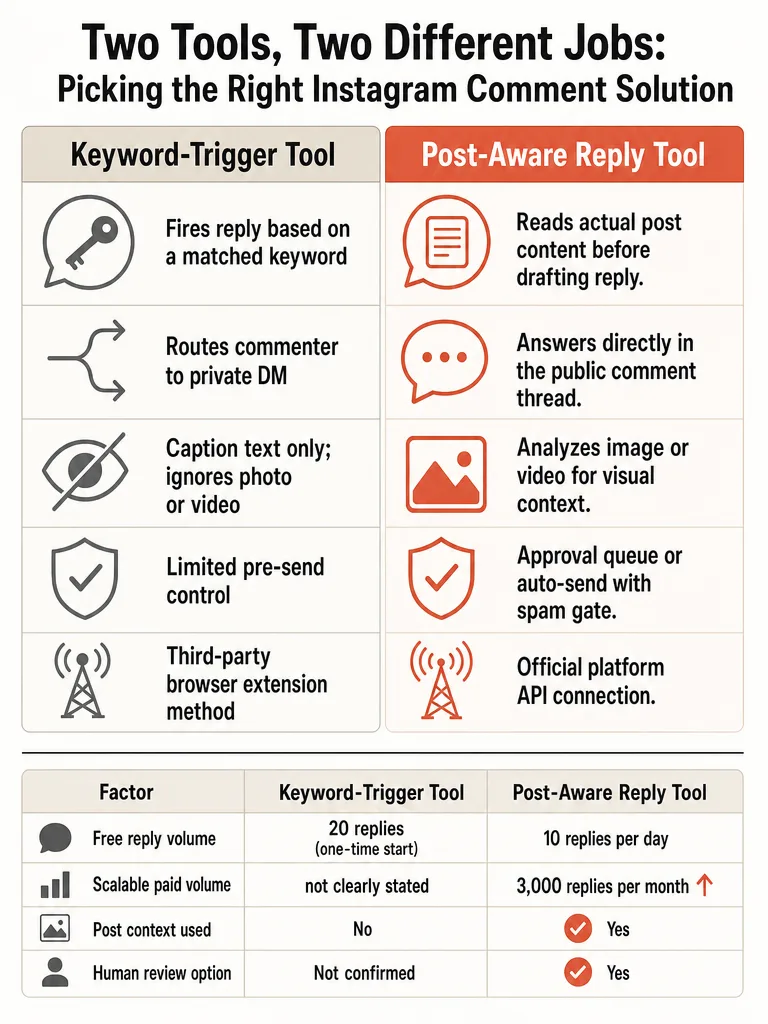
Public comment replies vs comment-to-DM automation: which job do you need?
Public comment replies post visible answers in the thread; comment-to-DM automation triggers a private message when someone comments a keyword. These are two separate jobs, and choosing wrong means paying for a workflow you don't run. If your pain is repetitive price, size, and availability questions cluttering a viral post, you need public replies. If your pain is capturing leads for a private offer, you need the DM route.
There's a hard limit that decides this for you. Creator Lane's 2026 guide reports that Instagram only allows a private-reply DM in response to a post comment within a 7-day window, after which the API rejects the call with error code 551. So comment-to-DM is time-boxed by design. A comment on last month's Reel can't trigger a fresh DM.
Public comment replies don't hit that wall. They live in the thread, answer the question where it was asked, and stay useful long after the post cools off.
| Job | Where the reply lands | Best for | Key constraint |
|---|---|---|---|
| Public comment reply | Visible in the thread | Repeat questions: price, sizes, booking, enrollment | Reply quality is public, so mistakes are seen |
| Comment-to-DM | Private DM | Lead handoff, gated offers, link delivery | 7-day window, then error code 551 |
ReplyMagic works the public thread. It can still suggest a "DM me" redirect for sensitive details, but it is not a DM bot.
What does InstaReply actually offer, and what is still unclear?
InstaReply ships as two different products, and the public listings only tell part of the story. On the Chrome Web Store, InstaReply is a browser extension offering one-click smart replies, multiple personality tones, and caption-based responses. It starts free with 20 AI-powered replies, shows 296 users, and carries a 5.0 rating from 2 ratings. The extension is version 0.7, updated December 11, 2025, and the listing states it's a third-party tool not affiliated with or endorsed by Instagram or Meta.
The Google Play listing is a separate app built around keyword templates. It says it uses the official Instagram API, gives 250 free credits every month at 1 credit per auto reply, and sends 1 reply per user per 24 hours. Setup is three steps: connect a Business account, set keywords and templates, let it reply.
Here's what the listings don't establish. There's no public detail on reply quality under viral load, no independent testing of accuracy, and no confirmation that drafts are built from image, Reel, or video analysis rather than caption and keyword input. The Chrome listing markets "understands your content," but caption-based responses read the caption, not what the post actually shows.
How to auto-reply to Instagram comments in 2026?
Safe Instagram comment auto-reply in 2026 runs on official Meta access, a connected Business account, and human control on anything risky. Creator Lane's 2026 guide is blunt about this: it states the only legal path is the official Instagram Graph API, and that tools which scrape comments or drive accounts through headless browsers risk account flags. Use the API, and you avoid the method that gets accounts limited.
Here's the setup sequence that holds up:
- Connect through official Meta or Instagram API access. InstaReply's Google Play listing says it uses the official Instagram API; the Chrome extension is a browser tool, a different risk profile.
- Connect an Instagram Business account. Personal accounts don't get API comment access.
- Define which comments can be answered publicly. Scope it to the repeat questions you answer the same way every time.
- Keep review on risky cases. Sensitive, ambiguous, or complaint comments should wait for a human.
- Avoid scraping and browser-control methods. They're the fast path to a flagged account.
ReplyMagic connects through Meta/Instagram OAuth, so there's no password handoff and no browser automation. For the full safety breakdown, see how to auto-reply to Instagram comments safely.
How do Instagram comment auto replies work when the post itself matters?
Keyword and caption-based replies work by matching text, which means they miss what the Reel, image, or video actually shows. A trigger word fires the same template no matter what's in frame. A caption reader sees "check the link" and knows nothing about the product photo everyone's asking about. That gap is where auto-replies land wrong and embarrass the brand.
The commenters asking "what size is that?" or "is enrollment still open?" are reacting to the visual, not the caption. If the tool never looks at the post, its answer is a guess dressed up as an answer.
ReplyMagic closes that gap by using Google Gemini to read each post's photo, Reel, or video before drafting. The reply about sizes references the sizes shown. The reply about a cohort references the launch that post is promoting. Price, availability, booking, enrollment, shipping, policies: each answer is conditioned on what's actually in the post, not a matched keyword.
Context, not triggers, is what keeps an auto-reply from firing on the wrong post.
This is the difference between the two categories. Keyword tools scale a template. Post-aware tools scale an accurate answer. For the mechanism in detail, see what context-aware Instagram comment automation is and why keyword bots keep failing.
Can AI reply to Instagram comments in your voice?
AI can reply in your voice, but only if it's conditioned on how you actually write, not a generic tone slider. The risk is real and visible. Chris Noble, a creative director in Exeter, wrote in January 2026 that AI comments are "pretty alarming": derivative reframings of the post, repeating points that don't need repeating, a bland agreeable tone. On a public thread, that reads as a bot, and it costs trust.
Tone presets don't solve this. "Friendly" or "professional" is a category, not your voice. Your voice is your specific phrasing, your emoji habits, your sign-offs, the way you answer the same question every time.
ReplyMagic conditions drafts on the connected account's real past replies, tone preferences, emoji habits, and sign-offs. The draft sounds like the person who's been answering these comments all along, because it's built from those answers. That's how a public reply avoids the bland, obviously-robotic read Noble described.
For the setup that keeps voice consistent across teammates, see how to auto-reply to Instagram comments in your own brand voice.
How to choose an InstaReply alternative you can approve before it posts
Choose a tool by its control layer, because a public comment is visible the second it posts and a bad one can't be quietly deleted from everyone's memory. The features that matter aren't speed claims. They're the mechanisms that let you catch a wrong reply before your audience sees it. Approval queues are now a headline feature across the category for exactly this reason.
Run this checklist on any alternative:
- Approval queue: does every draft wait for a human, or does it post blind?
- Review mode: can you turn on review for uncertain replies while auto-sending the obvious ones?
- Per-post settings: can you set different rules for a launch post versus an evergreen one?
- Exclusion phrases: can you block automation on comments containing certain words?
- Spam gates: are scams, link bait, and abuse filtered before the AI is ever called?
- Pause control: can you stop everything instantly when a post goes sideways?
- Obvious vs edge case: does the tool separate the five repeat questions from the ones that need a human?
ReplyMagic runs pre-LLM spam gates before any AI call, plus approval-queue mode, auto-send mode, per-post settings, and exclusion phrases. You automate price and availability, and hold complaints for review. See approval queue or full auto for how the modes combine.
How much usable reply volume do you get before you upgrade?
Free tiers in this category are small, and the units don't match, so compare carefully before you commit. InstaReply's Chrome extension starts with 20 AI-powered replies, a one-time trial figure, not a monthly allowance. Its separate Google Play app gives 250 free credits every month at 1 credit per auto reply. ReplyMagic Free gives 10 replies per day, which is roughly 300 a month if you use it daily. ReplyMagic Pro is 3,000 replies per month, and extra Instagram accounts are $15/month each for one more account plus 3,000 more replies.
| Plan | Free volume | Paid volume | Extra account |
|---|---|---|---|
| InstaReply (Chrome) | 20 AI replies to start | Premium listed, price not public | Not stated |
| InstaReply (Google Play) | 250 credits/month | Pro/Business, price not public | Multiple accounts supported |
| ReplyMagic Free | 10 replies/day | , | , |
| ReplyMagic Pro | , | 3,000 replies/month | +$15/mo per account |
The catch on InstaReply's Play app: 1 reply per user per 24 hours. Fine for spreading engagement, limiting for a launch where the same buyer asks three follow-ups in an hour. Public pricing beyond the free mentions isn't published for either InstaReply listing.
Where should creators send price, booking, enrollment, and sensitive questions?
Route by sensitivity: simple repeat questions get a public reply, private or sensitive details get a "DM me" redirect, and anything uncertain waits in review. That routing is the whole game. Answer "what's the price?" in the thread where the next ten commenters see it. Push "here's my medical history, can I join?" to a private channel. Hold the ambiguous ones for a human.
Public replies handle the volume: price, sizes, availability, booking windows, enrollment dates, shipping, standard policies. Each one answered once in the thread saves you answering it fifty times. ReplyMagic drafts these from the actual post, and can suggest a DM redirect when a question needs privacy, without being a DM bot itself.
Where each scenario fits:
- Coaches and cohorts: public replies for prerequisites and dates, DM for individual fit. See how coaches answer prerequisite questions and course launch FAQ automation.
- Service businesses: public for pricing ranges and availability, review for custom quotes. See how service businesses auto-reply to booking questions.
- Travel and hospitality: multilingual public replies, booking details in DM. ReplyMagic replies in whatever language the commenter wrote in, automatically. See multilingual replies for travel brands.
- Launches and viral Reels: auto-send the repeats, queue the rest. See surviving a comment flood.
Ready to answer the flood without losing your voice? Get started with ReplyMagic.
Frequently asked questions
What's the difference between public comment auto-replies and comment-to-DM automation on Instagram?
Public comment replies post a visible answer in the thread; comment-to-DM automation sends a private message when someone comments a keyword. They're two separate jobs. There's also a hard API limit: Instagram only allows a comment-triggered DM within a 7-day window: after that, the call fails with error code 551. If your problem is repetitive price, size, or availability questions on a viral post, you need public replies, not a DM funnel.
Does InstaReply read the actual post image or Reel before drafting a reply?
InstaReply's Chrome extension markets "caption-based responses": meaning it reads the caption text, not the photo or video. The Google Play app uses keyword templates. Neither listing confirms image, Reel, or video analysis before drafting. That gap matters when commenters are reacting to something visible in the post that the caption never mentions, like a specific color, size, or product detail.
How much free reply volume does InstaReply give compared to other tools?
InstaReply's Chrome extension starts with 20 AI-powered replies: a one-time trial figure, not a monthly allowance. Its separate Google Play app gives 250 free credits per month at 1 credit per reply, with a limit of 1 reply per user per 24 hours. ReplyMagic Free gives 10 replies per day (roughly 300/month); ReplyMagic Pro is 3,000 replies per month. Public pricing beyond the free tiers isn't published for either InstaReply listing.
How do I auto-reply to Instagram comments safely in 2026 without risking my account?
The only safe path is the official Instagram Graph API through a connected Business account: tools that scrape comments or run through headless browsers risk account flags. Connect via official Meta/Instagram OAuth so there's no password handoff and no browser automation. Keep review mode on for sensitive or ambiguous comments, and scope auto-replies to the repeat questions you'd answer the same way every time.
Can AI reply to Instagram comments in my actual brand voice, or does it sound like a bot?
Generic tone presets: "friendly" or "professional": don't reproduce a real voice. As creative director Chris Noble noted in January 2026, AI comments are recognizable by their bland, agreeable tone and derivative rephrasing. Voice conditioning works when drafts are built from the account's actual past replies, specific emoji habits, phrasing patterns, and sign-offs: not a category label. That's the mechanism that keeps a public reply from reading as obviously automated.
What control features should I check before letting any tool auto-reply to Instagram comments?
Seven things to verify: an approval queue that holds drafts before posting, review mode for uncertain replies, per-post settings so a launch post has different rules than an evergreen one, exclusion phrases that block automation on specific keywords, pre-LLM spam gates that filter scams before AI is called, a pause control for when a post goes sideways, and a clear split between obvious repeat questions (auto-send) and edge cases (human review). A bad public reply can't be quietly forgotten.
Sources
- InstaReply: ChatGPT Comment Assistant for Instagramchromewebstore.google.com
- Anyone else annoyed how "content creators" are flooding ...play.google.com
- Auto Reply: Comment & DM - Apps on Google Playwww.linkedin.com
- AI-generated comments flood LinkedIn feeds | Chris Noble ...www.instagram.com
- 10 Best Instagram Comment-to-DM Automation Tools in 2026www.replyrush.com
- ReplyRush for Creators | Instagram DM Automationwww.slidedm.app
- SlideDM Instagram Comment to DM Automation Toolwww.reddit.com